.svg)
ADA Website Compliance for Businesses: What Title III Requires (and What Happens If You Ignore It)
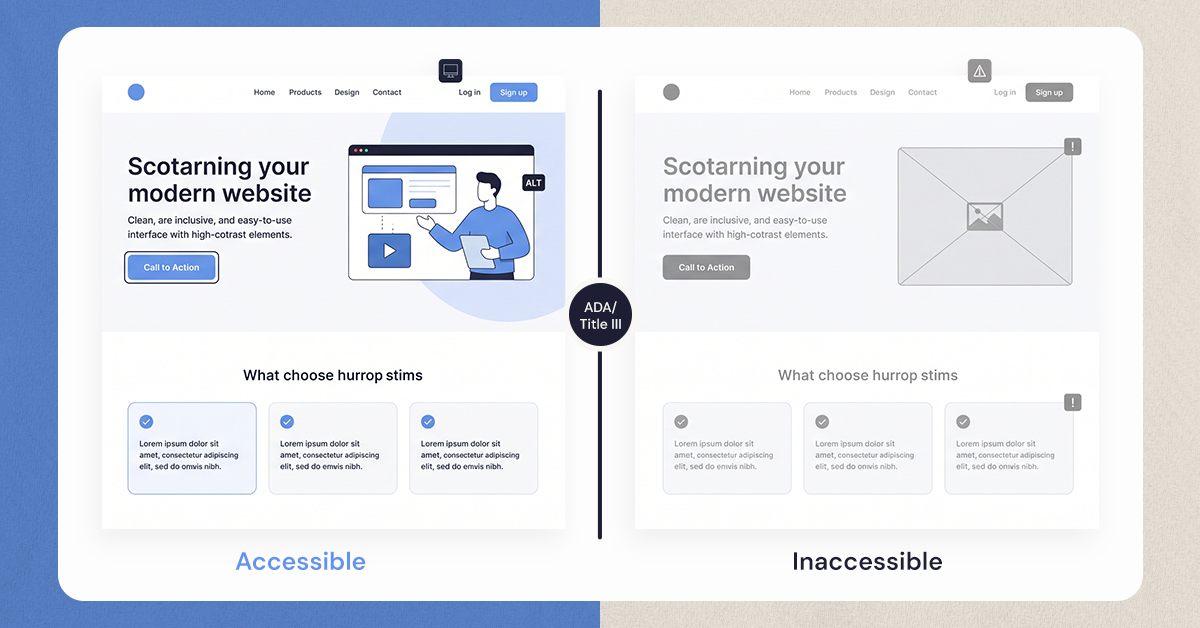
Title III of the ADA requires business websites to be accessible to people with disabilities, the same equal-access standard already required at a physical location. That single requirement is why ADA website lawsuits keep climbing, and why businesses that treat their website as a legal blind spot keep ending up with a demand letter.
A blind visitor can't tab through a checkout page. A screen reader skips over product images because there's no alt text. Neither makes headlines, but both are Title III violations with real financial exposure attached.
Ignoring it costs more than legal fees. Inaccessible websites push paying customers toward competitors and chip away at brand reputation before a lawsuit is ever filed.
An ADA website compliance audit catches these gaps early: missing alt text, broken keyboard navigation, poor color contrast, screen reader incompatibility, before they turn into a claim.
None of this is only about avoiding a lawsuit. Fixing these issues makes a site usable for more people, and that shows up in wider audience reach, stronger customer satisfaction, and a brand people trust.
Understanding ADA and Title III: The Legal Foundation
The Americans with Disabilities Act, passed in 1990, aims to eliminate discrimination. It provides equal rights and opportunities for individuals with disabilities.
Title III of the ADA focuses on public accommodations. This includes businesses that offer goods and services to the public, extending its reach to online spaces.
Why is online accessibility critical? Digital platforms have become extensions of brick-and-mortar businesses. They are essential for communication, transactions, and service delivery.
Companies are required to ensure their websites comply with ADA Title III. This ensures that people with disabilities have equal access to information and services online.
A lack of compliance can lead to unintended exclusion. It can affect customers who rely on adaptive technologies for website navigation, hindering their user experience.
Key components under Title III include making reasonable modifications to overcome accessibility barriers. This might involve adopting new technologies or redesigning existing platforms.
The importance of Title III compliance includes avoiding legal pitfalls and fostering an inclusive business environment. Compliance demonstrates social responsibility and commitment to diverse customer bases.
Here are some key points about Title III:
- Covers businesses open to the public.
- Requires equal access to digital content.
- Enforces nondiscrimination in online services.
- Encourages proactive accessibility initiatives.
Neglecting these legal obligations risks potential ADA lawsuits. These lawsuits have been on the rise as digital spaces become pivotal in accessing goods and services.
Title III establishes a framework. But the exact technical standards are not specified within the Act, leaving room for interpretation.
However, businesses can follow the Web Content Accessibility Guidelines (WCAG) to achieve compliance. Adhering to these guidelines helps ensure that their digital content meets the necessary accessibility standards.
Who Must Comply? Businesses Covered Under Title III
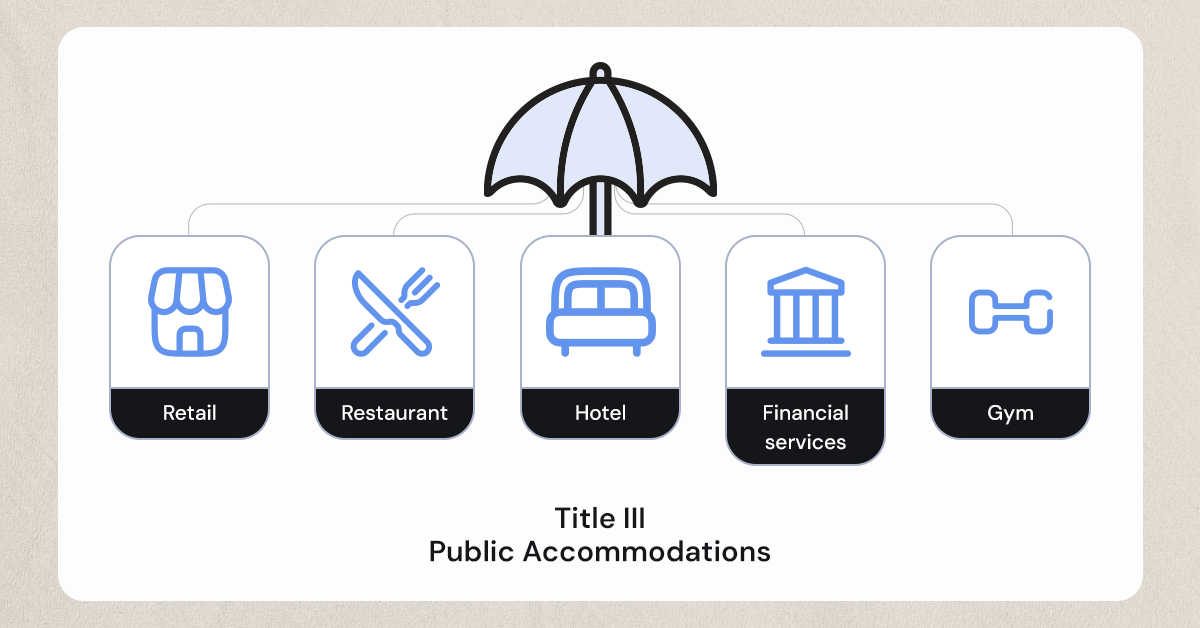
All businesses providing public accommodations must comply with ADA Title III. This applies to both physical locations and digital presences like websites.
Title III covers a diverse range of businesses. These include restaurants, stores, hotels, theaters, doctors' offices, and more. Compliance is mandatory for any operation serving the public.
The necessity to comply extends to businesses both big and small. Whether it's a local shop or a multinational corporation, ADA adherence is critical. Even small businesses with an online presence fall under its purview.
Examples of public accommodations include:
- Retail stores and shopping centers
- Service establishments like banks and law firms
- Restaurants and bars
- Hotels and motels
- Recreational facilities and gyms
Private entities are responsible for ensuring that their digital content is accessible. Websites must be designed and maintained, allowing users with disabilities full accessibility.
Ignoring these responsibilities could result in legal consequences. In today's digital era, an accessible website is not just a necessity; it is a critical component of operating a business. By ensuring compliance, businesses not only avoid potential lawsuits but also foster inclusivity and broaden their customer base.
What Does ADA Website Compliance Mean?
ADA website compliance ensures websites accommodate users with disabilities. This involves making web content accessible and navigable for everyone, regardless of their physical or cognitive limitations.
Key aspects of compliance focus on accessibility features. Websites should incorporate elements like alternate text for images, keyboard navigation capabilities, and compatibility with screen readers. These features make it easier for users who rely on assistive technology.
Furthermore, compliance means designing with inclusivity in mind. This includes ensuring that color contrasts are sufficient for users with visual impairments. Websites must also support text enlargement without losing content or functionality.
Meeting these standards is crucial. It enables users with disabilities to engage fully with online platforms. For a website to be considered ADA compliant, it needs to adhere to established guidelines.
Essential components of ADA compliance include:
- Alternative text for images
- Keyboard navigability
- Screen reader compatibility
- Adequate color contrast
- Resizable text without loss of content
Following these components makes your website more accessible and user-friendly. Compliant websites cater to a wider audience and reflect a commitment to equality and inclusion. By focusing on accessibility, businesses improve user experience, benefiting all visitors, not just those with disabilities.
Implementing ADA compliance is not just about legal obligations. It's also about recognizing the diverse needs of users and ensuring everyone can access your services easily. Prioritizing accessibility not only enhances user engagement but also aligns with ethical business practices.
The Role of WCAG in ADA Website Compliance
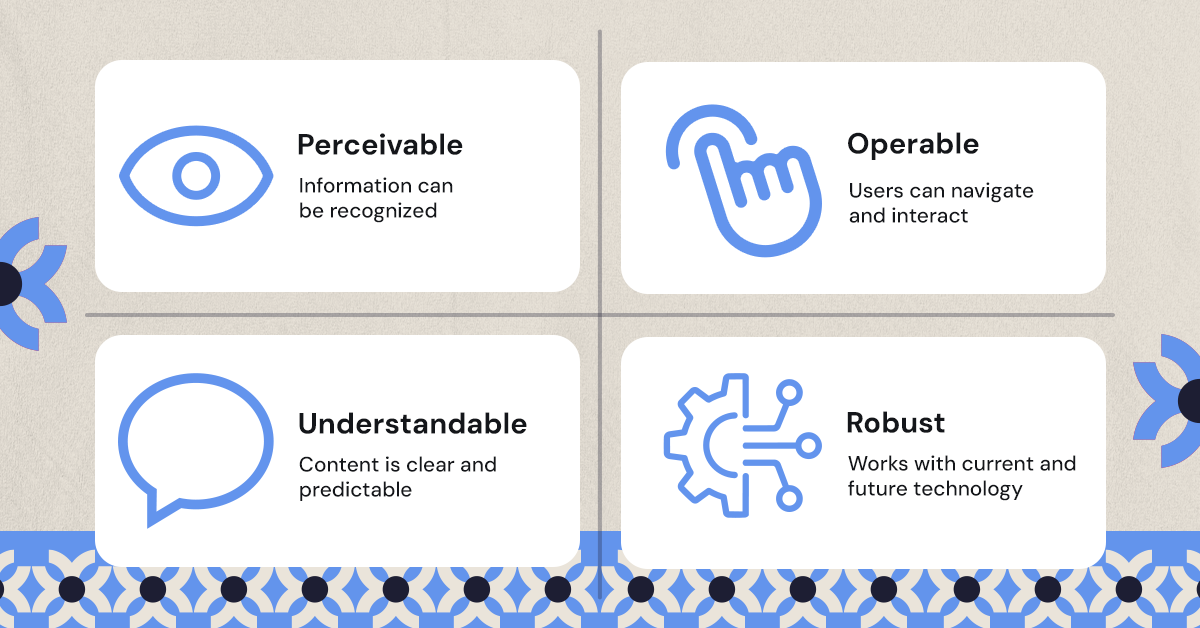
The Web Content Accessibility Guidelines (WCAG) play a central role in ADA website compliance. They provide a structured framework to make web content more accessible to users with disabilities. These guidelines are widely recognized as the standard for ensuring digital accessibility.
WCAG outlines principles essential for an accessible web. These principles include perceivable, operable, understandable, and robust design. Implementing these makes your website accessible and user-friendly, enhancing the user experience.
Following WCAG is crucial for ADA compliance. Although the ADA does not prescribe specific technical standards, WCAG serves as a comprehensive resource. Its guidelines are designed to cover a broad spectrum of disabilities, ensuring inclusivity.
Key WCAG principles include:
- Perceivable: Information should be presented in ways users can perceive.
- Operable: Interfaces should be operable by anyone, regardless of their mode of interaction.
- Understandable: Content should be clear and comprehensible.
- Robust: Content must be reliable across different assistive technologies.
Incorporating these principles improves both usability and accessibility. Following WCAG helps businesses achieve legal compliance and promotes a more inclusive online environment. Embracing these standards benefits businesses by expanding their reach and fostering goodwill among diverse user groups. Ultimately, WCAG guidance aids in creating digital experiences that are inclusive and empowering for all users.
Key Elements of Accessible Web Design
Accessible web design is essential for creating an inclusive online experience. It ensures that websites are usable by everyone, including individuals with disabilities. By focusing on key elements, businesses can design sites that are both functional and compliant.
One critical element is the use of proper headings. Headings should reflect the structure of the content and facilitate easy navigation. They help users, including those relying on screen readers, understand the hierarchy and flow of information.
Incorporating alternative text for images is vital. Alt text provides a written description for images, making them accessible to those who cannot see. This feature enhances understanding and ensures no user misses important visual content.
Crucial features of accessible web design:
- Keyboard Navigation: Ensure users can navigate all site functions using keyboard alone.
- Screen Reader Compatibility: Verify content is readable by screen readers, offering verbal descriptions where needed.
Contrast and color are also significant considerations. Text and background colors must offer enough contrast to be legible for users with visual impairments. Adequate contrast improves readability and user satisfaction.
Moreover, multimedia content should be accessible. Providing captions and transcripts for videos and audio recordings makes content accessible to users with hearing impairments. This practice ensures inclusivity and compliance.
Multimedia accessibility tips:
- Captions: Add captions to all video content.
- Transcripts: Provide written transcripts for audio materials.
Additionally, intuitive and consistent navigation aids in usability. Simple menus, clear labels, and logical layouts help users easily find information. Consistency throughout the site contributes to a smoother user journey.
Finally, user feedback is invaluable. Engaging with users to understand their needs can inform ongoing improvements. Regular user testing ensures the website meets diverse accessibility requirements. By prioritizing these elements, businesses can create a web presence that reflects commitment to accessibility and inclusivity.
ADA Website Compliance Audit: Why and How to Conduct One
Conducting an ADA website compliance audit is a proactive step in ensuring accessibility. This process identifies any barriers that might prevent individuals with disabilities from using your site effectively. Audits are crucial for uncovering issues that might not be immediately visible.
The first step in an audit is to understand the criteria you need to meet. Familiarize yourself with the Web Content Accessibility Guidelines (WCAG) as they form the basis for most audits. These guidelines provide specific criteria for making web content accessible.
To begin the audit, use automated tools to perform a preliminary scan. These tools can quickly identify common accessibility issues. However, automated tools cannot catch all problems, making a manual review necessary.
Components of a manual review:
- Visual Inspection: Check color contrasts and fonts manually.
- User Testing: Engage users with disabilities to navigate the site.
- Assistive Technology Testing: Use screen readers and other assistive technologies to test site accessibility.
Once the audit is complete, document any findings and prioritize changes based on impact. Address high-priority issues first to maximize your compliance efforts.
Finally, plan for regular audits. Technology and guidelines evolve, and so should your website. Regularly updating and testing your site helps ensure ongoing compliance and accessibility for everyone.
Common Accessibility Barriers and How to Fix Them
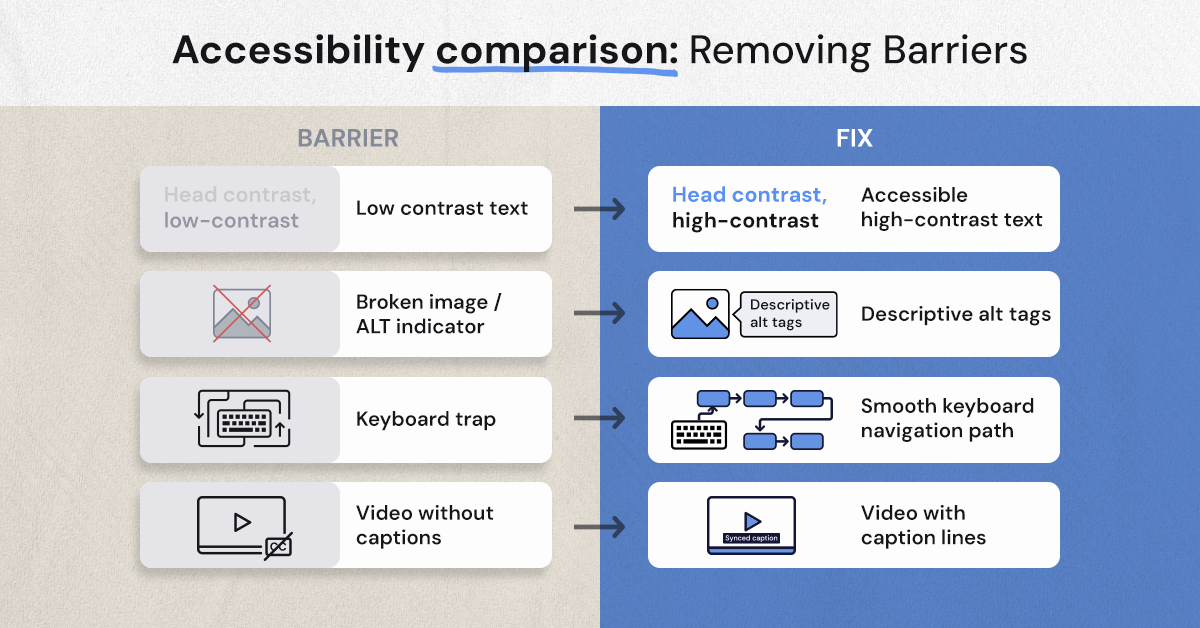
Accessibility barriers can be hard to spot. These barriers prevent people with disabilities from accessing your site effectively. Understanding common issues is key to making impactful changes.
One major barrier is insufficient color contrast. Low contrast can make text hard to read. To fix this, use a color contrast tool to ensure text is easy to see against backgrounds.
Another frequent issue is missing alt text for images. Alt text is crucial for users who rely on screen readers. Add descriptive alt text to images to convey the content or function of visuals.
Other common barriers include:
- Poor Keyboard Navigation: Ensure all interactive elements are accessible via keyboard.
- Inaccessible Forms: Label form fields clearly for screen readers.
- Lack of Captions on Videos: Include captions for all multimedia content.
Headings also play an important role. Clear, hierarchical headings help users navigate more efficiently. Make sure to structure your headings logically and clearly.
Lastly, test your website for mobile accessibility. Mobile users face distinct challenges, and a responsive design can help. Ensure elements adjust and display correctly on various devices to improve accessibility for all users.
The Consequences of Ignoring ADA Website Compliance
Ignoring ADA website compliance can lead to serious consequences. Financial penalties are one potential outcome. Fines for non-compliance can reach tens of thousands of dollars.
Legal actions are another risk. Businesses may face lawsuits if their websites are inaccessible. Litigation costs can add up quickly, straining financial resources.
The impact extends beyond finances. Non-compliance can damage a company's reputation. Customers value inclusivity and may choose competitors with accessible websites.
Ignoring accessibility also limits market reach. People with disabilities form a significant consumer group. Businesses miss potential revenue by excluding them from their digital presence.
Furthermore, non-compliance can lead to increased operational costs. Rectifying accessibility issues after a lawsuit can be more expensive than preemptive action.
Apart from monetary loss, there's a human cost. Excluding people with disabilities is discriminatory. Ensuring equal access online is a moral obligation.
To summarize the risks, consider these points:
- Financial penalties
- Legal actions and lawsuits
- Reputation damage
- Limited market reach
In terms of human impact:
- Exclusion of people with disabilities
- Ethical implications of ignoring inclusivity
Therefore, it's crucial for businesses to prioritize ADA compliance. Addressing accessibility upfront can prevent these adverse effects and promote a more inclusive digital environment.
Legal Trends: Lawsuits, Enforcement, and Recent Developments
The landscape of ADA website compliance is constantly evolving. Recent years have seen a surge in lawsuits. Many businesses have been taken to court over inaccessible websites.
This increase highlights the importance of proactive compliance. Lawsuits can be costly and time-consuming. They often result in financial settlements or court-ordered accessibility improvements.
Enforcement of ADA standards has also intensified. The Department of Justice views website accessibility as integral. Businesses are increasingly held to these standards.
Staying abreast of legal developments is crucial for compliance. Changes in regulations can affect what is considered compliant. Awareness of these trends helps in crafting effective accessibility strategies.
Recent legal developments showcase the growing focus on digital spaces. Court decisions have reinforced the need for accessible online platforms. As a result, businesses must ensure their websites align with emerging standards.
Key trends include:
- Rising number of ADA lawsuits
- Increased enforcement by regulatory bodies
- Court decisions favoring digital accessibility
To keep on top of these trends, businesses need to regularly assess their websites. A proactive approach is better than reacting to lawsuits. Legal compliance should be an ongoing concern, ensuring all users can access digital content without barriers.
Building a Roadmap to Compliance: Step-by-Step Guide
Achieving ADA website compliance requires a clear plan. Start by understanding the current state of your website. Conduct a comprehensive audit to identify accessibility issues.
Next, prioritize the issues identified during the audit. Focus on high-impact changes first. Accessibility improvements will benefit users with disabilities and enhance user experience overall.
Create a detailed action plan to address issues. Assign responsibilities to team members. Involve designers, developers, and content creators for a collaborative approach.
Regularly check progress against your plan. Use benchmarks and milestones to keep your team on track. These will help maintain momentum in achieving compliance goals.
Invest in training for all stakeholders. Provide resources and education about accessibility standards and best practices. This ensures a shared understanding of compliance requirements.
Implement changes incrementally, starting with critical issues. Use feedback from users with disabilities to refine improvements. Their insights are invaluable in creating an accessible digital environment.
To craft a successful roadmap, consider these steps:
- Conduct an accessibility audit
- Prioritize and plan corrective actions
- Assign tasks and responsibilities
- Monitor progress and achievements
- Train team members on accessibility
Key factors for compliance success include:
- Collaboration across departments
- Ongoing education and training
- Incremental implementation of solutions
By following this guide, businesses can create more inclusive digital platforms. A well-planned roadmap not only ensures compliance but also enhances user satisfaction.
Ongoing Maintenance: Keeping Your Website Compliant
Maintaining ADA website compliance is an ongoing process. Regular updates and testing are essential. This ensures that your website remains accessible to all users.
Implement a schedule for routine checks of your site's accessibility. This should include both automated and manual testing methods. Staying proactive helps in identifying new issues as they arise.
Stay informed about updates in accessibility standards and guidelines. This knowledge helps adapt your strategies to evolving requirements. Keeping your team trained and informed is crucial.
Consider these ongoing maintenance activities:
- Conduct periodic accessibility audits
- Update content with accessibility in mind
- Train staff on emerging accessibility practices
Proactive maintenance helps avoid potential legal issues and enhances user experience. By committing to ongoing compliance, businesses not only meet legal obligations but also demonstrate their dedication to inclusivity.
The Business Benefits of ADA Website Compliance
ADA website compliance offers significant advantages for businesses. Ensuring accessibility can enhance your brand's reputation. It shows your commitment to inclusivity and diversity.
Moreover, an accessible website can help you reach a wider audience. People with disabilities make up a substantial portion of the market. By catering to their needs, you expand your potential customer base.
An accessible website also improves user experience, which can increase customer satisfaction. This often leads to higher engagement and loyalty. Better usability can also enhance your site's SEO performance.
Consider the following benefits:
- Broader market reach
- Improved brand reputation
- Enhanced user satisfaction
- Increased SEO ranking
Being proactive with ADA compliance is not just about avoiding legal issues. It also opens doors to numerous business opportunities and strengthens your position in the market. Embracing accessibility can set your business apart from competitors.
Embracing Accessibility as a Business Imperative
The push for ADA website compliance is more than a legal requirement. It represents a commitment to inclusivity and social responsibility.
Embracing accessibility benefits businesses in numerous ways. It enhances user experience and broadens your market reach.
Ignoring ADA guidelines can lead to significant downsides. Legal risks and damaged reputation are costly pitfalls.
To align your business with accessibility goals, consider these actions:
- Conduct regular ADA website compliance audits.
- Stay informed on legal updates and WCAG guidelines.
- Invest in accessibility training for your team.
- Engage with experts to ensure ongoing compliance.
Ultimately, accessibility should be viewed as an opportunity. It's a chance to innovate and improve, benefitting both your business and society. Adopting accessible web practices reflects a forward-thinking attitude and ensures you remain competitive in today's digital landscape. Embrace this imperative now to set your business up for lasting success.
.svg)
.jpg)


.jpg)

.svg)

.svg)

.svg)
