
.svg)
.svg)

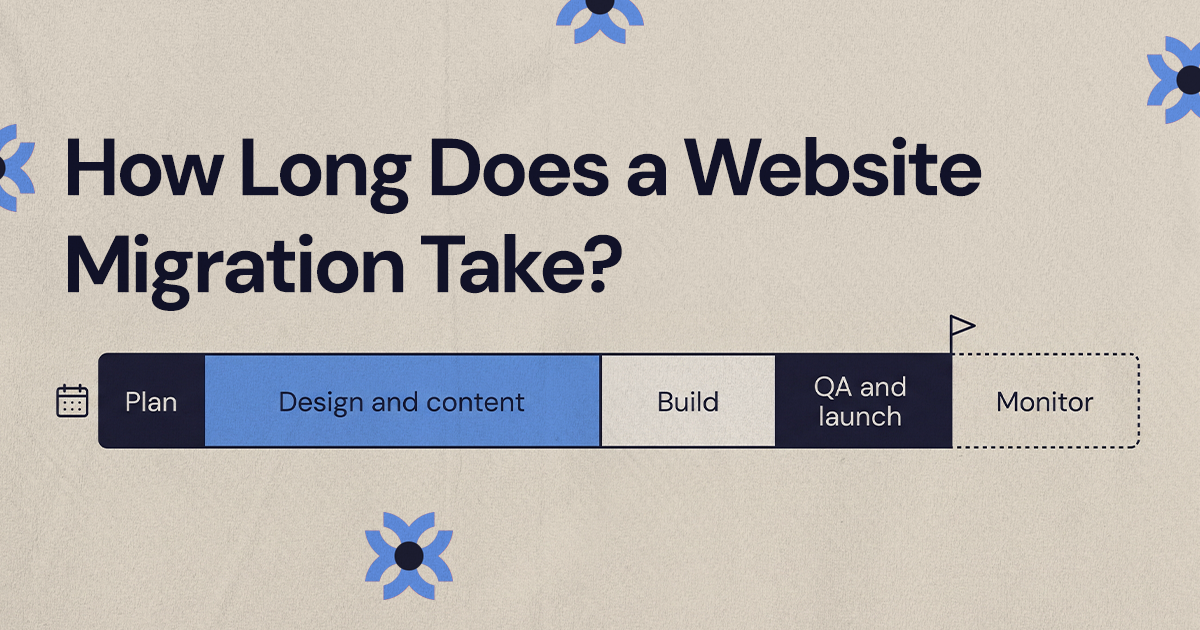
A website migration typically takes three to six weeks for a small, well-organized site and several months for a larger site or one being redesigned at the same time. The timeline depends on page count, whether design and content are changing, how many integrations need rebuilding and how fast your team approves work.
A website migration typically takes a few weeks for a small, well-organized site and several months for a larger site or one that is being redesigned at the same time. As a rough guide, a straightforward small-site move often lands somewhere around three to six weeks, a small redesign plus migration often runs closer to two or three months, and a mid-sized or complex project can take four months or more.
Those ranges are planning estimates, not promises. The honest answer to how long to do website migration work depends on how many pages you have, whether the design and content are changing, how many tools are connected to the site, and how quickly your team can make decisions. This guide breaks the timeline into phases, explains what usually happens in each one, and shows where projects tend to slow down.
What affects a website migration timeline?
Two companies can both say they are "migrating the website" and mean very different projects. One is moving a 15-page brochure site onto a cleaner CMS with the same design. The other is redesigning hundreds of pages, consolidating content, changing URLs, rebuilding templates and reconnecting a stack of marketing tools.
The factors that move the schedule most are:
- Site size: more pages means more content decisions, more redirects, more CMS entries and more QA.
- Design scope: a visual refresh is usually faster than a redesign with new page strategy, wireframes and a component system.
- Platform change: moving between CMS platforms adds content modeling, template rebuilding and editor training.
- SEO exposure: if organic search drives leads, the project needs URL mapping, metadata review, redirect testing and post-launch monitoring.
- Content readiness: approved copy, images and downloads speed things up. Missing or outdated content slows everything behind it.
- Integrations: CRM forms, analytics, chat, scheduling and payment tools all need to be rebuilt or reconnected and then tested.
- Approvals: founder, sales, legal and product reviews stretch timelines when they are not scheduled up front.
The most reliable way to estimate timing is to write down what is actually changing. A move that keeps the same structure and design is a different project from a redesign, repositioning and platform change bundled together, and it should be scheduled that way.
Typical timeline ranges by site size and complexity
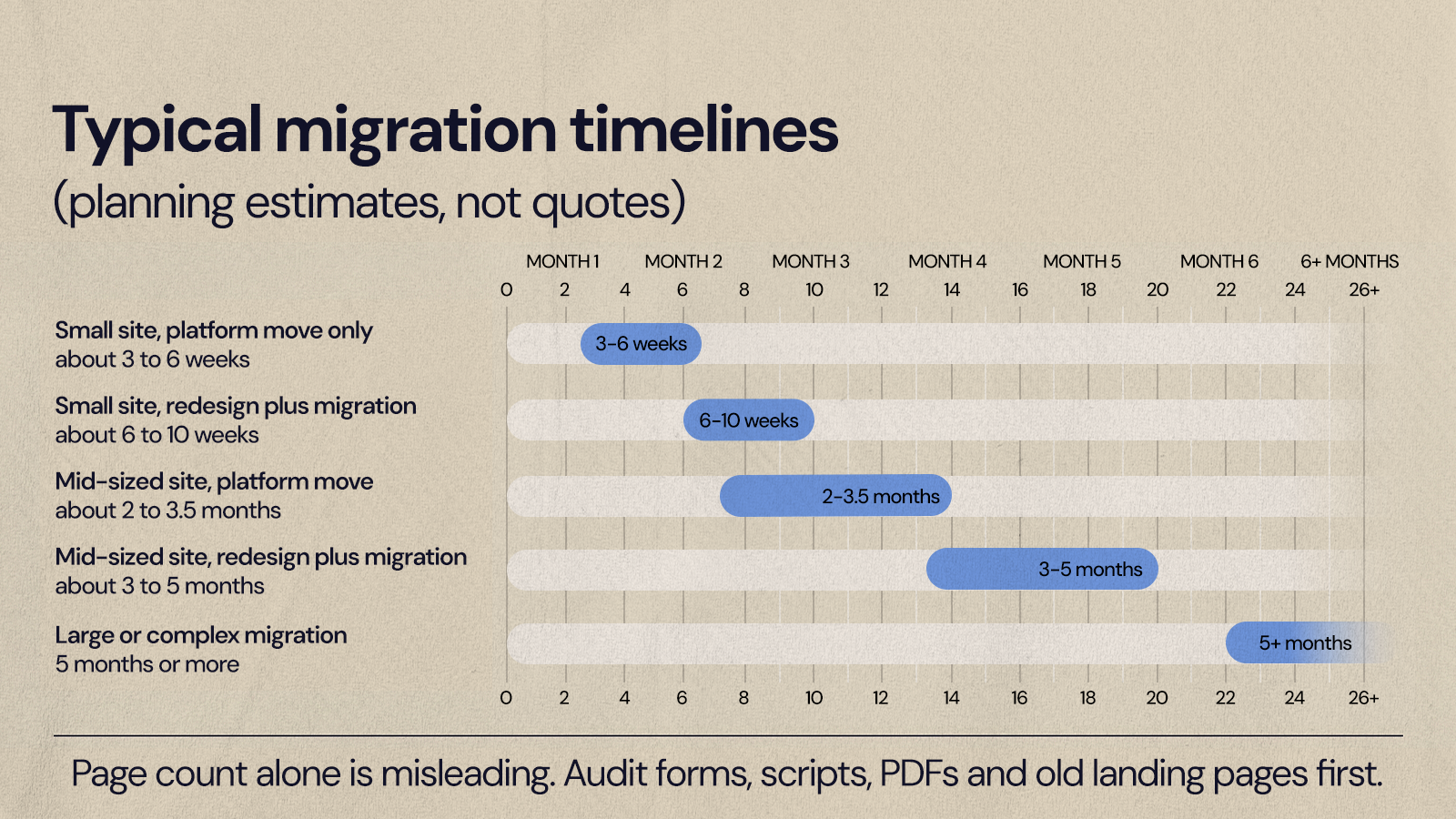
The ranges below are typical for marketing websites at small and mid-sized businesses. Treat them as a starting point before a proper audit, not as a quote.
Small site, platform move only
Often around three to six weeks. This usually means a simple marketing site with a handful of templates, content that is moving mostly as is, basic redirects, analytics setup and launch QA.
Small site, redesign plus migration
Often six to ten weeks. The extra time goes into a new design direction, revised core pages, CMS setup, responsive development, SEO basics, forms and launch support.
Mid-sized site, platform move
Often two to three and a half months. Expect multiple page types, a content audit, URL mapping, a CMS structure with several collections, a few integrations and deeper QA.
Mid-sized site, redesign plus migration
Often three to five months. Strategy, UX, a design system, rewritten or reorganized pages, development, SEO migration planning, testing and launch coordination all run in sequence or partial overlap.
Large or complex migration
Five months or more is common. These projects usually involve many content types, technical SEO requirements, custom integrations, compliance review or several stakeholder groups, and they are often launched in phases.
Page count on its own is misleading. A 30-page site can hide old landing pages still getting traffic, duplicated service pages, PDFs, form routing rules, event tracking and CRM fields that someone set up years ago. The visible site is only part of what has to move. If you want to see how scope affects budget as well as time, our breakdown of what drives website migration cost covers the same variables from the pricing side.
How long to do website migration work if you are only changing platforms?
A platform-only migration, where the design and content stay mostly the same, usually takes less time than a redesign but still needs careful planning. A small platform move often fits in three to six weeks. A more involved CMS move with many templates, integrations or redirects can take two to three months or longer.
This is the common case when a business has outgrown a site that is hard to edit. The aim is to move safely, keep what is working and make the site easier for the marketing team to run. The work usually follows this order:
- Site and content audit: list pages, templates, assets, forms, tracking scripts and URL patterns.
- CMS planning: decide how pages, blog posts, landing pages and reusable sections will be structured in the new platform.
- Template rebuild: recreate page layouts with responsive behavior intact.
- Content transfer: move copy, images, metadata, downloads and CMS entries.
- Redirect mapping: match every old URL to its new home wherever paths change.
- Integration setup: reconnect forms, analytics, CRM tools and scripts.
- QA and launch: test, publish, verify tracking and watch for errors.
The usual slowdowns are undocumented pages, unclear content ownership, old scripts no one recognizes and integrations set up by a previous team. Before agreeing to a compressed date, make sure someone has checked what is actually running on the current site. The CMS migration checklist we use with clients is a good way to run that check.
Planning: the phase that sets the schedule
Planning often takes one to three weeks for smaller projects and longer for complex sites. It defines scope, maps the current site, surfaces risks and gives everyone the same plan to work from.
Key planning activities include:
- Agreeing on why the migration or redesign is happening
- Auditing pages, templates, forms, integrations and tracking
- Reviewing which URLs earn organic traffic and links
- Sorting content into keep, rewrite, merge and retire
- Naming decision-makers and approval checkpoints
- Choosing the platform, CMS structure and launch approach
- Writing a migration plan with milestones and owners
Planning slows down when teams skip the audit, underestimate how many people need to weigh in, or try to settle strategy, content and platform questions all at once. It also slows down when the current site has no documentation. If nobody knows which forms feed sales or which scripts still matter, planning has to find out before build work can move safely. A good planning phase ends with a clear answer to five questions: what is moving, what is changing, what is being removed, who approves each stage and what must be tested before launch.
Why do design and content take the longest?
Design and content are where most schedules expand. A light visual refresh can take a few weeks. A full redesign with new messaging, page layouts and conversion paths often takes four to ten weeks on its own, depending on review cycles and how much content is being written.
For a migration, design covers more than color and type. It includes page strategy, navigation, reusable sections, mobile behavior, form placement, calls to action and how the brand shows up across service pages, blog posts and landing pages. Content adds its own workstream. Reusing existing copy with light edits keeps things moving. New positioning, rewritten service pages or refreshed leadership copy turns content into one of the longest parts of the project.
Common design and content slowdowns:
- Stakeholders disagreeing on positioning or which audience comes first
- Existing copy that is outdated, duplicated or too vague to move directly
- Late change requests from sales, product or leadership
- Missing brand assets, icons or approved messaging
- Designing every page individually instead of building reusable templates
- Deciding what a page should say only once development has started
The practical fix is to separate structural decisions from preferences. Navigation, page hierarchy, messaging, calls to action and template structure should be locked early. Button labels and minor copy edits can be refined later without moving the launch date.
Reusable templates matter more as sites grow. On NUUX's multi-brand migration for Quality Collision Group, 26+ partner brand websites moved onto one Webflow platform with shared templates and a single content model. That kind of structure is decided once and then filled in, which is far faster than designing each page from scratch.
What is the minimum timeline for a Webflow migration?
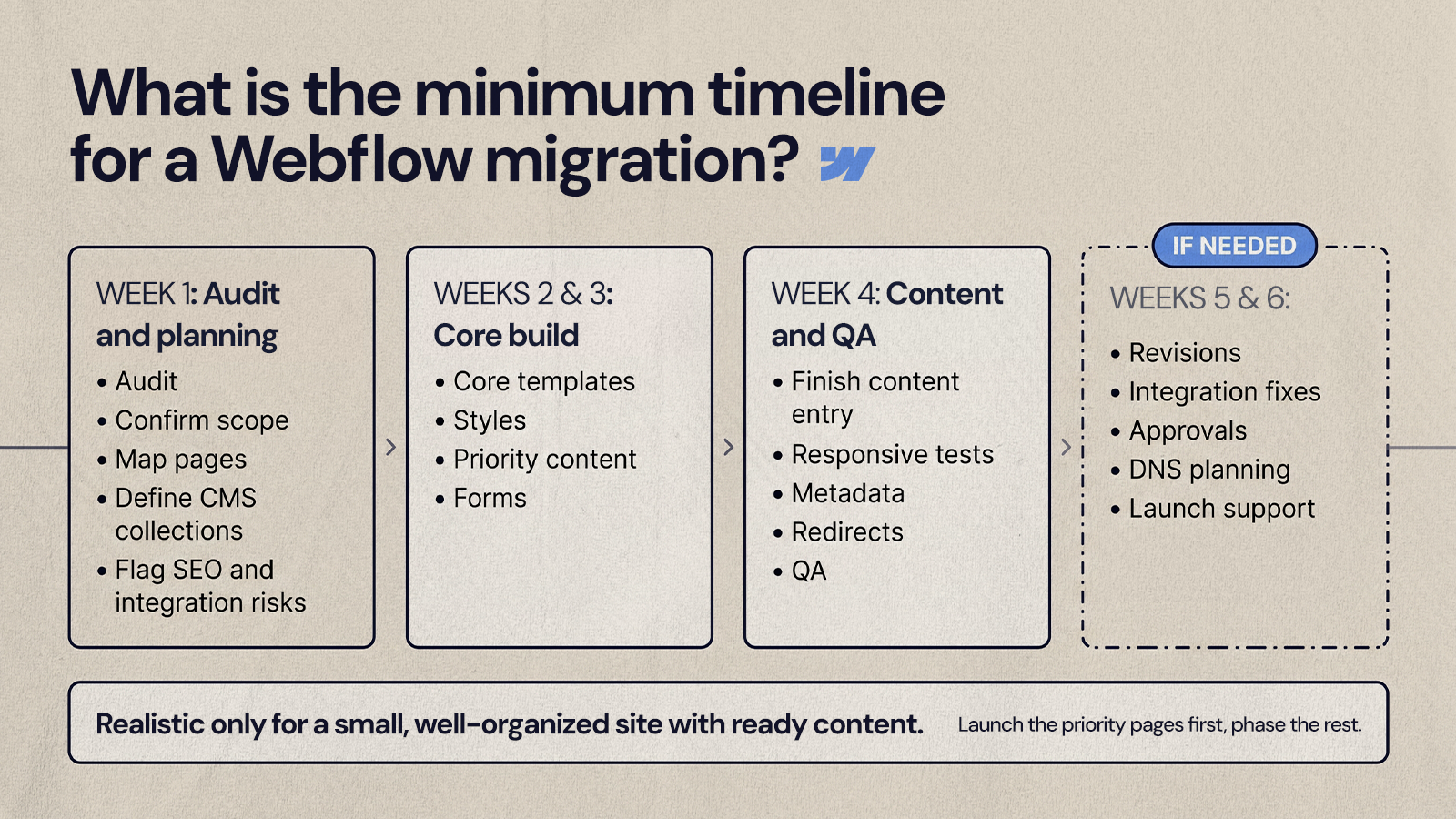
For a small, straightforward site with few templates, ready content, simple forms and few integrations, a Webflow migration can often be done in around three to six weeks. If the project also includes new messaging, layouts, CMS structure and SEO migration work, six to ten weeks is a more realistic expectation for a small business.
Webflow can be efficient for marketing teams because of its visual development, reusable components, CMS collections and editor-friendly publishing. It does not remove the need for a content model, responsive build, QA, redirects, analytics and launch coordination. A lean schedule might look like this:
- Week 1: audit the current site, confirm scope, map pages, define CMS collections and flag SEO or integration risks.
- Weeks 2 and 3: build core templates, set up styles, migrate priority content and configure forms.
- Week 4: finish content entry, test responsive layouts, review metadata, prepare redirects and run QA.
- Weeks 5 and 6, if needed: handle revisions, integration troubleshooting, final approvals, DNS planning and launch support.
This only works when the existing site is already well organized. It stops being realistic when there are many page types, heavy custom functionality, messy content or several reviewers on every page. A phased approach helps here: launch the pages that matter most, then handle lower-priority pages and enhancements in a second phase. Our WordPress to Webflow migration guide walks through the platform-specific steps if that is the move you are planning.
Development: turning the plan into a working site
Development often takes two to eight weeks for small and mid-sized projects, and longer for complex builds. The range depends on the number of templates, CMS collections, custom interactions, integrations and the level of accessibility and performance work expected.
Development typically includes building templates and reusable sections, creating CMS collections for content like blog posts, team members, locations or services, entering or importing content, setting up navigation, footer and forms, connecting analytics, CRM and scheduling tools, and implementing redirects, canonical tags and metadata fields.
Development slows down when the design is incomplete, content is still changing, integrations are undocumented or new features get requested mid-build. Hidden functionality on the old site causes the same problem: conditional forms, gated content, landing page scripts or embedded tools that were missed during planning. Finalize the main page types before the build starts and avoid restructuring the CMS once templates are in progress.
How long should testing and launch take?
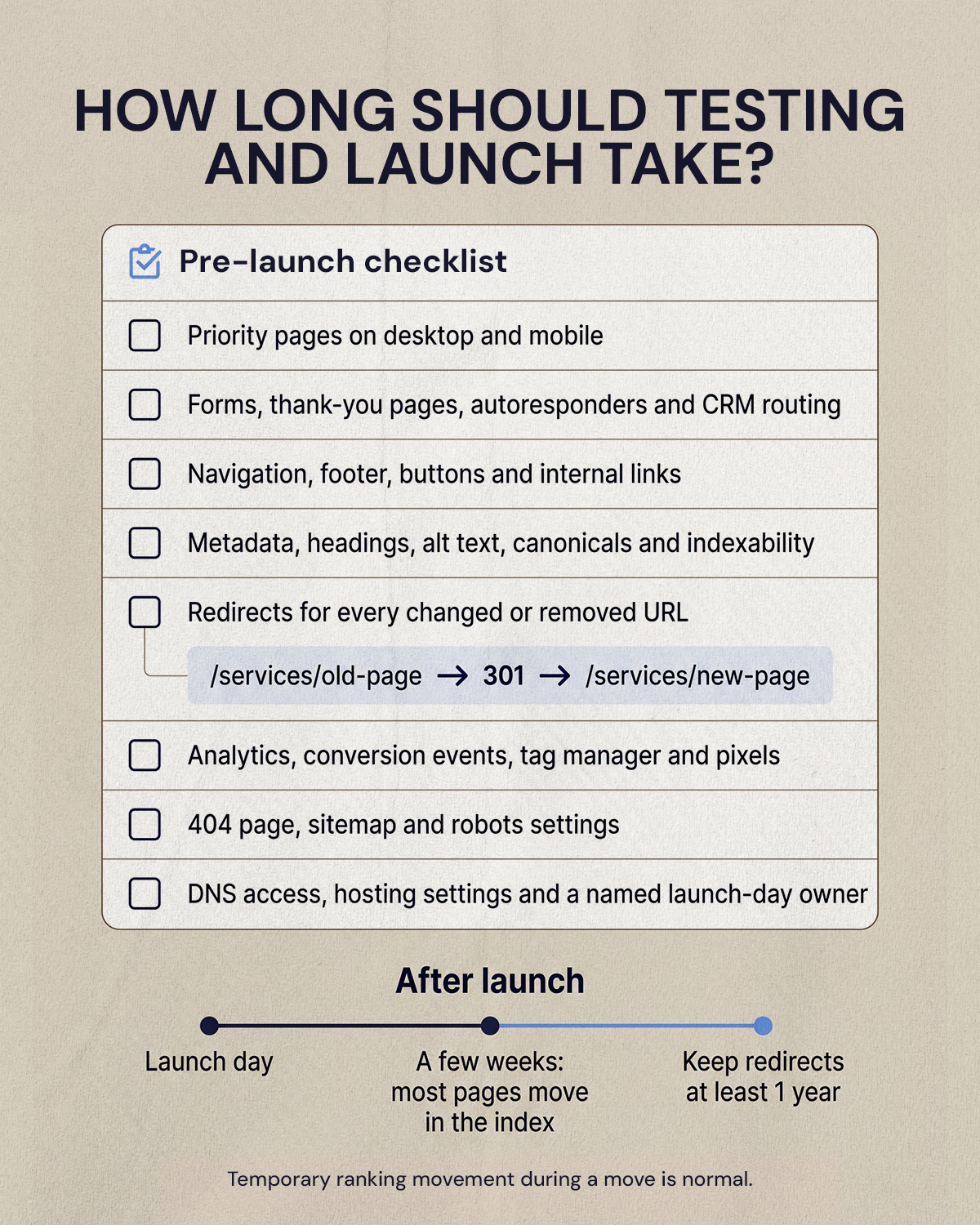
For smaller sites, QA and launch preparation often take one to two weeks. Mid-sized and complex migrations can need several weeks of testing, especially with many templates, redirects, forms or approval groups.
A practical pre-launch checklist:
- Review priority pages on desktop and mobile
- Test forms, thank-you pages, autoresponders and CRM routing
- Check navigation, footer links, buttons and internal links
- Verify metadata, headings, alt text, canonical tags and indexability
- Confirm redirects for every changed or removed URL
- Check analytics, conversion events, tag manager setup and pixels
- Review the 404 page, sitemap and robots settings
- Confirm DNS access, hosting settings and who owns launch day
Redirects deserve extra attention. Google recommends permanent server-side redirects when a URL changes, and its site move guidance says to keep those redirects "for as long as possible, generally at least 1 year." Our guide to handling redirects when migrating to Webflow covers how to set them up.
Launch day is usually short. The weeks after it are not. Google's documentation says a small to medium-sized site can take a few weeks for most pages to move in its index, larger sites take longer, and temporary ranking fluctuation during a move is normal. Plan for a monitoring window after launch rather than treating go-live as the finish line.
Why do website migrations get delayed?
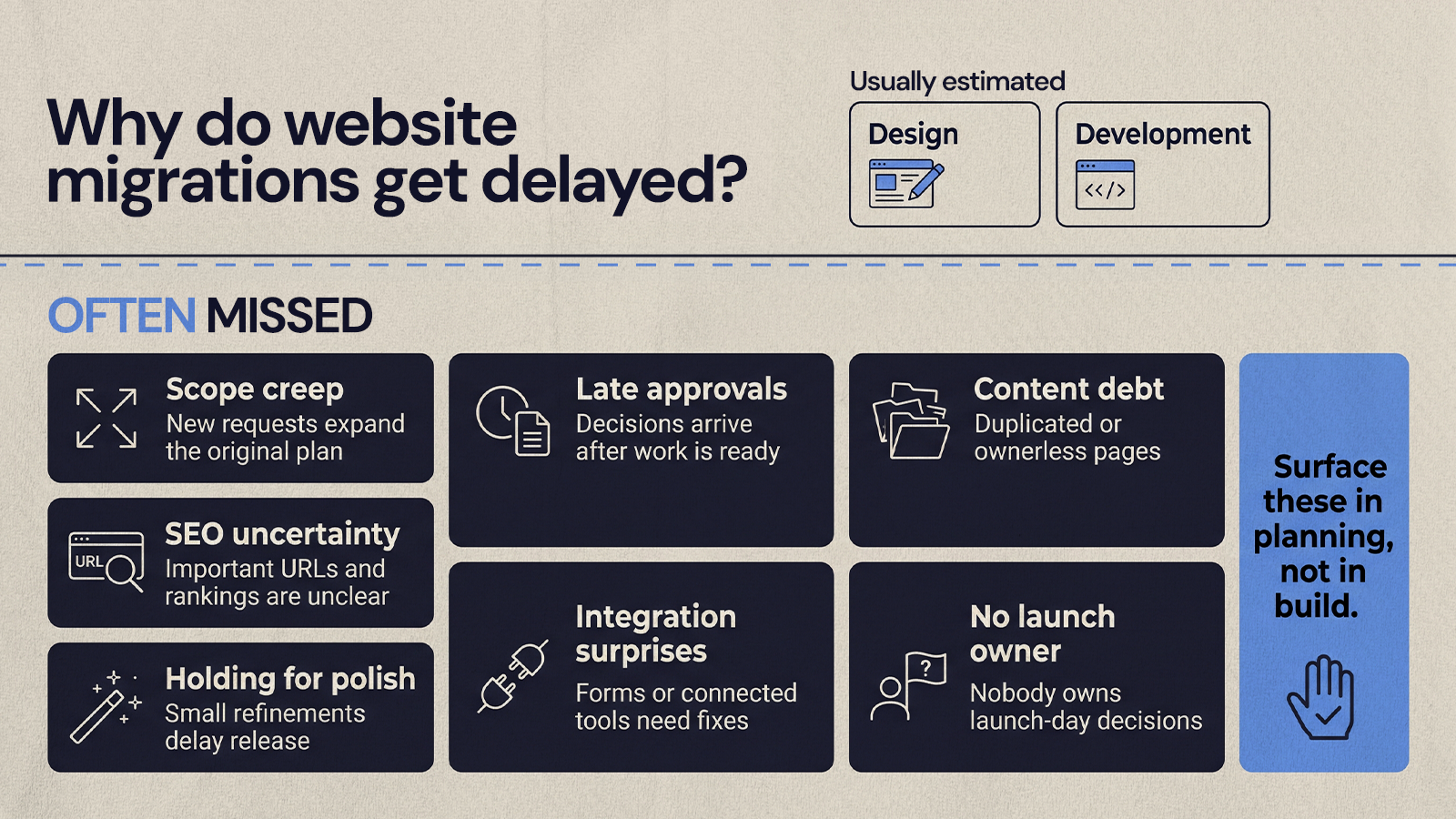
Most delays come from the same place: the visible work was estimated and the hidden work was not. Teams schedule design and development, then run into content gaps, stakeholder conflicts, SEO questions, integration issues or approval bottlenecks that should have come up in planning.
- Scope creep: the project starts as a migration and turns into a redesign, rewrite and marketing operations cleanup.
- Late approvals: leaders review late, disagree with earlier decisions or ask for changes after the build is done.
- Content debt: pages are duplicated, outdated, off-brand or have no clear owner.
- SEO uncertainty: URL changes, redirects and indexed pages are not mapped early.
- Integration surprises: forms, CRM fields or tracking scripts behave differently on the new platform.
- No launch owner: everyone assumes someone else is handling DNS, redirects, analytics or final QA.
- Holding for polish: launch waits on low-priority improvements that could ship afterward.
Setting a realistic migration date
A migration can move quickly when the site is small, the content is ready, the platform is chosen and stakeholders agree. It takes longer when it includes a redesign, content strategy, SEO preservation, a new CMS architecture, integrations or several layers of approval. Start with the typical ranges above, then refine the date once the audit is done and you know what is actually moving.
If you want help scoping the timeline for your site, our web development and migration team can walk through it with you.
Want results like this
Your website should make money, not excuses. Let us find the revenue hiding in your current experience.
FAQs
Quick answers to the questions we hear most about website conversion and UX design.
A redesign usually takes longer than a platform move because it adds strategy, wireframes, visual design and content work. For a small business site, six to ten weeks is a common range. Mid-sized redesigns often run three to five months, and larger sites with many page types, integrations or approval layers can take longer. Review speed is often the biggest variable.
A migration can cause temporary ranking fluctuation, and Google says that is normal during a site move. The risk grows when URLs change without redirects, metadata is lost or internal links break. Mapping every old URL to a new one, using permanent server-side redirects, keeping them for at least a year and monitoring Search Console after launch all reduce that risk.
Google's site move documentation says a small to medium-sized website can take a few weeks for most pages to move in its index, and larger sites take longer. During that period rankings may fluctuate while Google recrawls and reindexes. Submitting an updated sitemap and keeping redirects in place helps Google process the change.
In most cases, yes. The new site is built and tested on a staging domain while the old site stays live. At launch, DNS is pointed to the new platform and redirects go live together. There can be a short propagation window, so teams usually launch at a low-traffic time and have someone ready to check forms, tracking and redirects immediately afterward.
Start with an audit of every page, template, form, integration and tracking script on the current site. Note which URLs earn organic traffic or links, decide what content is moving, being rewritten or retired, and name who approves each stage. Confirm access to the domain, DNS, analytics and CRM. That preparation makes the timeline estimate far more accurate.
Related articles
More field notes on conversion, UX, and building websites that sell.


