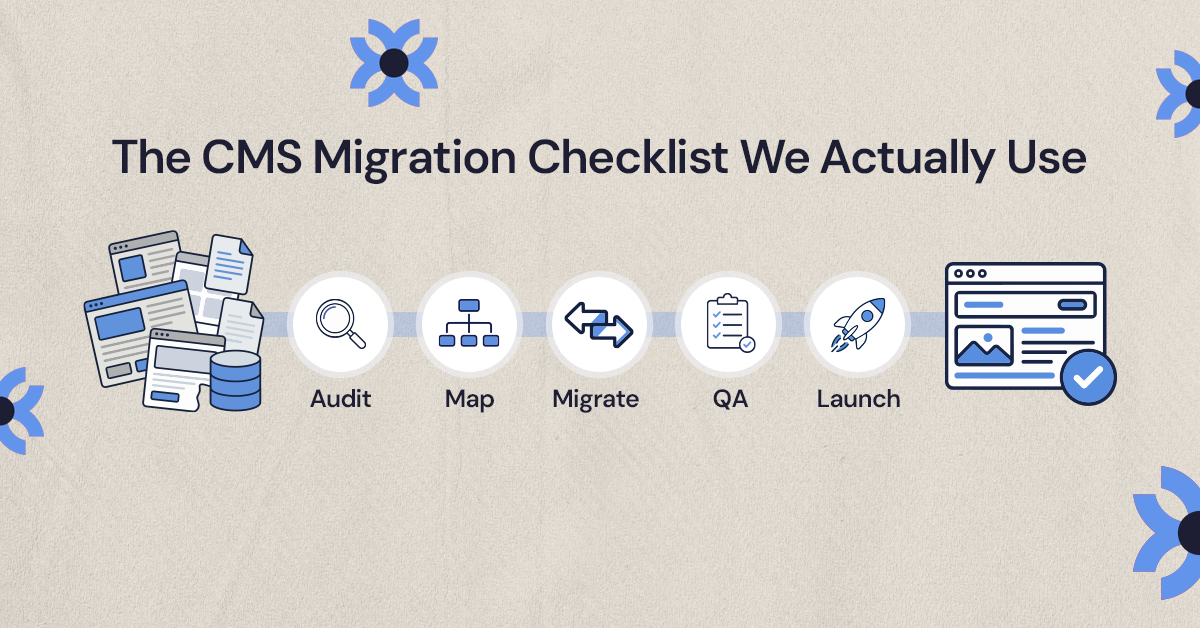
.svg)
.svg)


Most traffic drops after a CMS migration come from a short list of mistakes: old URLs that change without 301 redirects, a noindex tag or robots.txt rule carried over from staging, and titles, content, internal links or structured data lost in the rebuild. You prevent them by mapping every valuable URL before launch, testing redirects and indexing on staging, and monitoring Search Console by page group for the first weeks after go-live.
Most traffic drops after a CMS migration come from a handful of preventable mistakes: URLs that change without redirects, a noindex tag or robots.txt rule left over from staging, and page titles, content, internal links or structured data that quietly disappear in the rebuild. Good CMS migration SEO means finding every page that earns traffic before you move, giving each one a direct path to its new home, and testing the new site the way Google will crawl it before and after launch.
Some movement is normal. Google says that during a site move with URL changes, the visibility of your content "may fluctuate temporarily" and that for a medium-sized site it can take a few weeks or more for the new URLs to replace the old ones in results. A permanent drop is different. That almost always traces back to one of the failure points below.
What causes traffic drops after a CMS migration?
Search engines treat a migration as a question: is the new site a reliable replacement for the old one? Every page that ranked did so because Google could reach it, understand it and trust it. A migration can break any of those three things at once, often without anyone noticing until the monthly report comes in.
The most common causes are:
- Changed URLs without redirects: old pages return 404 errors, so the signals they built up have nowhere to go.
- Blocked indexing: a noindex tag, robots.txt rule, password protection or staging canonical tag ends up on the live site.
- Lost or rewritten metadata: title tags, meta descriptions and H1s get replaced by template defaults.
- Content cut during the redesign: the sections that answered searchers' questions are trimmed to make layouts cleaner.
- Broken internal links: new navigation, footers and body links stop pointing at the pages that matter.
- Missing structured data: schema for articles, products, local businesses or breadcrumbs is not rebuilt in the new templates.
- Slower templates: heavier images, scripts and fonts make pages worse for users on mobile.
- Tracking gaps: analytics or conversion tags are not migrated, so traffic looks like it fell when measurement actually broke.
Which CMS migration mistakes cost the most traffic?
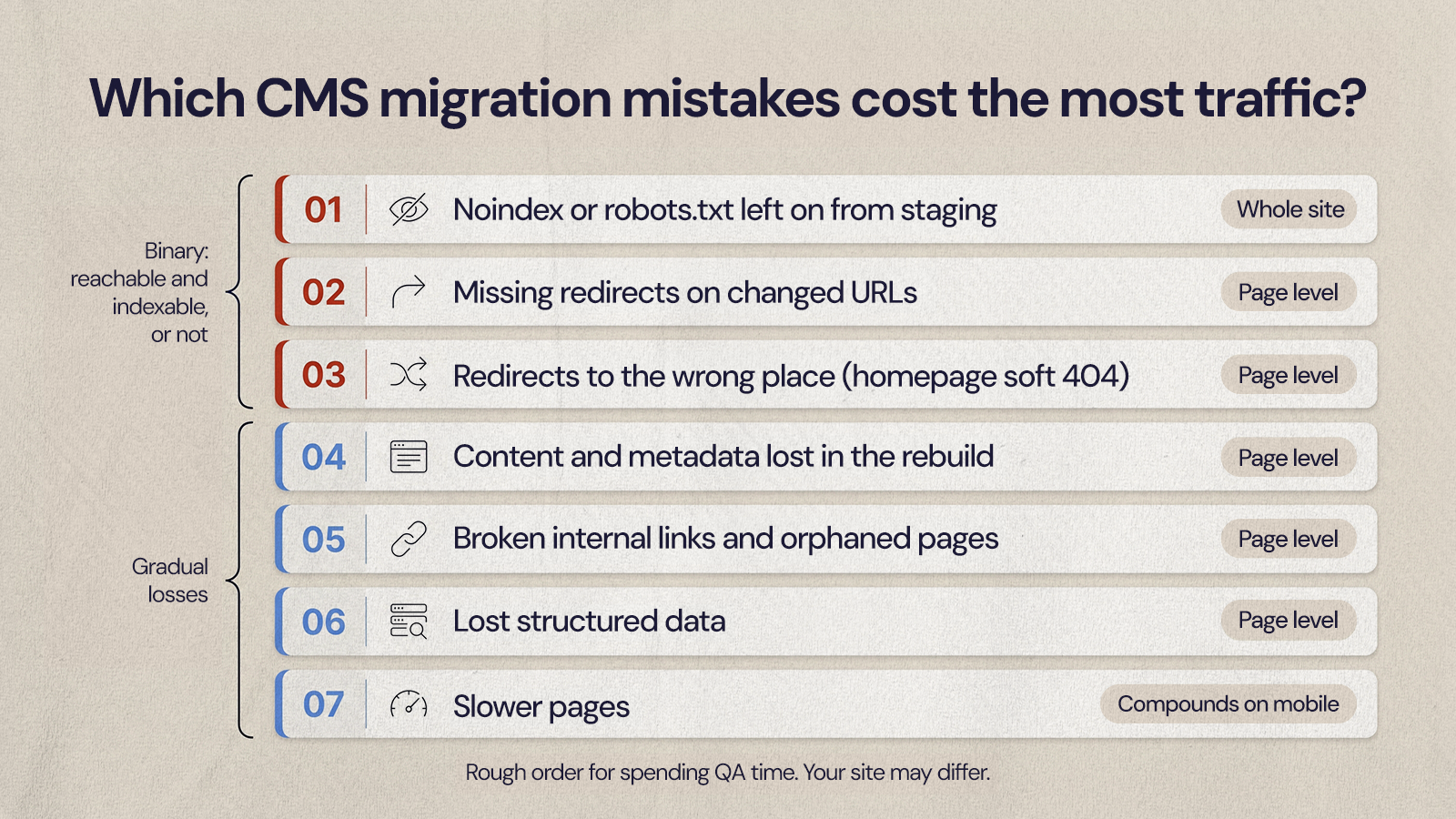
Not every mistake does the same damage. The order below is a rough guide to how much each one tends to cost, based on how directly it cuts Google off from pages that already rank. Your own site may differ, but this is a sensible order for spending limited QA time.
- Noindex or robots.txt left on from staging. This can affect the whole site at once. Google's documentation says a page with a noindex rule is dropped "entirely from Google Search results, regardless of whether other sites link to it."
- Missing redirects on changed URLs. Every high-traffic page without a redirect becomes a 404, and backlinks pointing at it stop helping.
- Redirects to the wrong place. Sending many old URLs to the homepage feels tidy, but Google warns this may be treated as a soft 404.
- Content and metadata lost in the rebuild. The page still exists, but it no longer matches the queries it used to rank for.
- Broken internal links and orphaned pages. Important pages get harder to discover and look less important within the site.
- Lost structured data. Pages can lose eligibility for rich results, which affects how they appear even if rankings hold.
- Slower pages. Usually a slower, smaller loss, but one that compounds on mobile and hurts conversions as well as search.
The first three are binary problems: a page is either reachable and indexable or it is not. That is why they belong at the top of any pre-launch checklist.
How do you build a redirect map that protects rankings?
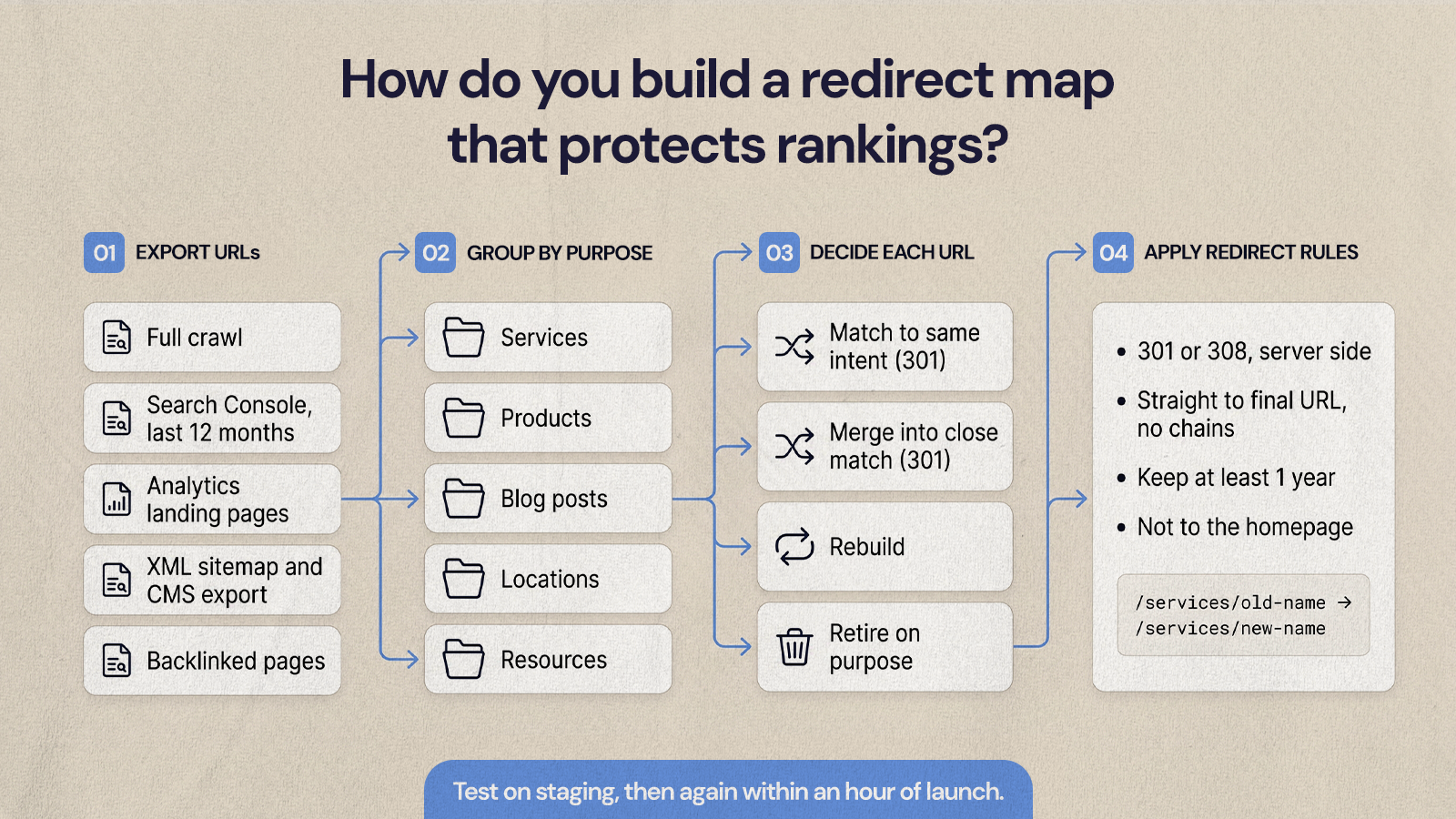
A redirect map is a spreadsheet that pairs every old URL worth keeping with the closest matching new URL. Build it before development finishes, not the week of launch. Start by exporting URLs from several places, because no single tool sees all of them:
- A full crawl of the current site
- Google Search Console pages with clicks or impressions in the last 12 months
- Analytics landing pages, including paid and email campaign pages
- Your XML sitemap and CMS export
- Pages with external backlinks from your SEO tool of choice
Then group the URLs by purpose (services, products, blog posts, locations, resources) and match each one to a new page that serves the same intent. Where there is no equivalent, decide deliberately whether to rebuild the page, merge it into a close match, or retire it. A service your business no longer offers can be retired, but it should be a conscious choice rather than an accident.
Google's site move guidance is specific on the mechanics. Use server-side permanent redirects (301 or 308), point each old URL straight at its final destination rather than through a chain, and keep the redirects in place "for as long as possible, generally at least 1 year." Permanent redirects also tell Google that the new URL should be treated as the canonical version. For platform-specific steps, our guide to handling redirects when migrating to Webflow walks through the setup in detail.
Test the full map on staging, then again within an hour of launch. Check status codes, not just whether the page loads, because a redirect that lands on a 200 page through three hops still wastes crawl effort and is easy to fix before it matters.
Why does a leftover noindex tag wipe out traffic?
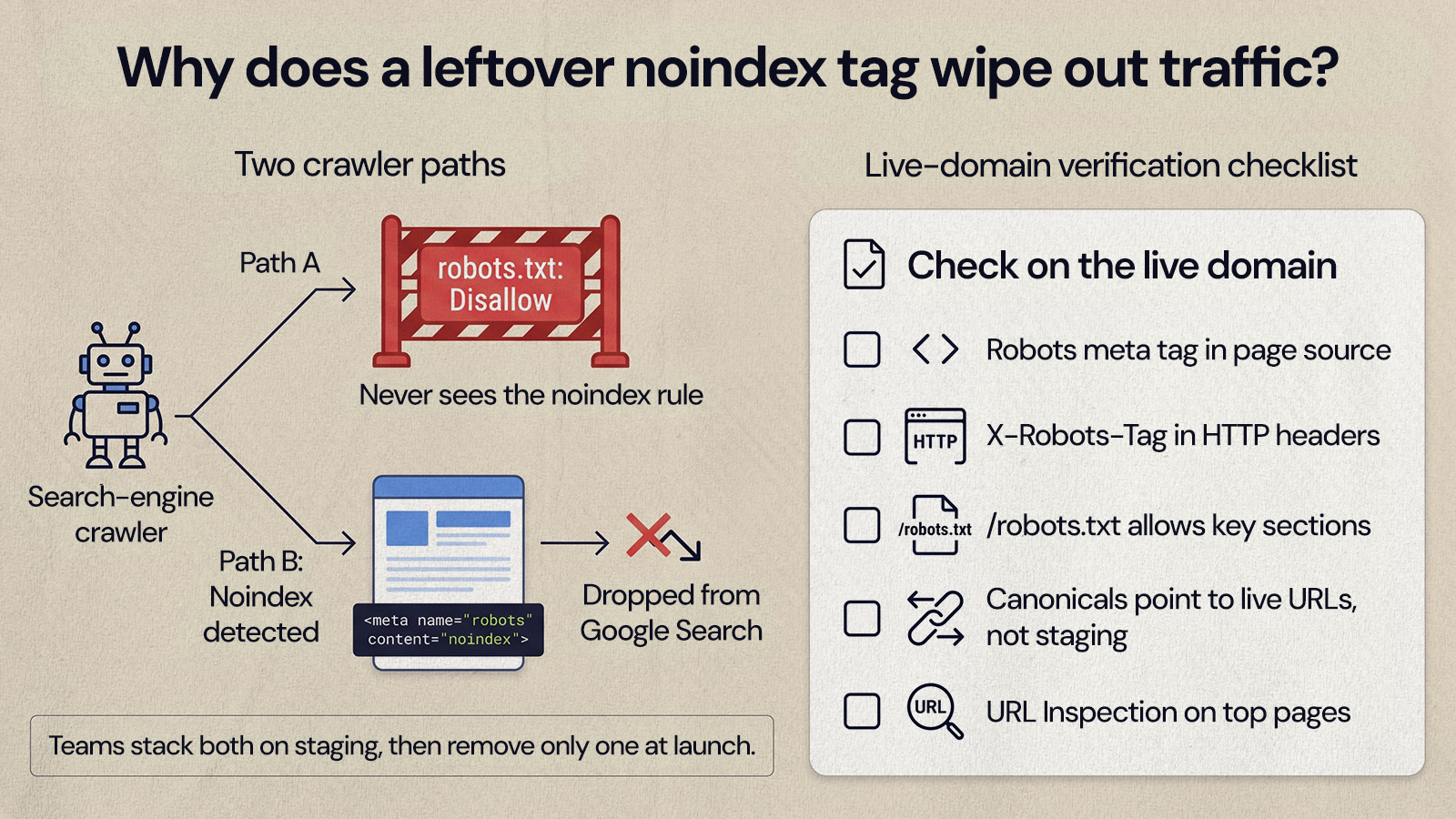
Staging sites are usually set to noindex so unfinished pages do not show up in search. The problem is that the setting often lives in a site-wide toggle, a template header or a robots.txt file, and it can carry over when the site is pushed live. Because it applies to every page, it is the fastest way to lose most of your organic traffic in one release.
There is a second trap. Google notes that for a noindex rule to work, the page must not be blocked by robots.txt, because a blocked crawler "will never see the noindex rule." Teams sometimes stack both settings on staging and then remove only one at launch. Check both on the live domain:
- View the page source of your homepage and a few key templates for a robots meta tag
- Check HTTP headers for an X-Robots-Tag
- Open /robots.txt on the live domain and confirm it is not disallowing important sections
- Confirm canonical tags point to live URLs, not the staging domain
- Run the URL Inspection tool in Search Console on your top pages
What gets lost in the rebuild: metadata, content and structured data
These losses are quieter than a missing redirect. The page loads, the redirect works, and traffic still slides because the new page is not as useful or as clearly labeled as the old one.
Title tags, meta descriptions and headings
New templates often fill titles with a default pattern, such as the page name plus the brand. Export your current titles, meta descriptions and H1s during the audit, then carry them over for every page that ranks well. Improve them where you have a reason to, and log each change so you can connect it to any movement later.
Page content
Redesigns tend to shorten pages to fit cleaner layouts. If a service page ranked because it explained what is included, who it is for and how pricing works, cutting those sections removes the reason it ranked. Keep the substance and improve the structure. Consolidating thin pages is fine when the new page fully covers what both old pages answered.
Structured data
Schema markup is usually hardcoded in old templates and easy to forget. Inventory which page types carry it (articles, FAQs, products, local business, breadcrumbs) and rebuild it in the new CMS. Google is clear that structured data makes a page eligible for rich results rather than guaranteeing them, so treat it as protecting how your pages appear, not as a ranking shortcut.
On the Quality Collision Group migration, NUUX moved 26+ partner brands onto one platform and planned the SEO into the sitemap from the start: one page per service, one per manufacturer certification and one per location. For Brandywine Coachworks, one of those brands, the migrated site saw about a 5% increase in organic calls, per QCG's own call tracking. The practical lesson is that SEO decisions made at the sitemap stage are much cheaper than fixes made after launch.
How do internal links and page speed affect a migrated site?
Internal links tell Google which pages matter and help it find new URLs quickly. During a migration they break in three ways: navigation changes remove links to important pages, hardcoded body links still point at old URLs (which now go through a redirect or 404), and related-content modules are rebuilt with different logic. Update body links to point directly at new URLs rather than relying on redirects, and check that no priority page ends up orphaned.
Speed matters for users first. Google's web.dev guidance sets "good" Core Web Vitals thresholds of Largest Contentful Paint within 2.5 seconds, Interaction to Next Paint of 200 milliseconds or less and Cumulative Layout Shift of 0.1 or less, measured at the 75th percentile of page loads. A new design with large hero images, heavy fonts and extra third-party scripts can miss those targets even if the old site met them. Compress images, set up modern formats like WebP, and question every script before it goes into the new templates.
The CMS migration SEO checklist for launch
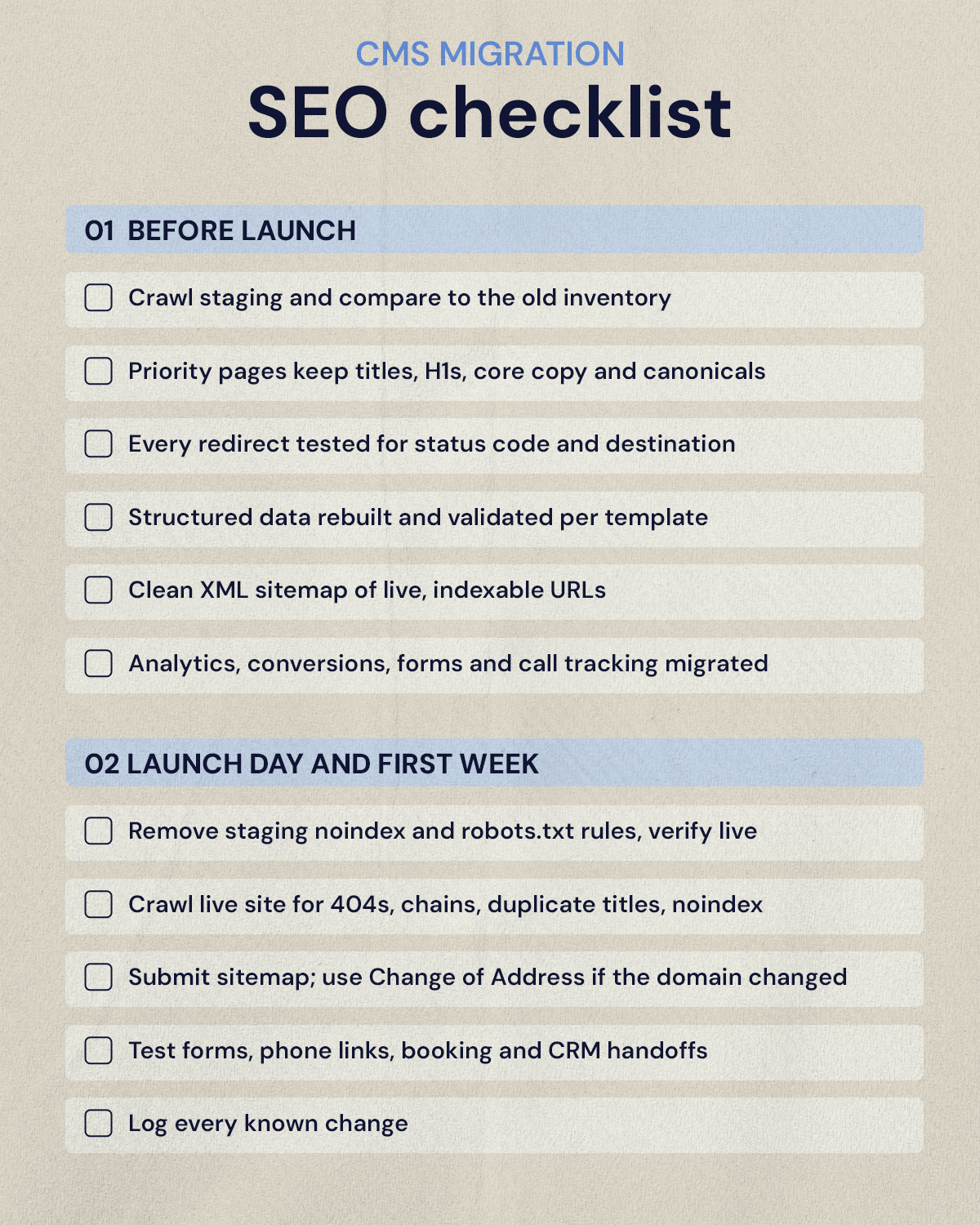
A written checklist keeps launch day from depending on memory. Split it into what happens before the switch and what happens right after. Our full CMS migration checklist covers the wider project; this is the SEO slice.
Before launch
- Crawl staging and compare it against the old site inventory
- Confirm priority pages keep their titles, H1s, core copy and canonical tags
- Test every redirect in the map for status code and final destination
- Rebuild and validate structured data on each template
- Prepare a clean XML sitemap with only indexable, live URLs
- Migrate analytics, conversion events, form tracking and call tracking
Launch day and the first week
- Remove staging noindex and robots.txt rules, then verify on the live domain
- Crawl the live site for 404s, redirect chains, duplicate titles and noindex errors
- Submit the new sitemap in Search Console, and use the Change of Address tool if the domain changed
- Test forms, phone links, booking tools and CRM handoffs end to end
- Write down every known change so traffic shifts can be explained later
How long does traffic take to recover after a migration?
Google's own guidance is that a medium-sized site can take a few weeks or more for new URLs to replace old ones in search, and larger sites take longer. If the redirects, indexing and content are right, most sites see rankings settle over that period rather than recover from a real loss.
Watch performance by page group rather than as one total. A small overall dip can hide a major loss on your highest-value service pages, while a large drop can come from low-value blog posts that no longer fit the business. In Search Console, compare the old and new URLs for your top pages and look for:
- Old URLs still returning 404 errors instead of redirecting
- Priority pages reported as excluded or not indexed
- Falling impressions on core service or product queries
- Fewer calls, forms or bookings from organic visitors
- Traffic appearing under the wrong source because tracking broke
Fix indexing and redirect problems first, since they have the biggest effect and the fastest recovery. Content gaps, internal links and speed come next. If you are moving platforms specifically, our WordPress to Webflow migration guide covers where those issues tend to show up on each side.
Plan the migration around what already ranks
The safest migrations treat SEO as an input to the sitemap, templates and content plan, not a check at the end. Start from the pages that already bring in traffic and leads, give each one a clear path forward, and test the new site the way Google will see it. If you are budgeting for outside help, our breakdown of what professional migration costs explains what drives the scope.
If you want a team to plan and build the migration with SEO built in from day one, see how NUUX approaches website builds and migrations.
Want results like this
Your website should make money, not excuses. Let us find the revenue hiding in your current experience.
FAQs
Quick answers to the questions we hear most about website conversion and UX design.
Not necessarily. Changing platforms does not hurt rankings on its own. Losses come from what changes along the way: URLs without redirects, indexing settings carried over from staging, and content or metadata that disappears. If you keep valuable URLs or redirect them one to one, preserve the content that ranks and test before launch, rankings usually settle after a short period of normal fluctuation.
Keep them where you can, because an unchanged URL needs no redirect and carries its history with it. Some platforms force a different structure, such as a /blog/ folder or collection path, and sometimes a cleaner structure is worth the change. When URLs do change, map every valuable old URL to its closest new equivalent and use permanent 301 redirects that point straight to the final page.
Google's site move guidance says to keep redirects for as long as possible, generally at least one year, so it has time to transfer signals to the new URLs. In practice many teams leave them in place indefinitely, because old backlinks, bookmarks and email links keep sending visitors to the original addresses long after Google has updated its index.
A short dip is normal. Google says visibility may fluctuate temporarily during a site move, and that a medium-sized site can take a few weeks or more for new URLs to fully replace old ones. A drop that keeps falling, or that hits your most important pages hardest, usually points to a redirect, indexing or content problem that needs fixing rather than waiting out.
Submit the new XML sitemap, then use URL Inspection on your top pages to confirm they are indexable and use the right canonical. Watch the Pages report for new 404s and excluded URLs, and compare clicks and impressions for your most important page groups against the weeks before launch. If your domain changed, also use the Change of Address tool.
Related articles
More field notes on conversion, UX, and building websites that sell.