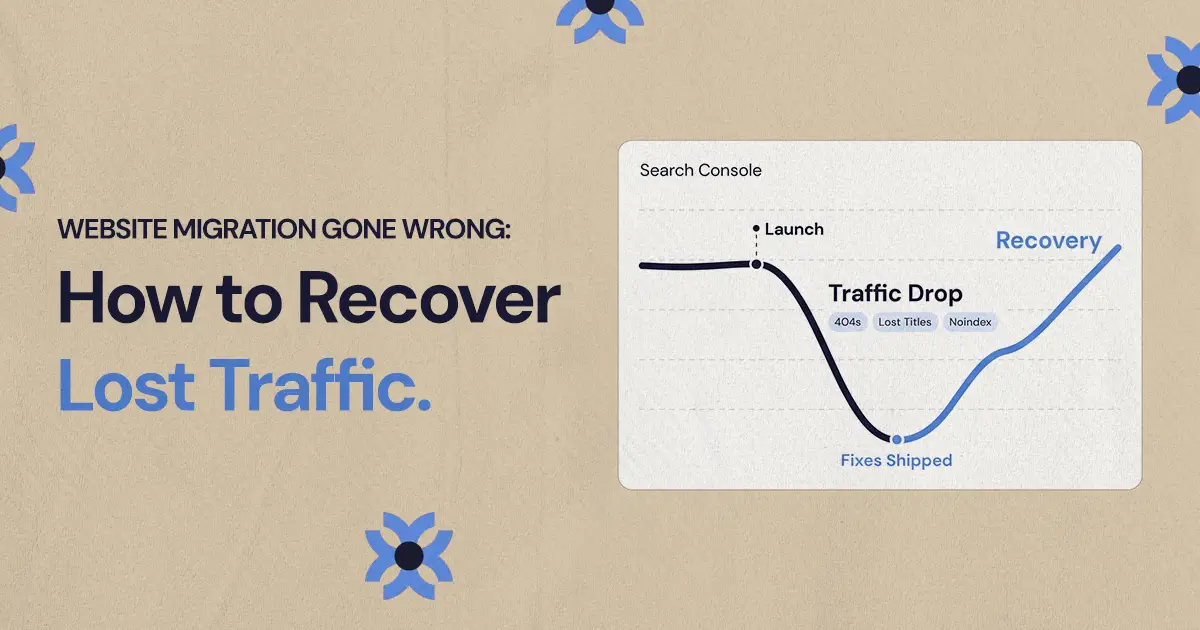
Recover traffic after a bad website migration by comparing Search Console data from before and after launch, crawling the old URLs, fixing redirects with permanent one-to-one mappings, and restoring the content and metadata that used to rank. Then resubmit a clean sitemap and expect recovery to take weeks, not days.
To recover traffic after a website migration gone wrong, find out exactly what changed, fix the redirects and indexing problems first, restore the content and metadata that used to rank, then resubmit your sitemap so Google can recrawl the corrected pages. Most bad website site migration SEO problems come from a short list of causes, and many can be recovered if you work from evidence instead of guessing.
For marketing leads and founders at small and mid-sized businesses, a bad migration usually shows up as a revenue problem before anyone calls it an SEO problem. Organic traffic drops, form fills slow down, and the team that launched the new site is suddenly asked what happened. This guide walks through the diagnosis and the fixes in the order that tends to matter most.
Why did traffic drop after the website migration?
Traffic usually drops because Google can no longer find, access or connect the new pages to the old ones. That can happen after a domain change, a CMS move, a redesign, a URL restructure or a launch where important signals were removed without anyone noticing.
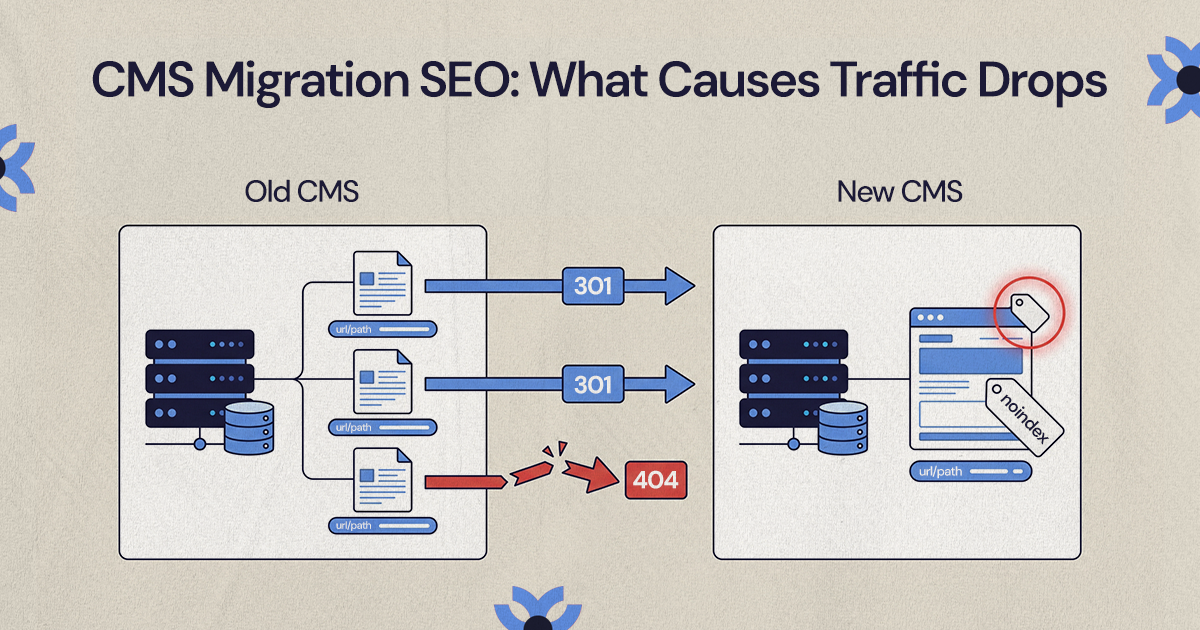
It's rarely one mistake. More often several issues stack up: important URLs changed without redirects, title tags were rewritten, internal links now point somewhere weaker, useful content was deleted, or search engines were blocked from the new site. Even a modest drop on a few high-intent pages can hurt pipeline if those pages drove quote requests, demo bookings or calls.
The most common causes are:
- Missing or wrong redirects: old URLs return 404 errors, redirect to the homepage or point to unrelated pages.
- Changed page intent: a service page that answered buying questions became a thin brand page.
- Lost metadata: titles, headings, alt text and structured data were removed or rewritten poorly.
- Blocked crawling or indexing: robots.txt rules, noindex tags, canonical tags or staging settings carried over to the live site.
- Internal link changes: navigation and body links stopped pointing to the pages that matter most.
- Content pruning without SEO review: pages that earned traffic were deleted because they looked old.
Assume something measurable changed, and find it before you make broad edits.
How do you confirm the drop in Google Search Console?
Search Console is the first place to separate a tracking problem from a real visibility problem. Analytics tags often break during a redesign, so a drop in analytics alone doesn't prove you lost search traffic. Search Console shows how Google sees the site: clicks, impressions, average position, indexed pages and crawl issues.
Compare a normal pre-launch window with the same length of time after launch, such as the 28 days before and after. Avoid comparing a busy season with a slow one unless you account for seasonality.
- Performance by page: find the URLs that lost the most clicks and impressions.
- Performance by query: find the search terms that dropped, even if the ranking page changed.
- Page indexing report: check whether the number of indexed pages fell and why pages are excluded.
- Crawl stats: look for spikes in errors, redirects or server problems.
- Sitemaps report: confirm Google read the new sitemap and found the expected URLs.
- Manual actions and security issues: rule out the rare but serious problems.
Prioritize pages that matter commercially: service pages, location pages, pricing or consultation pages, and articles that regularly lead to inquiries. A blog post that lost low-intent traffic is less urgent than a service page that used to rank for a buying search.
Export everything before you change anything. A spreadsheet with the old URL, new URL, clicks and impressions before and after, status code, redirect target, title tag and planned fix makes the recovery faster and easier to explain to leadership.
Crawl the old URLs before changing anything
Before rewriting copy or redesigning pages again, crawl the old URLs. The old URL list shows what Google and your visitors already knew about the business, and the crawl shows whether those signals survived the launch.
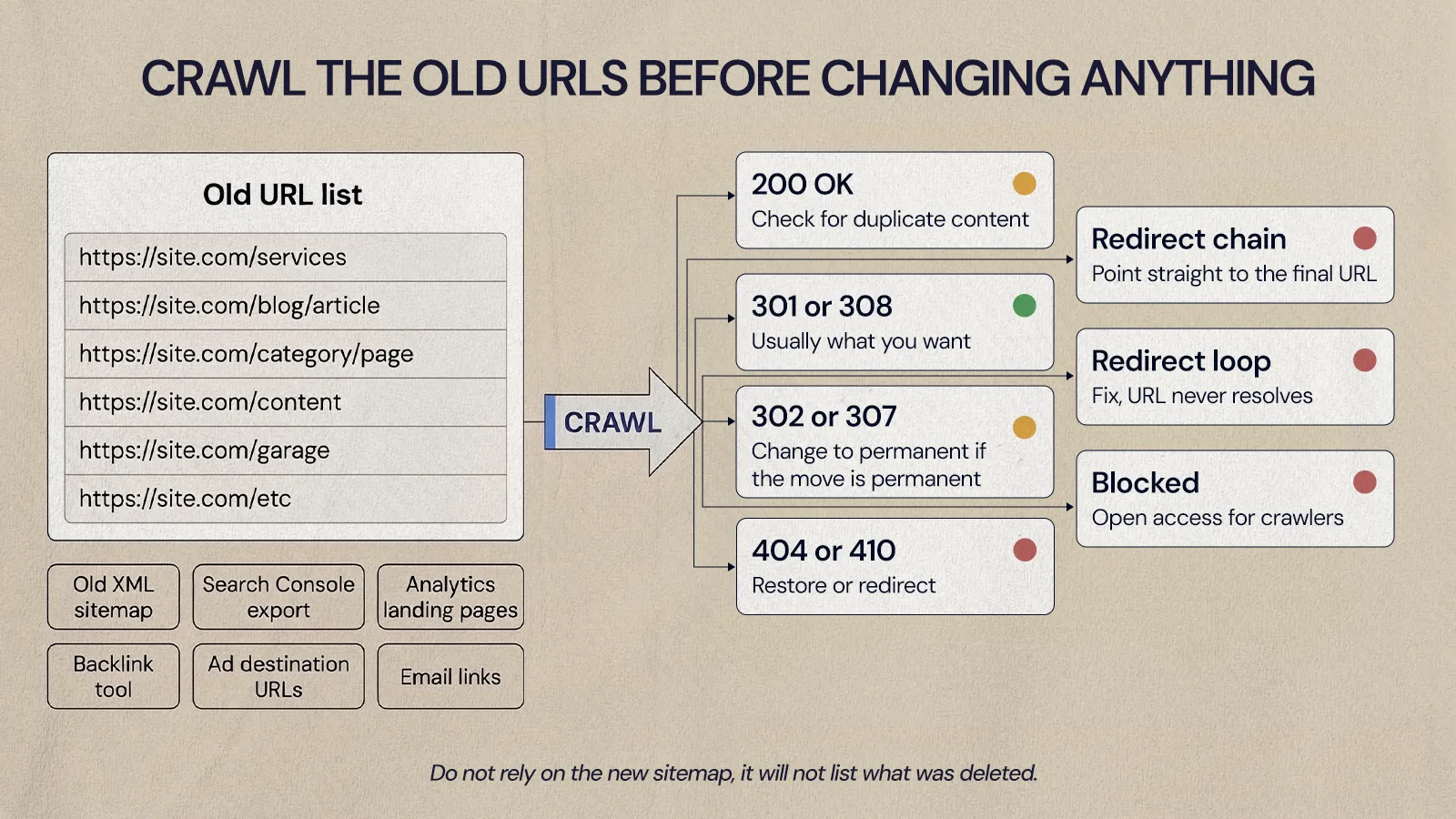
Gather old URLs from several places: the previous XML sitemap, Search Console exports, analytics landing page reports, backlink tools, paid ad destination URLs, links in emails and any pre-launch crawl. Don't rely on the new sitemap, because it won't list what was deleted.
Then crawl that list and sort each URL by result:
- 200 OK: the old URL still loads, which may be fine or may create duplicate content.
- 301 or 308: a permanent redirect, usually what you want.
- 302 or 307: a temporary redirect, which Google doesn't treat as a signal that the new URL should be canonical.
- 404 or 410: the page is gone and may need to be restored or redirected.
- Redirect chain: the URL hops through several redirects before it resolves.
- Redirect loop: the URL never resolves.
- Blocked: crawlers can't reach the page or its destination.
Pay close attention to old pages that had backlinks, rankings or conversions. If they now redirect to the homepage or a generic category page, visitors and search engines both lose the specific answer they were looking for.
This step also prevents panic fixes. If only a group of old blog URLs failed, you don't need to overhaul the site. If most top service pages lost their content, you need a broader recovery plan.
How do you fix redirects after a bad migration?
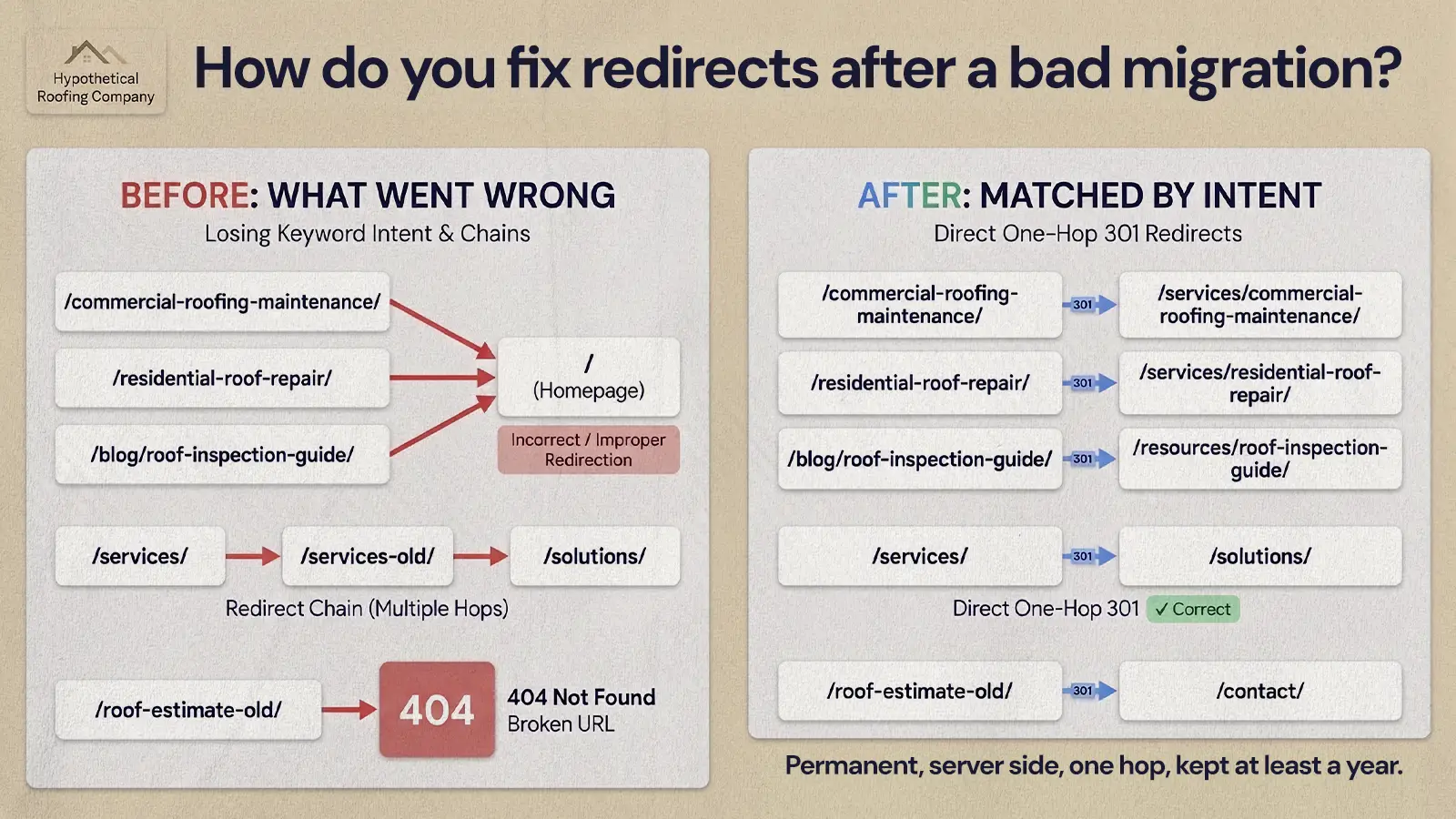
Map every important old URL to the most relevant live page, use permanent server-side redirects, remove chains, and only send a URL to the homepage when the homepage really is the closest match. Build the redirect map around what each page was for, not around what's convenient.
For example, a hypothetical roofing company with an old /commercial-roofing-maintenance/ page should redirect it to the new commercial roofing maintenance page. If that page no longer exists, restore it or redirect to the closest commercial roofing service page.
Google's site move guidance recommends permanent redirects such as 301 or 308, keeping the number of hops in a chain low, and keeping redirects in place for as long as possible, generally at least a year. Use this checklist:
- Start with high-value URLs: pages that had traffic, backlinks, leads or strong rankings.
- Use permanent redirects for permanent moves: avoid 302s unless the move really is temporary.
- Match by intent: informational pages to informational replacements, service pages to service pages.
- Remove chains: each old URL should point straight to its final destination.
- Update internal links: navigation, footer and body links should point to final URLs, not redirected ones.
- Check protocol and slash variants: HTTP to HTTPS, www to non-www, trailing slashes and uppercase URLs can add extra hops.
- Retest: crawl the old list again to confirm every redirect behaves as planned.
If you moved to Webflow, our guide to handling redirects when migrating to Webflow covers the platform-specific setup.
Restore the content and metadata that carried rankings
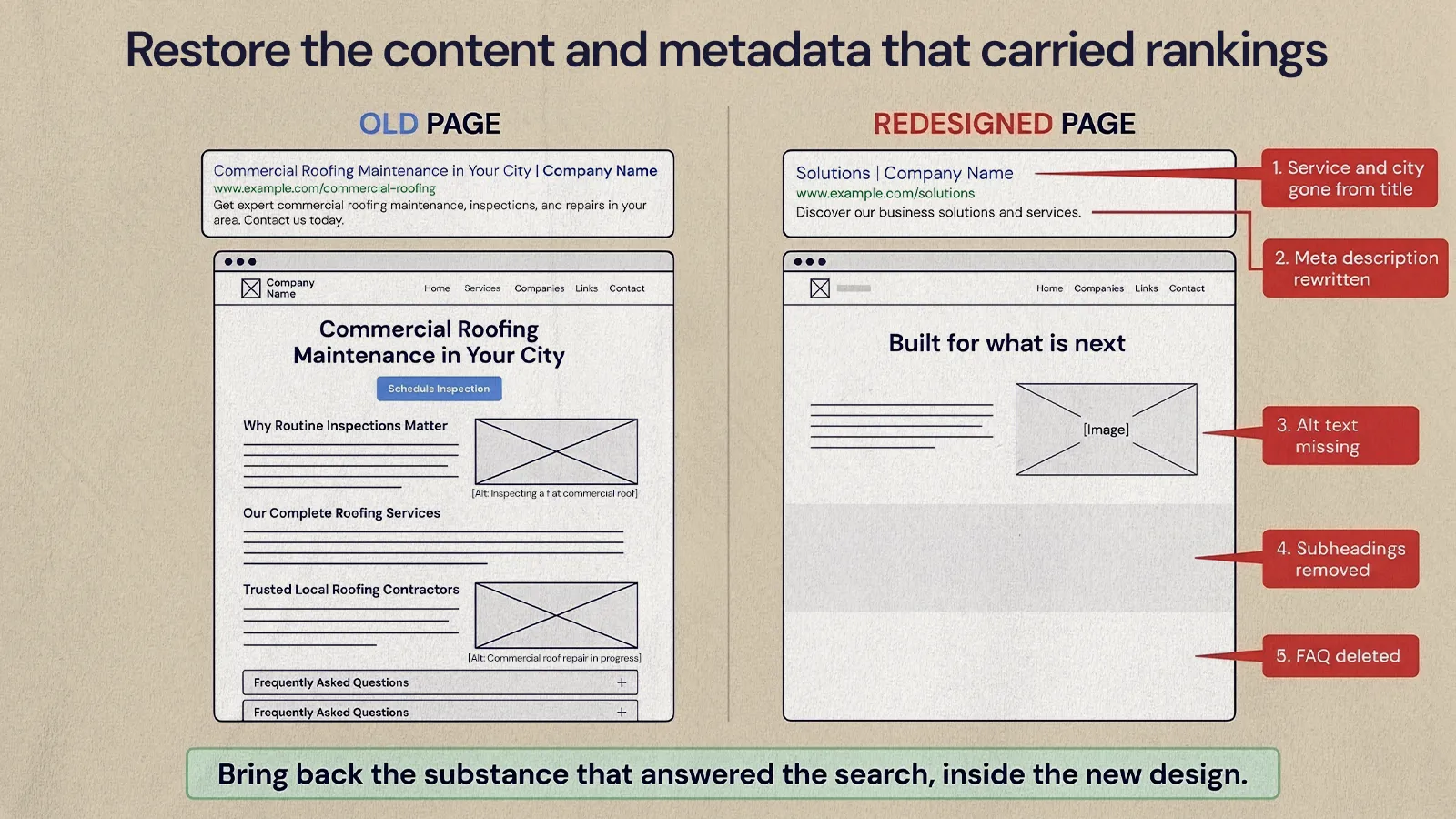
A redesign often changes more than the look. Copy gets shortened, headings get simplified, FAQs disappear and title tags get replaced with brand-heavy wording. The page may look cleaner, but it can lose the relevance signals that helped it rank.
Put your top declining pages next to their old versions. Compare the main heading, subheadings, body copy, internal links, image alt text, title tag, meta description, structured data and calls to action. You don't need to copy the old site back, but you do need to bring back the substance that answered the search, inside the new design.
For service and product pages, check that the new page still explains:
- What the service or product is and who it's for
- The problems it solves and what's included
- Industries or use cases served
- Location or service area, if relevant
- Proof you can honestly support
- How to take the next step
Look at title tags first. If an old title named a specific service and city and the new one just says "Solutions | Company Name," the page is now less clear about what it offers. Meta descriptions are worth restoring too, because Google may use them in the search snippet and a clear one helps people choose your result.
Avoid shortcuts while you recover. Don't stuff exact-match keywords into every heading, spin up thin replacement pages or create doorway pages for minor keyword variations. Google's spam policies treat those tactics as problems in their own right.
Should you resubmit your sitemap after a migration?
Yes, once the fixes are live. Update the XML sitemap so it lists only canonical, indexable, live URLs you want in search. Remove redirected URLs, blocked pages, staging URLs and duplicates. Google recommends submitting the new sitemap in Search Console during a site move so it can learn about the new URLs.
Keep expectations realistic. Google describes a sitemap as a hint, not a guarantee that it will crawl the URLs. For your most important corrected pages, use the URL Inspection tool to request indexing. Google says this doesn't guarantee inclusion, that indexing can take up to a week or two, and that there's a daily limit on requests, so save it for the pages that matter most.
Make sure the sitemap and internal links agree. If a page is in the sitemap but nothing on the site links to it, it looks less important. If internal links still point to redirected URLs, you're asking search engines to do extra work.
A simple post-fix workflow:
- Ship the redirect, indexing and content fixes.
- Crawl the site to confirm they work.
- Update the XML sitemap.
- Submit it in Search Console.
- Inspect and request indexing for priority URLs.
- Check indexing, clicks, impressions and errors every week.
How long does it take to recover traffic after a site migration?
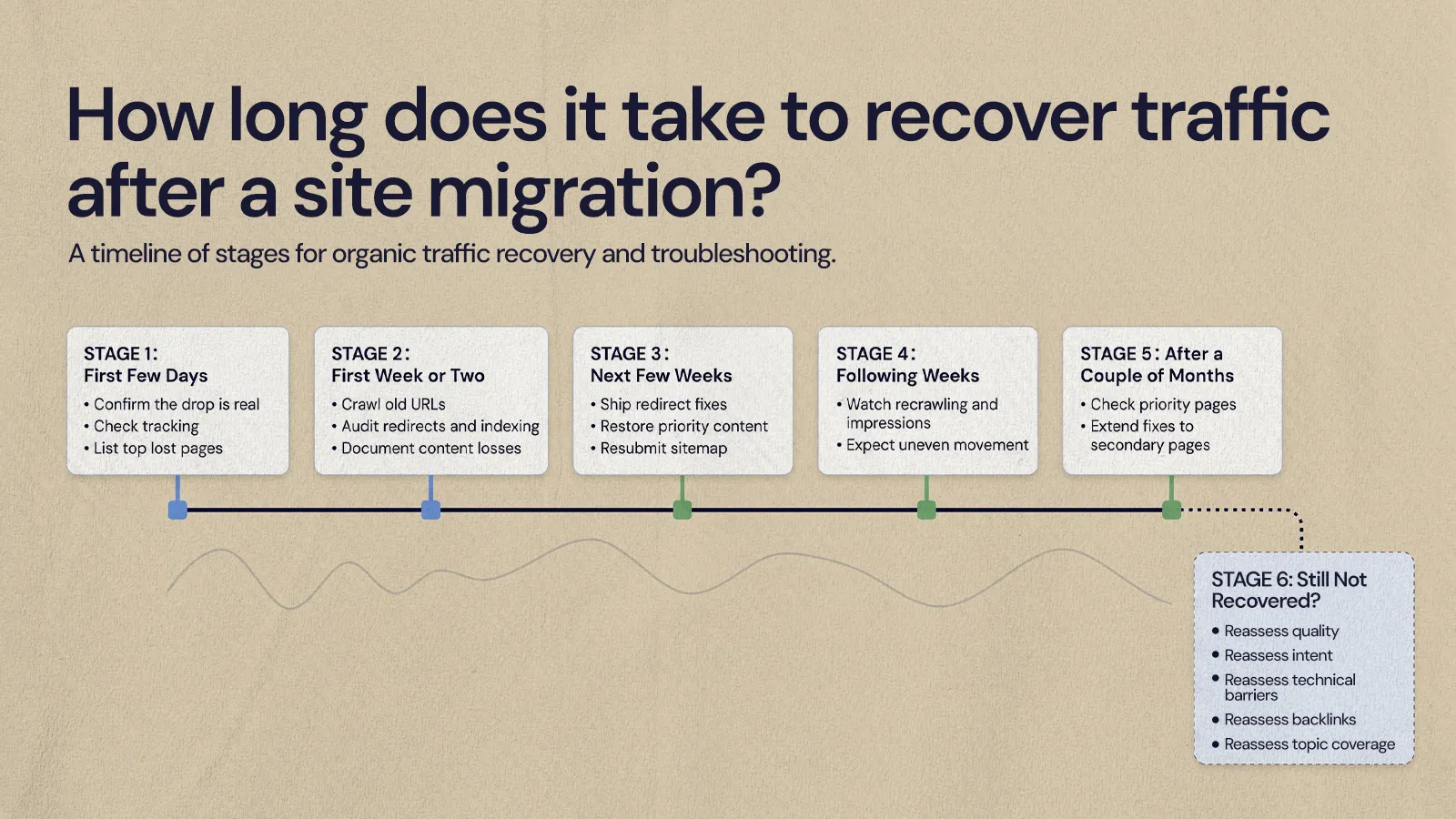
Plan in weeks and months, not days. Google says that for medium-sized sites it can take a few weeks or more before the new URLs start showing in place of the old ones, longer for larger sites, and that visibility may fluctuate during a move. Recovery after a botched launch follows a similar pattern, because Google has to recrawl and reprocess the corrected pages.
How long it takes depends on what went wrong. A single problem, such as a noindex tag left on key pages, can start to improve once Google recrawls them. A launch that lost content, changed the URL structure, broke redirects and rewired internal links usually takes longer, because several signals have to be rebuilt.
A rough sequence for planning and for updating leadership:
- First few days: confirm the drop is real, check analytics tracking, compare Search Console data and list the highest-value lost pages.
- First week or two: crawl old URLs, audit redirects and indexing rules, and document content and metadata losses.
- Next few weeks: ship redirect fixes, restore priority content, update internal links and metadata, and resubmit the sitemap.
- Following weeks: watch recrawling, indexing and impressions. Expect uneven movement as Google processes the changes.
- After a couple of months: check whether priority pages are recovering, extend fixes to secondary pages and refine content based on query data.
- If key pages still haven't recovered: reassess page quality, search intent, technical barriers, backlinks and whether the new structure weakened the site's coverage of its main topics.
For founders, the key is to keep recovery work separate from opinions about the redesign. A page doesn't have to look like the old one to recover, but it does need the information and relevance that made it useful.
How do you avoid a bad site migration SEO outcome next time?
Treat SEO as a launch requirement, not a cleanup task. Before any redesign or platform move, write a migration plan that protects the URLs, content, metadata, internal links and tracking that bring in business. Our CMS migration checklist is the version we use with clients. At a minimum, cover:
- A crawl of the existing site and a list of top organic landing pages
- A redirect map for every URL that changes
- A content inventory and metadata backup for high-value pages
- Analytics and conversion tracking checks
- A robots.txt, canonical and noindex review
- A crawl of the staging site and a tested XML sitemap
- A post-launch crawl in the first day or two
Building SEO into the new structure from the start is easier than recovering it later. When NUUX migrated Quality Collision Group's 26+ partner brand websites onto one Webflow platform, on-site SEO strategy was built into the sitemap itself. On one of those brands, Brandywine Coachworks, the migration and redesign was followed by about a 5% increase in organic calls, per QCG's own call tracking. If you're still budgeting for the fix or the next move, our breakdown of what professional website migration costs explains what drives the price.
Getting back on track
A website migration gone wrong is usually fixable once you stop guessing. Compare Search Console data before and after launch, crawl the old URLs, repair redirects, bring back the content and metadata that ranked, resubmit a clean sitemap and give Google time to process the changes. If you'd like help diagnosing a drop or planning a safer move, NUUX's web development and migration team can take a look.
Want results like this
Your website should make money, not excuses. Let us find the revenue hiding in your current experience.
FAQs
Quick answers to the questions we hear most about website conversion and UX design.
Some fluctuation is normal. Google says visibility may shift temporarily during a site move while it processes the new URLs. A sharp or lasting drop on important pages is different: that usually points to missing redirects, removed content, changed titles or indexing settings carried over from staging, and it's worth investigating straight away rather than waiting for it to settle.
Usually not. Rolling back creates a second migration, with its own redirects and recrawling, and can confuse search engines further. It's typically faster to fix the specific problems on the new site: redirects, indexing rules, content and metadata. A rollback only makes sense in rare cases where the new site is fundamentally broken and can't be repaired quickly.
Google recommends keeping redirects in place for as long as possible, generally at least one year, so it can transfer signals to the new URLs. In practice, many teams keep redirects for important pages indefinitely, especially pages that still have backlinks or appear in old emails, ads and printed materials.
A 302 is a temporary redirect. Google follows it, but doesn't use it as a signal that the new URL should be treated as the canonical version. For a permanent move, a 301 or 308 redirect tells Google clearly that the new page replaces the old one. Swapping accidental 302s for 301s is a common migration fix.
At a minimum, Google Search Console for clicks, impressions and indexing, a site crawler that can crawl a list of old URLs and report status codes and redirects, and your analytics platform to confirm tracking still works. A backup of the old sitemap or a pre-launch crawl makes the job much easier.
Related articles
More field notes on conversion, UX, and building websites that sell.