A headless CMS migration is worth it when your content needs to be structured, reused across channels or connected to other systems, and you have developers to own the front end. It involves a content audit, a new content model, a rebuilt front end, data migration, a full redirect map and editor training.
A headless CMS migration is worth it when your content needs to be structured, reused across channels or connected to other business systems in ways a visual CMS handles awkwardly, and when you have developers to own the front end long term. It involves auditing your content, designing a new content model, rebuilding the front end in a framework like Next.js, migrating the data, protecting SEO with a full redirect map, and training editors on a different way of working.
For most small and mid-sized businesses the question comes up during a redesign or rebrand. This guide is for the marketing leads and founders who have to decide whether headless is a smart investment for their site or an extra layer of complexity they don't need.
When is a headless CMS migration worth it?
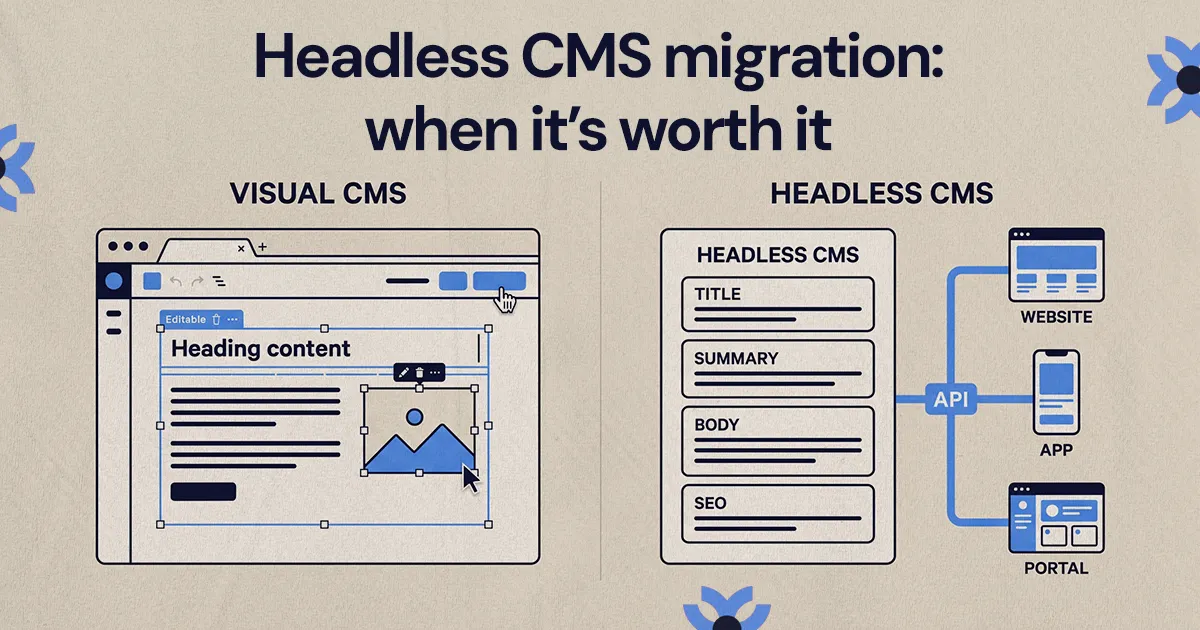
A headless CMS migration is worth considering when your current site limits how you publish, reuse, localize, personalize or connect content. A headless CMS stores and manages content, then delivers it through an API to a separate front end. That separation gives developers much more freedom, and it also means someone has to build and maintain that front end.
The case gets stronger as the website becomes part of a larger system. For example, a business might need product data pulled from a database, content that appears in both a website and an app, personalized pages by region, or custom logic in its quote or signup flow.
A headless approach often makes sense when:
- the same content needs to appear on several channels, such as a website, an app, a customer portal or a sales tool
- your current CMS forces workarounds for structured content, relationships between items or reusable components
- developers need custom logic or deeper integrations than your platform comfortably supports
- you need roles, approval workflows or content types that map closely to how the business actually works
- a redesign is already planned, so rethinking the content system at the same time costs less than doing it later
It's usually not worth it if the site is small, your team relies on visual editing, or you don't have ongoing development support. A headless build without technical ownership tends to stall after launch.
How is a headless CMS different from a visual CMS like Webflow?
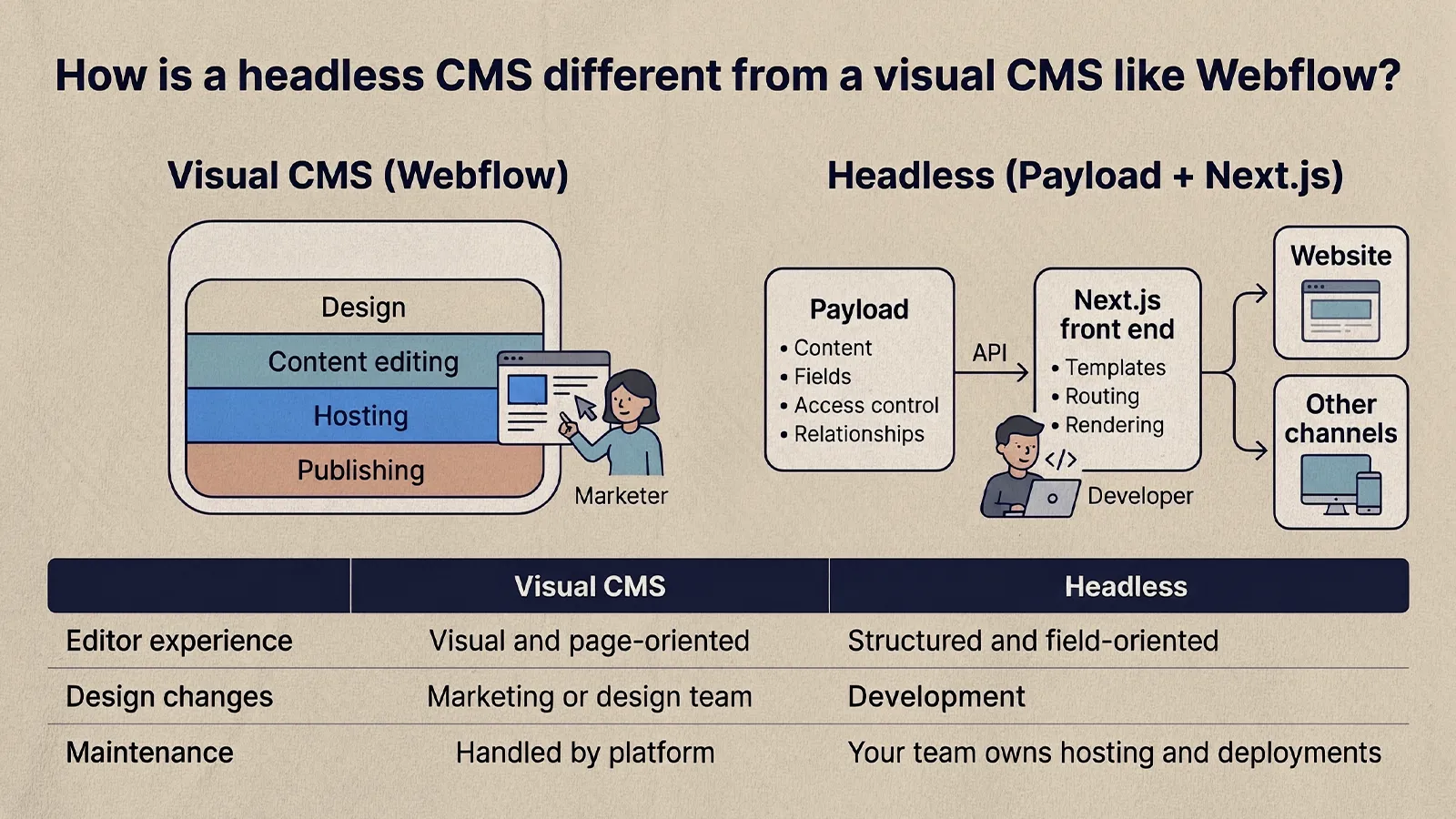
Webflow and a headless CMS aren't a basic versus advanced choice. They're built around different priorities. Webflow combines design, content editing, hosting and publishing in one platform, so a marketing team can often update pages and launch campaigns without waiting on developers. A headless CMS is stronger when structured content, API access, a custom front end and integration flexibility matter more than visual editing.
With a stack like Payload and Next.js, content management and presentation are handled in code. Payload describes itself as a Next.js fullstack framework that can be added to a new or existing Next.js app, where it manages content, fields, access control and relationships. Next.js renders the pages, which gives the team control over templates, routing and performance. The tradeoff is that layout and functionality changes usually need a developer.
Here's how the two tend to compare in practice:
- Best fit: visual CMS for marketing sites, landing pages and moderate content systems; headless for complex sites, structured content and sites that share content with other products.
- Editor experience: visual and page-oriented in Webflow; structured and field-oriented in a headless CMS.
- Design changes: often made by the marketing or design team in Webflow; made through development in a headless build.
- Integrations: good coverage of common marketing tools in Webflow; wide flexibility for custom APIs and internal systems with headless.
- Maintenance: hosting and updates are largely handled by the platform with Webflow; a headless stack needs someone to own hosting, dependencies and deployments.
We've covered the visual side in more depth in our breakdown of Webflow pros and cons.
When should you stay on a visual CMS instead?
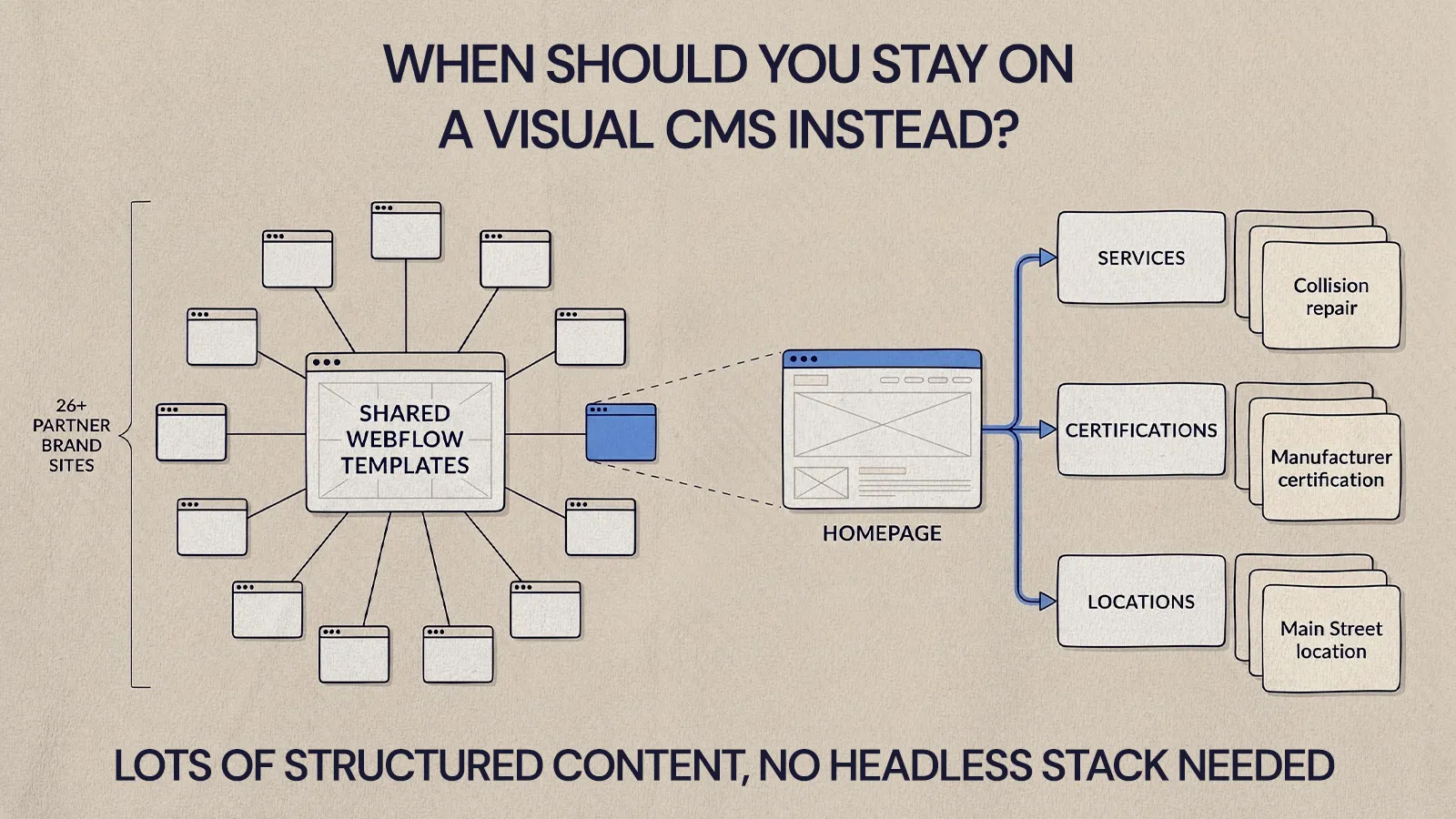
Stay on a visual CMS when the website is mainly a marketing site and your team's biggest need is speed and independence. If most pages are unique, design-led and updated by marketers, a headless build can slow you down: every new layout becomes a development ticket.
NUUX is a Webflow Premium Partner and Webflow is our default recommendation for multi-site and multi-brand marketing migrations, because it lets teams run a lot of pages on shared templates without a developer involved in every edit. On our Quality Collision Group migration, for example, 26+ partner brand sites were moved onto Webflow with one page per service, per manufacturer certification and per location, all built on shared templates. That's a lot of structured content, and it still didn't need a headless stack.
If your frustration is really about a messy site structure, old templates or a slow build, a well-planned migration to a visual CMS, or a cleanup of the one you have, may solve it at lower cost and risk.
Why does content modeling matter so much in a headless migration?
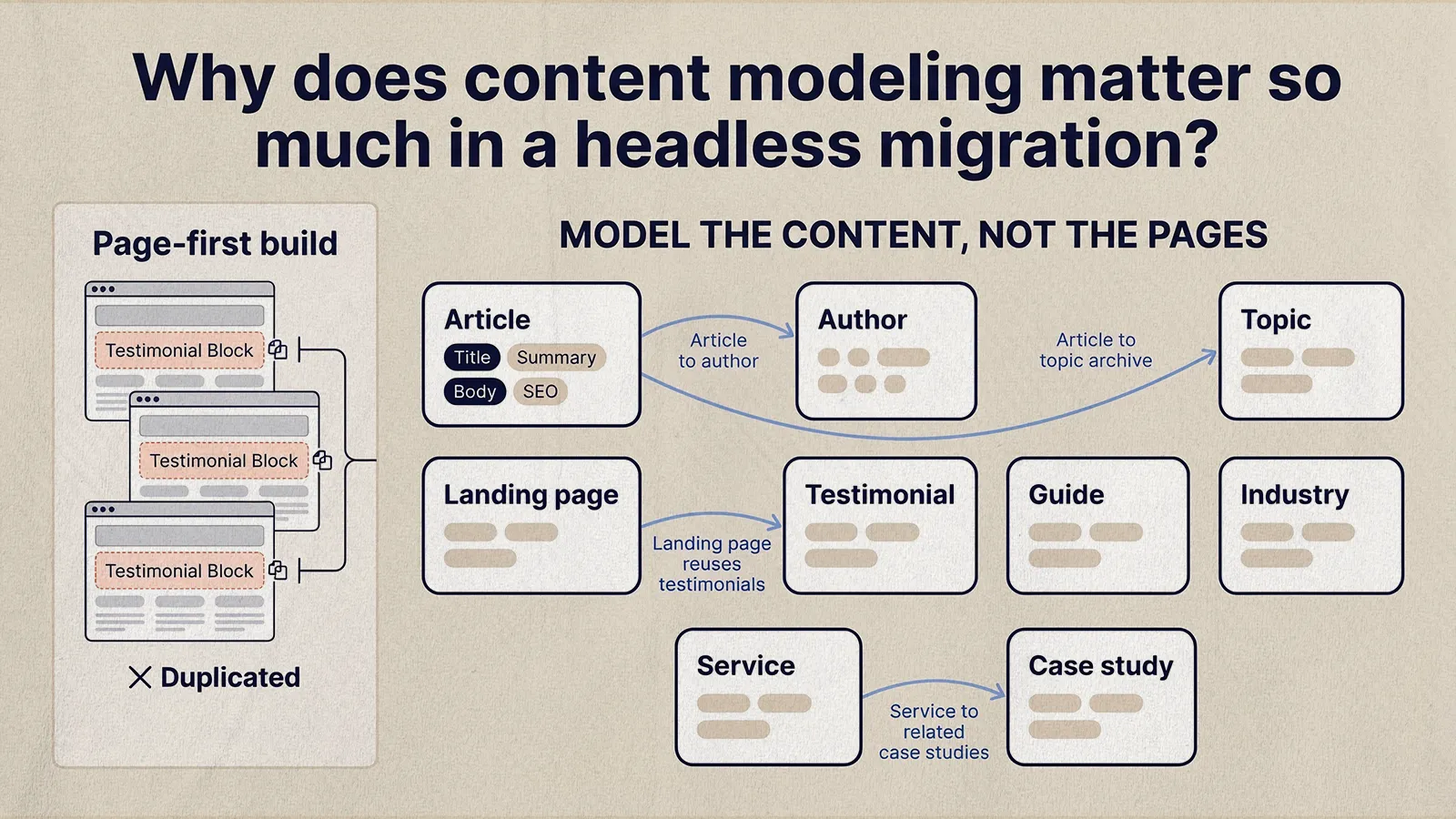
Content modeling is where a headless CMS earns its value or creates a mess. Instead of thinking in pages, you define the types of content the business manages and the fields and relationships each type needs.
For example, a resource library might include articles, guides, case studies, authors, industries, services and topics. In a page-first build, those can end up as separate layouts with duplicated information. In a structured model, a service page can pull in related case studies, an article can connect to an author profile and topic archive, and a landing page can reuse approved testimonials from one central source instead of copy-and-paste.
Before development starts, map what the business actually needs to manage:
- Inventory current content: pages, posts, resources, forms, landing pages, team profiles and reusable elements.
- Group content by purpose: evergreen pages, campaign pages, educational content, conversion pages and operational content.
- Define content types: articles, services, locations, products, industries, events or whatever fits your business.
- List required fields: titles, summaries, body content, images, SEO fields, CTAs, categories and publishing rules.
- Plan relationships: how items connect, such as services to case studies or topics to resources.
- Cut what nobody will maintain: extra fields and taxonomies add friction for every editor, every day.
A good content model makes publishing clearer. If editors need a long explanation to know where something belongs, the model is too complicated.
What does a headless CMS migration actually involve?
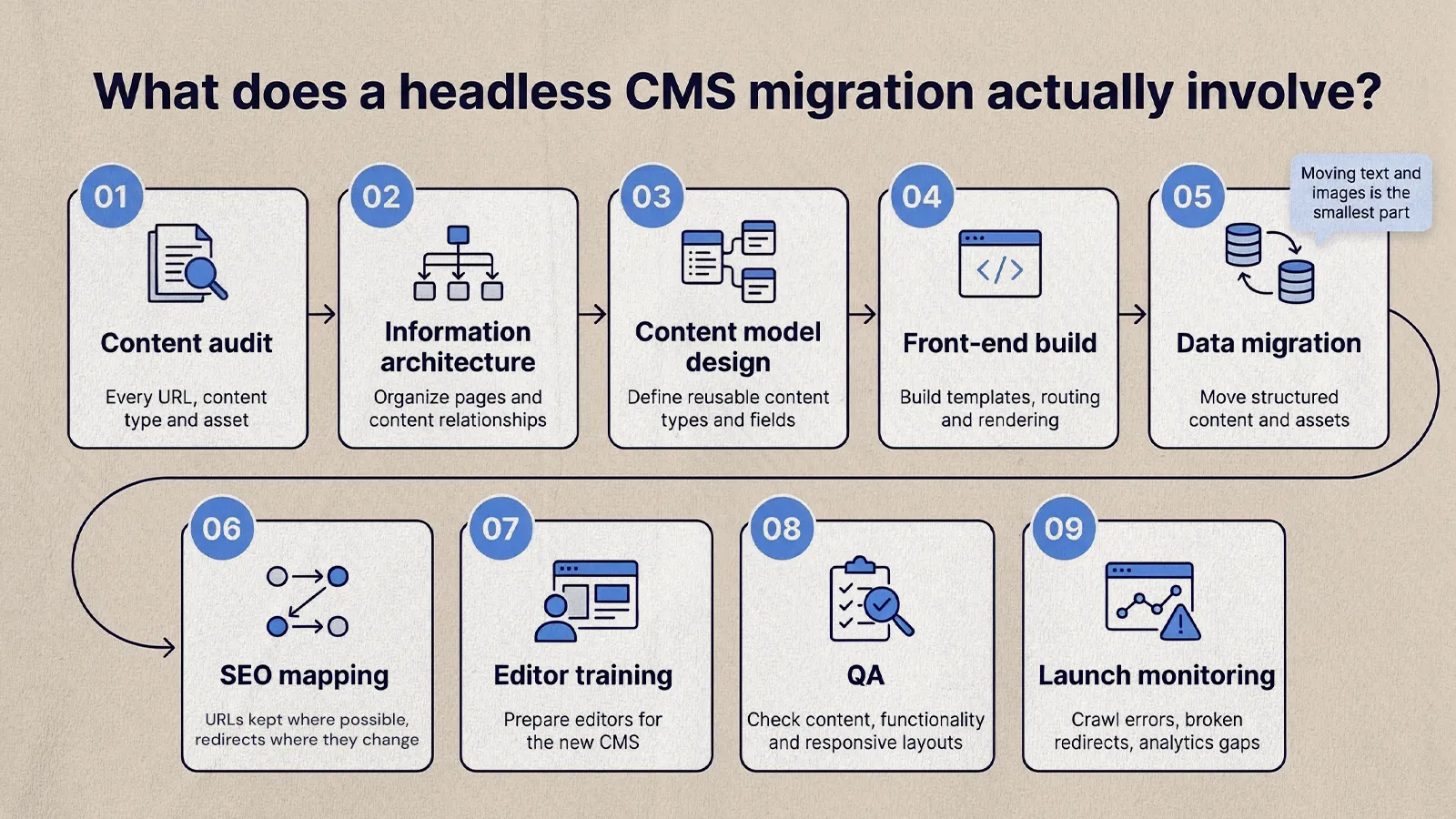
A headless CMS migration covers strategy, content modeling, design, development, data migration, SEO, editor training, testing and launch support. Moving text and images is the smallest part of it.
Work usually begins with discovery: reviewing the current site, deciding what stays, what changes and what goes, and setting clear goals such as more qualified leads, simpler publishing or support for new content programs. Architecture and content modeling come next, defining collections, fields, relationships, permissions and workflows. In a Payload and Next.js build, developers also plan how content will be queried and rendered.
Design has to account for the model, too. NUUX's work with AMAX Insurance includes a website redesign and migration designed for the client's Payload CMS and Next.js stack, alongside a multi-state homepage with location personalization. On that kind of project, design decisions and content structure are tied together, since every component needs to map to fields editors can manage.
Then development: templates, CMS connections and integrations like forms, analytics, CRM connections and search. The content migration itself can be manual, scripted or a mix. Manual works for smaller sites where editorial judgment is needed. Scripts suit large volumes of structured entries, but they still need checking, because formatting, image references, internal links and metadata often break in transfer.
A typical plan includes:
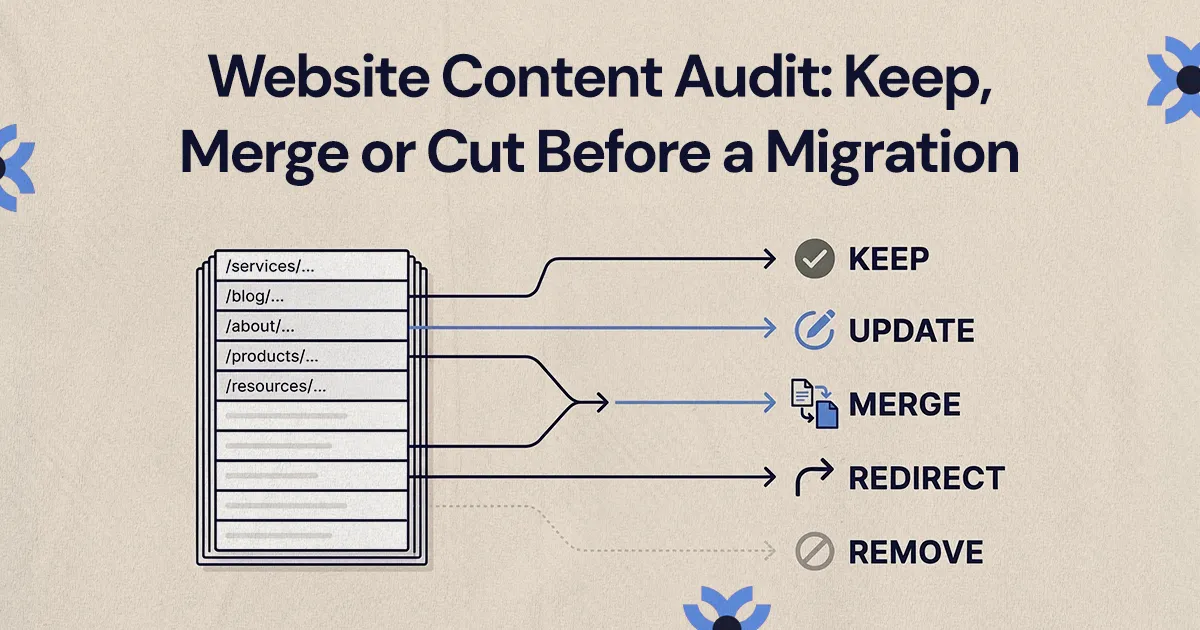
- Content audit: every existing URL, content type, asset and its metadata and performance.
- Information architecture: which pages and sections exist after the move.
- Content model design: the structure editors will work in.
- Front-end build: templates and components in the chosen framework.
- Data migration: content, images, files, relationships, authors, categories and metadata.
- SEO mapping: URLs kept where possible, redirects where they change.
- Editor training: creating, previewing and publishing in the new system.
- QA: pages, forms, links, metadata, accessibility basics and tracking.
- Launch monitoring: crawl errors, broken redirects, analytics gaps and editor pain points.
Our CMS migration checklist walks through these steps in more detail, and our guide to website migration cost covers what drives the budget.
How do you protect SEO during a headless CMS migration?
SEO belongs in the migration plan from day one. A headless build can give you a clean technical foundation, but URLs, metadata, redirects, internal links or indexing rules handled carelessly can cost you organic visibility.
Start by identifying the pages that currently drive traffic, leads and backlinks. If a URL changes, map it before launch. Google's guidance on site moves with URL changes recommends server-side permanent redirects (such as 301s) from each old URL to its new equivalent, avoiding redirect chains and mass redirects to the homepage, and keeping redirects in place for at least a year. Our guide to handling redirects during a migration covers building that map.
Rendering matters with a JavaScript front end. Google's JavaScript SEO basics notes that server-side rendering or pre-rendering is still a good idea because it makes a site faster for users and crawlers, and not all bots run JavaScript. Next.js supports both. Its Metadata API can generate titles, descriptions, Open Graph images, sitemaps and robots.txt from your CMS data, so editors can own those fields without touching code.
Key items to protect:
- current URL inventory and planned destinations
- permanent redirects for changed or removed URLs
- titles, meta descriptions, headings and body content
- internal links and navigation paths
- XML sitemap and robots.txt
- canonical tags and indexing rules
- image alt text and file handling
- analytics and conversion tracking
- structured data, where it's relevant to your content
A new CMS doesn't automatically improve search performance. It gives you a foundation, and implementation decisions determine the result.
Why does editor experience matter as much as developer experience?
Headless projects often focus on developer flexibility, but editors decide whether the system works after launch. If the marketing team can't confidently create and update content, the business ends up dependent on developers for routine changes.
In Webflow, editors see and change content in context. In a headless CMS, editors fill in fields, choose related items, upload assets and publish entries that the front end displays through predefined components. That feels less visual at first, but it can reduce mistakes when content has to stay consistent across many pages.
The goal is the right control, not unlimited control. Questions to settle before building:
- Which pages should marketing be able to create without development help?
- Which components should be flexible, and which should stay locked for brand consistency?
- Do editors need a live preview before publishing?
- Who can publish directly, and who needs approval?
- How will images, documents and reusable CTAs be managed?
- What field labels, help text and validation rules will prevent confusion?
If your team is moving from Webflow to headless, expect a different mental model. Training, short documentation and careful field design cut down that friction.
A decision checklist for small and mid-sized teams
Before committing to a headless CMS migration, check whether these are true:
- You have a specific reason to migrate, like content reuse, integrations, personalization or publishing workflows.
- You accept more technical ownership in exchange for more flexibility, and you have developers to carry it.
- Editors are involved in designing the CMS, not just trained on it at the end.
- The content model is planned before development starts.
- SEO requirements are documented: redirects, metadata, slugs, tracking and priority pages.
- The budget includes a few weeks of post-launch fixes, which almost every migration needs.
- The platform fits the roadmap you actually expect, not every feature you might someday want.
If most of these hold, headless may be a strong fit. If several are unclear, improving your current system or choosing a visual CMS your team can manage alone is often the better call.
Choosing the right path
A headless CMS migration is a content and operations decision as much as a technical one. It changes how your team publishes, who owns the site and how easily it can adapt. If your content needs structure, reuse and deeper integrations, a stack like Payload with Next.js can be a solid foundation. If visual editing, fast page creation and low technical overhead matter most, Webflow is usually the better fit.
If you're weighing the two for an upcoming redesign, NUUX's web development team plans and runs CMS migrations and can help you work out which approach fits.
Want results like this
Your website should make money, not excuses. Let us find the revenue hiding in your current experience.
FAQs
Quick answers to the questions we hear most about website conversion and UX design.
A headless CMS is a content management system that stores and organizes content but doesn't control how it looks. Content is delivered through an API to a separate front end, such as a website built with Next.js or a mobile app. That lets the same content appear in several places, but someone has to build and maintain the front end that displays it.
It depends on the number of pages and content types, how much content needs rewriting or restructuring, integrations, and whether a redesign is happening at the same time. Small sites can move fairly quickly, while larger sites with many content types and integrations typically take considerably longer. Content modeling and QA are the phases teams most often underestimate.
Not automatically. Both can support strong SEO. A headless front end gives developers more control over rendering, routing and metadata, but it also means those things have to be built correctly. Webflow handles many technical basics out of the box. Search performance depends far more on content, structure, redirects and implementation than on the CMS category.
Yes. Webflow lets you export CMS collections, and that content can be restructured into a headless CMS content model, though rich text, images and references usually need cleanup. Pages built visually outside the CMS have to be rebuilt as templates or components. Plan redirects for any URL that changes, and train editors on the new field-based workflow.
Payload is an open-source content management framework built on Next.js. Teams use it to manage structured content, users and access control, and to power websites and applications from the same codebase. It suits projects that need custom content types, relationships and integrations, and where developers are available to build and maintain the front end and hosting.
Related articles
More field notes on conversion, UX, and building websites that sell.