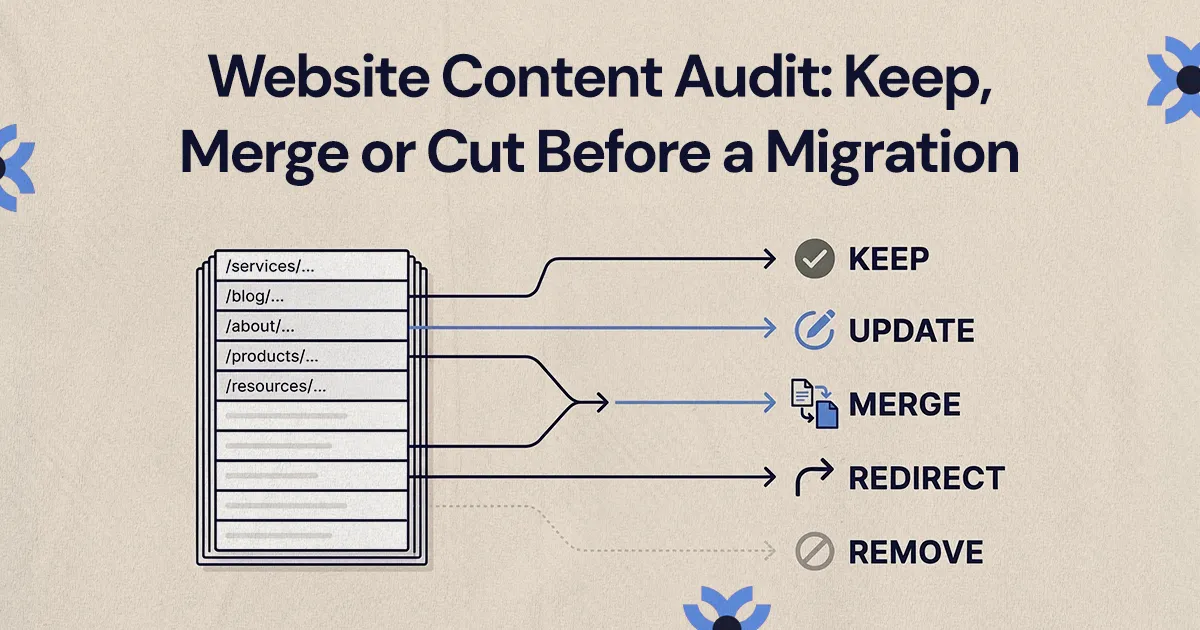
Before a migration, keep pages that earn search traffic, leads or links and still fit your business, update valuable but weak pages, merge pages that overlap and remove pages with no traffic, links or purpose. Each decision then becomes a line in the redirect map, so nothing valuable is lost at launch.
In a website content audit before a migration, keep pages that bring in search traffic, leads or links and still fit your business, update pages whose topic matters but whose content is weak, merge pages that cover the same intent, and cut pages that have no traffic, links, conversions or purpose. Every one of those decisions then becomes a line in the redirect map, so nothing valuable disappears when the new site launches.
This guide is for marketing leads and founders at small and mid-sized businesses who are about to redesign or replatform. It covers how to build the inventory, which data to pull, how to make the keep, update, merge, redirect or remove call for each page and how to turn those calls into instructions your developer can use.
Why should a website content audit come before a migration?
A website content audit should come first because content decisions drive the sitemap, the templates and the redirects. If the new site is designed before anyone decides what content it needs, teams tend to find out late that a key landing page was left out, that three similar posts should have become one, or that dozens of old URLs have nowhere to go.
For a founder, the audit shows which content actually helps buyers move toward an inquiry and which pages no longer describe the business. For a marketing lead, it replaces a series of opinions about pages with a documented decision for each one.
A good audit answers these questions:
- Which pages bring in qualified organic traffic today?
- Which pages generate leads, calls or bookings, or support sales conversations?
- Which content is outdated, thin, duplicated or no longer on-message?
- Which URLs must exist on the new site, and which should be consolidated or retired?
This matters most when the redesign changes navigation, URL structure or messaging. A better-looking site that quietly drops pages people were finding in search is a step backwards.
How do you build a content inventory?
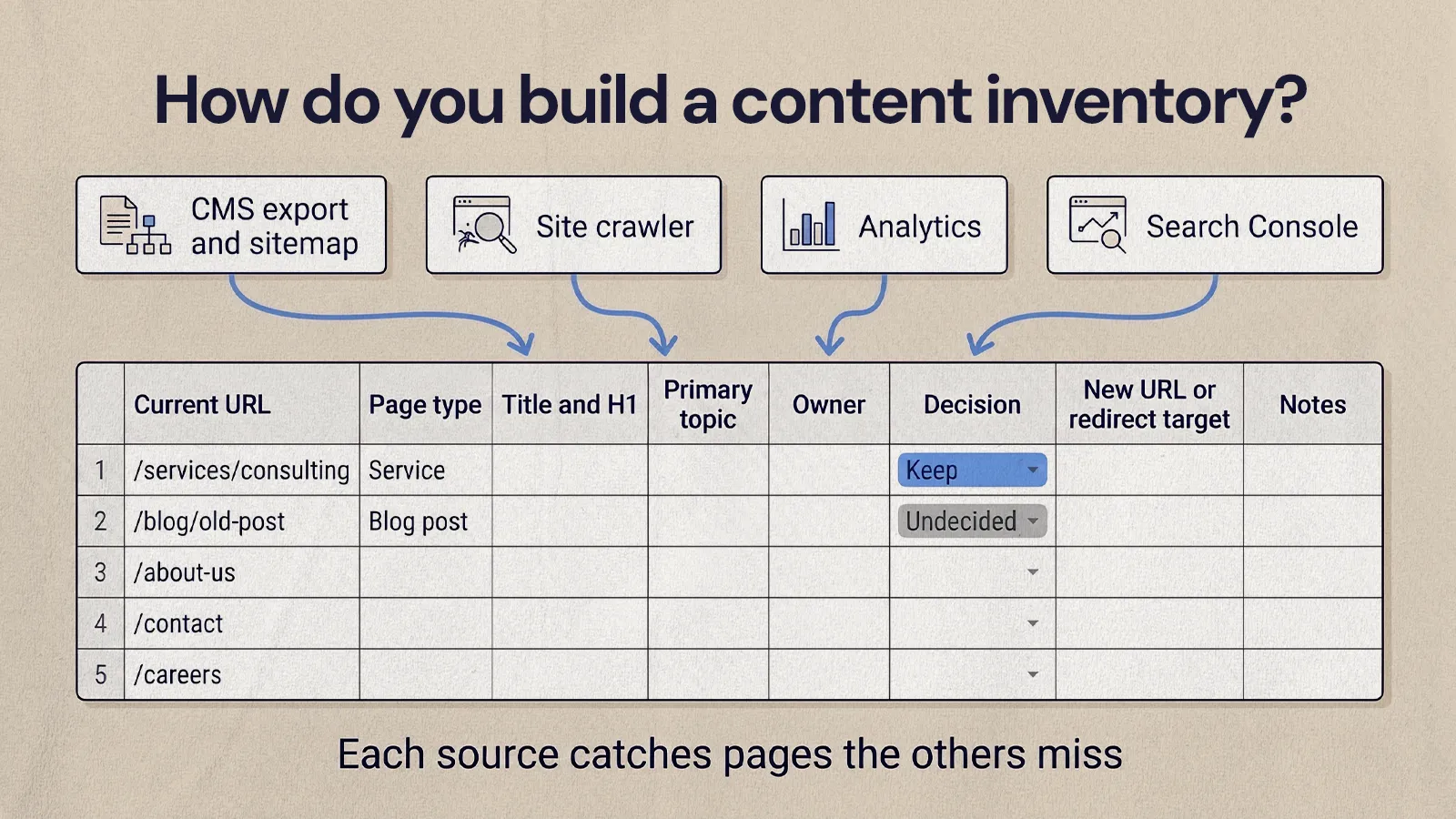
List every URL on the current site that can be visited, indexed, linked to or redirected. That includes service pages, industry or location pages, blog posts, case studies, landing pages from old campaigns, resource pages, team pages and thank-you pages. Most teams do this in a spreadsheet, and that spreadsheet becomes the shared record for the rest of the migration.
Pull URLs from several places, since each one misses something:
- your CMS export and XML sitemap
- a site crawler, which finds orphaned pages, broken links, duplicate titles and odd status codes
- your analytics platform, which shows old URLs that still get visits
- Google Search Console, which shows pages Google has shown in search results
Don't rely on the navigation menu. Older sites often carry campaign pages, legacy resources and blog posts that nothing links to anymore. Some still earn backlinks or search visits, and some are safe to drop. The inventory is how you tell the difference.
Give each row these columns:
- Current URL
- Page type: service, location, blog post, case study, landing page, resource or other
- Title and H1, which makes duplicates easy to spot
- Primary topic or keyword
- Owner: the person who can approve changes or removal
- Decision: keep, update, merge, redirect, remove or undecided
- New URL or redirect target
- Notes on risks, dependencies or content gaps
What content performance metrics matter most?
The metrics that matter most are the ones that tie a page to search visibility, business value and migration risk. Traffic on its own can mislead. A popular blog post may attract readers who will never buy, while a service page with modest traffic may be where most of your inquiries start.
Pull these for each URL, over the same date range:
- Organic clicks and impressions: Search Console's Performance report shows clicks, impressions, click-through rate and average position per page and per query.
- Organic sessions and conversions: from your analytics, including form fills, calls, bookings or purchases that started on the page.
- Backlinks: pages that other sites link to usually deserve to be kept or redirected carefully.
- Engagement: scroll depth, internal clicks and exits can show whether visitors find the page useful.
- Relevance: whether the page still matches what you sell and who you sell to.
- Freshness: outdated claims, discontinued services, old screenshots or old pricing.
- Sales use: some pages matter because your team sends them to prospects, whether or not they rank.
Read the metrics together. A post with modest traffic, good backlinks and plenty of impressions is probably worth updating. A high-traffic article unrelated to your offer might be a candidate for a rewrite or for retirement. A low-traffic service page that converts well should almost always be protected. After you look at the numbers, read the page the way a buyer would, because data can show what a page is doing but not whether it still says the right thing.
If you want a structured way to judge page quality beyond the numbers, our guide on how to analyze user experience on a website covers the qualitative side.
Keep, update, merge, redirect or remove: how to decide each page
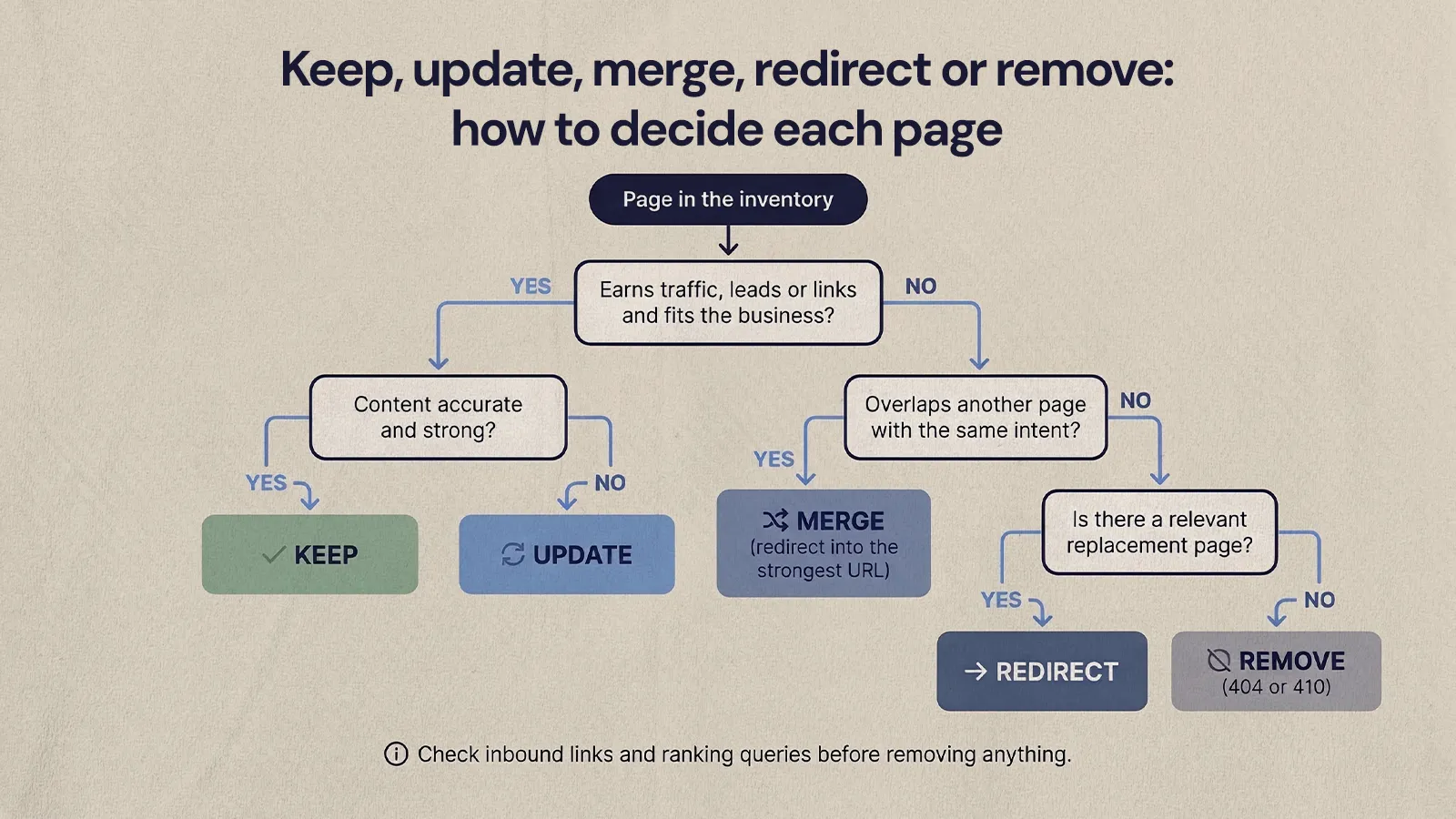
With the inventory and data in place, give every URL one decision. These labels tell the design, content and development teams exactly what moves to the new site and in what shape.
Keep pages that already work
Keep pages that are accurate, fit your current positioning and earn traffic, leads or links. Keeping a page does not mean copying it word for word. You can still improve its structure, calls to action, internal links and metadata in the new template, as long as it keeps answering the same question for the same searcher.
Good keep candidates are strong service pages, case studies, evergreen guides and resources your sales team shares regularly.
Update pages with potential
Update pages when the topic still matters but the content is thin, outdated or poorly aligned with search intent. Typical signs are a page that gets impressions but few clicks, a page that sits just off the first page of results, or a service page written around old positioning. Updates might mean rewriting sections, clarifying the offer, adding examples, improving headings and bringing the calls to action in line with the new site.
Merge pages that compete or overlap
Merge pages when several URLs cover the same intent or confuse visitors with slightly different versions of the same answer. Common candidates include short blog posts on one topic, near-duplicate service pages and landing pages built for past campaigns. Choose the strongest URL as the final page (based on relevance, backlinks and traffic), bring the best material from the others into it and redirect the retired URLs to it. Google describes a redirect as a strong signal that the redirect target should become the canonical page.
Merging also applies to conversion pages. On the Quality Collision Group partner sites, the legacy problem was too many competing calls to action and forms that asked far more than they needed to. NUUX consolidated each site to a single conversion page, with booking as the primary action and estimates as the secondary one on the same page.
Redirect pages that have a replacement
Redirect a page when its URL will not exist on the new site but there is a relevant page for visitors to land on. An old service URL goes to the new version of that service page. A discontinued offer goes to the closest current alternative, if that page genuinely helps the visitor. Google warns against sending many old URLs to one irrelevant page such as the home page, because it confuses users and may be treated as a soft 404.
Remove pages that add clutter or risk
Remove pages with no meaningful traffic, no backlinks, no conversions, no strategic role and no sensible replacement, along with content that is misleading or tied to services you no longer offer. Before you cut anything, check for inbound links, ranking queries and internal links. A page that is truly gone can return a 404 or 410 status. Google treats those codes the same way and removes the URL from its index.
This step can feel uncomfortable for businesses with a large blog archive. A smaller site with stronger pages is usually easier for buyers to use and easier for your team to maintain.
How do audit decisions shape the redirect map?
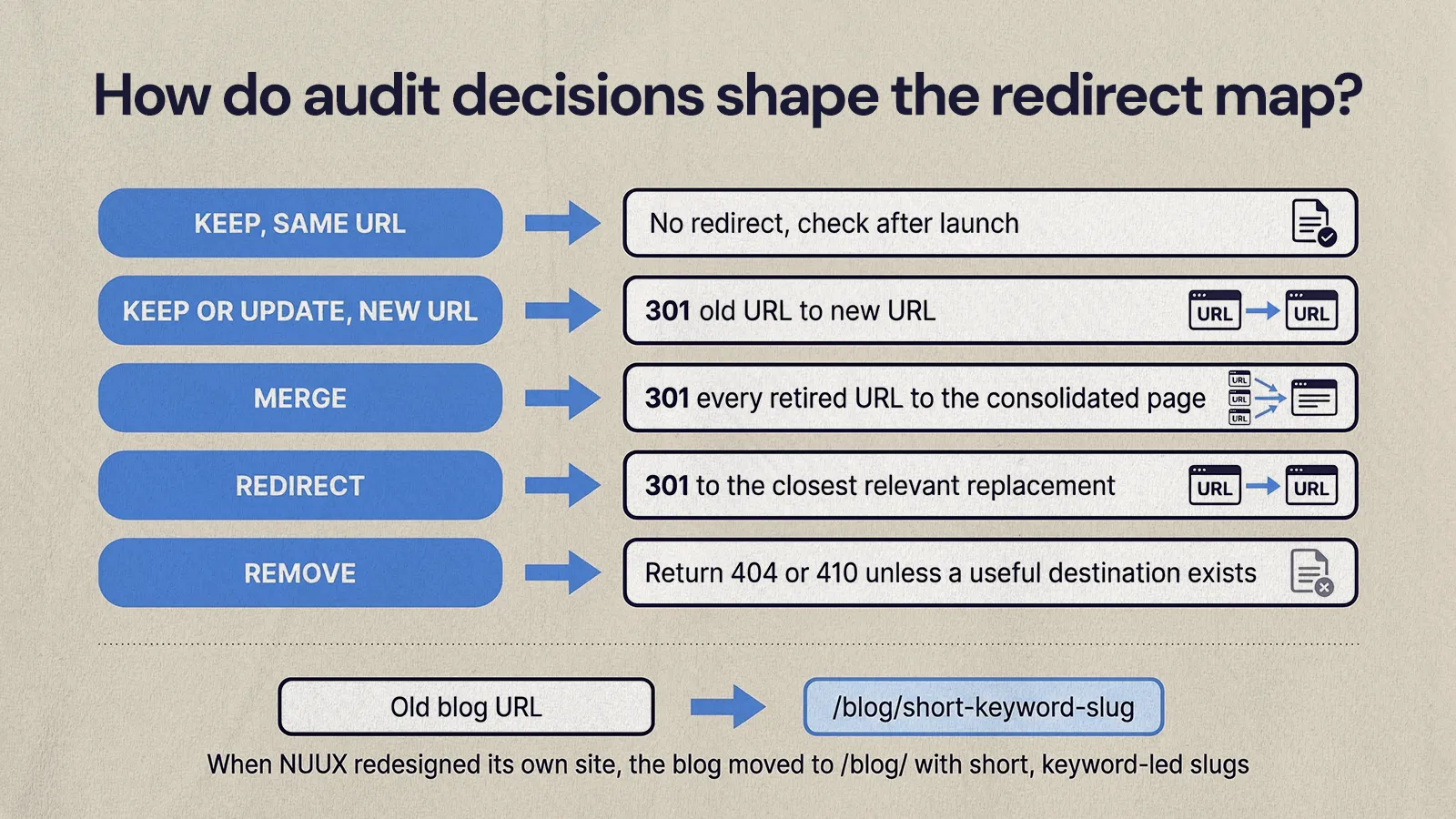
Each audit decision turns directly into a redirect instruction, so the developer never has to guess where an old URL should go. The redirect map needs at least two columns (old URL and new URL), but it is far more useful with the audit decision, page type, priority, owner and implementation status alongside.
Translate the decisions like this:
- Keep, same URL: no redirect, but check the page after launch.
- Keep or update, new URL: redirect the old URL to the new one.
- Merge: redirect every retired URL to the consolidated page.
- Redirect: point the old URL to the closest relevant replacement.
- Remove: no redirect unless a genuinely useful destination exists; let it return a 404 or 410.
URL changes are common in a redesign even when content stays. When NUUX redesigned its own site, the blog moved to /blog/ with short, keyword-led slugs, which meant each kept article needed a mapped redirect from its old address. Our guide to setting up redirects when migrating to Webflow covers how to implement the map, and the CMS migration checklist we use with clients shows where the audit sits in the full project.
Prioritize pages by business impact and migration risk
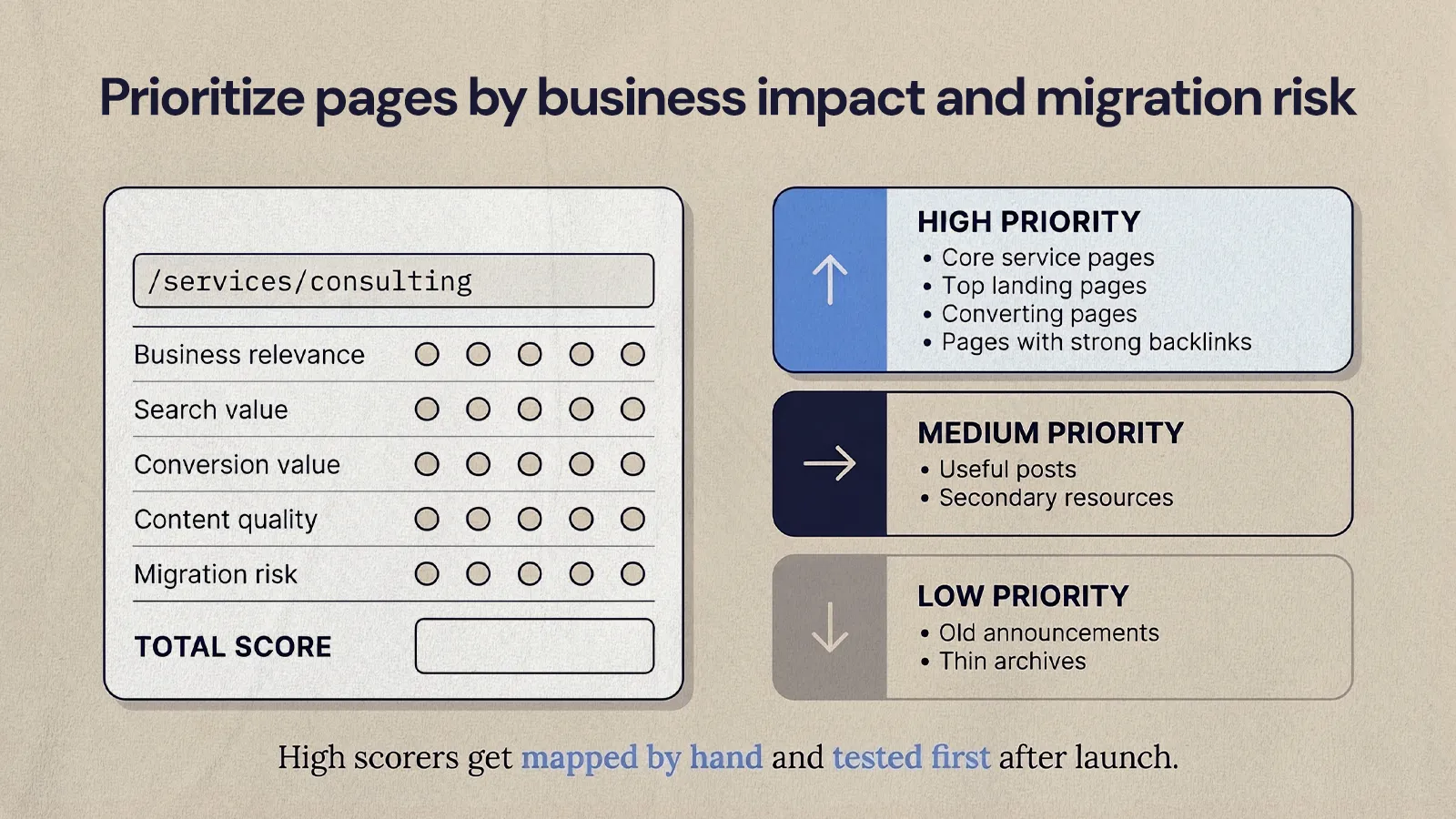
Not every page needs the same attention. Add a priority column so a small team can protect the pages that matter most before launch and improve the rest afterward.
- High priority: core service pages, top organic landing pages, pages that convert, pages with strong backlinks and pages used in ads or sales outreach.
- Medium priority: useful blog posts, secondary resources and supporting content.
- Low priority: old announcements, thin archive pages and anything with no measurable engagement.
If the call isn't obvious, score each page from one to five on a few questions and add them up:
- Business relevance: does it support a current offer or answer a buyer's question?
- Search value: does it earn clicks, impressions or backlinks?
- Conversion value: does it start or assist leads, calls or bookings?
- Content quality: is it accurate, complete and current?
- Migration risk: would losing it cause a measurable problem?
High scorers get reviewed by hand, mapped carefully and tested first after launch.
What mistakes should you avoid in a pre-migration content audit?
The most common mistake is treating content as something design will sort out later. When decisions come late, teams carry weak pages across, drop useful ones and end up with a redirect map that does not match the new structure. Watch for these as well:
- Auditing only top-level pages. Old posts and campaign pages can still carry search or sales value.
- Deciding without data. Team opinions matter, but check them against traffic, conversions and links.
- Keeping everything. Migrating clutter makes the new site harder to use and to manage.
- Cutting too hard. Removing pages without checking backlinks and conversions creates avoidable losses.
- Forgetting internal links. Merged and moved pages need links from relevant pages on the new site, pointing at final URLs.
- Skipping post-launch checks. Redirects, indexing, analytics and forms all need testing once the site is live.
If you're still deciding whether the site needs a rebuild at all, our list of signs your website needs a redesign can help frame the conversation.
A pre-migration website content audit checklist
Work through this before you finalize the sitemap, content plan and redirect map:
- Crawl the current site and export every URL.
- Add URLs from the CMS, sitemap, analytics and Search Console.
- Pull organic clicks, impressions, sessions and conversions for each page over the same date range.
- Note pages with backlinks.
- Tag each URL by page type and topic.
- Give every URL a decision: keep, update, merge, redirect, remove or undecided.
- Assign an owner to every update and approval.
- Set final URLs for pages moving to the new site.
- Map every changed or retired URL to its destination.
- Review high-priority redirects by hand before launch.
- Update internal links to point to final URLs.
- After launch, test redirects, analytics, forms and priority pages.
Audit first, then build
A website content audit gives the migration a plan for every page, so the new site keeps what already works and leaves behind what doesn't, and the redirect map reflects real decisions instead of last-minute guesses. Do it before design starts and the rest of the project gets easier.
If you want help auditing content and running the move, take a look at how NUUX handles website migrations and rebuilds.
Want results like this
Your website should make money, not excuses. Let us find the revenue hiding in your current experience.
FAQs
Quick answers to the questions we hear most about website conversion and UX design.
It depends mostly on how many URLs the site has and how many people need to approve decisions. A small business site with a few dozen pages can often be inventoried and reviewed in days, while a site with a large blog archive or several locations typically takes longer. Prioritizing high-value pages first keeps the audit from holding up the rest of the migration.
Most teams need a site crawler to find every URL, Google Search Console for clicks, impressions and queries, an analytics platform for sessions and conversions, and a backlink tool to see which pages other sites link to. A shared spreadsheet ties it together, with one row per URL and columns for the data, the decision, the owner and the new URL.
Delete only the posts that have no traffic, no backlinks, no conversions and no useful replacement, or that are inaccurate. Posts that overlap with stronger articles are usually better merged and redirected than deleted. Posts with a relevant topic but weak content are often worth updating. Check each one against search and analytics data before cutting it, since some older posts still bring in visits.
A content inventory is the list: every URL on the site with basic details such as page type, title and owner. A content audit adds judgment on top of that list, using performance data and a read of each page to decide whether to keep, update, merge, redirect or remove it. Before a migration you need both, and the inventory comes first.
Removing pages that had no traffic, links or conversions rarely causes problems, and a leaner site can be easier to navigate. The risk comes from removing pages that did have search visibility or backlinks without redirecting them to a relevant replacement. Google drops URLs that return a 404 or 410 from its index, so anything with value should be merged or redirected instead.
Related articles
More field notes on conversion, UX, and building websites that sell.