.svg)
.svg)

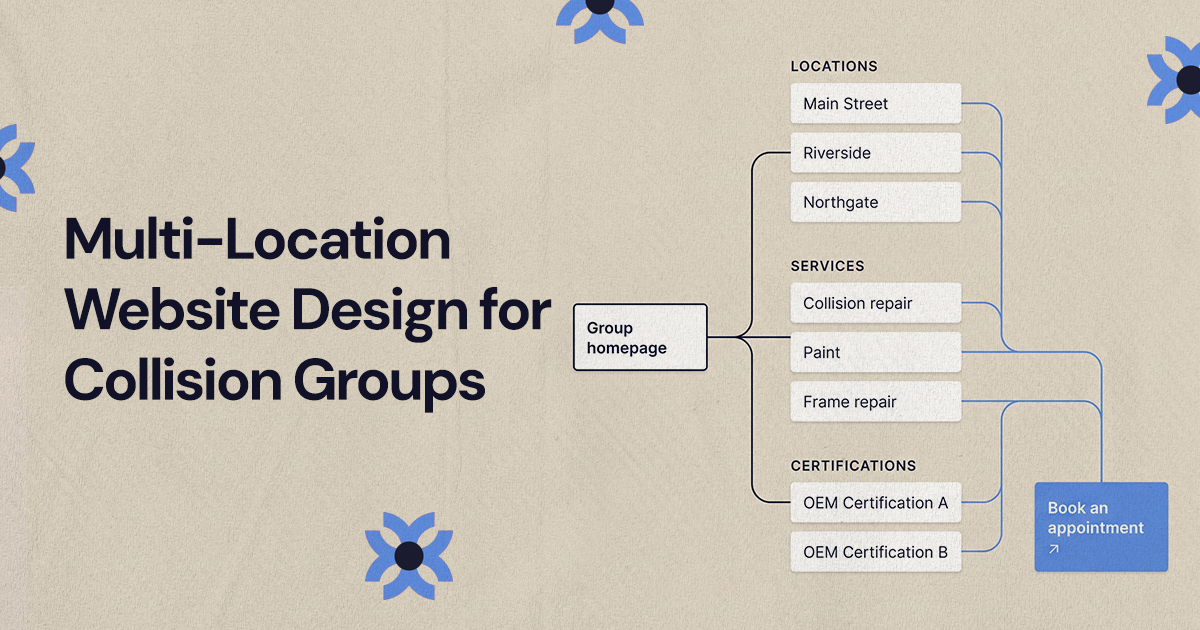
A multi-location collision website works best as one system: a hub and spoke structure, a mobile-friendly location selector, shared service pages alongside location-specific pages, one booking flow for every shop and one CMS. Drivers find the right shop and book quickly, and new locations slot in without a rebuild.
Multi-location website design for a collision repair group means building one connected site system: a hub and spoke structure, a location selector that works on a phone, shared service pages paired with location-specific pages, one booking flow used by every shop and one CMS behind it all. Done well, a driver can find the nearest shop, confirm it handles their repair and start a booking in a few taps, and your team can add a new location without rebuilding anything.
Collision customers are often stressed and on a phone, at the roadside, in a parking lot or at home after an accident. They don't want to decode your ownership structure. They want to know which shop is closest, whether it can fix their car, how to get started and what happens next. Everything below is aimed at answering those questions.
What makes multi-location website design different for collision groups?
The site has to serve the group and every individual shop at once. A single-location auto body shop can often get by with a homepage, a few service pages and one booking page. A collision group needs a framework that handles many addresses, phone numbers, service combinations, certifications and local search needs, and often several brands under one owner.
That makes it an information architecture problem before it is a visual one. If the structure is weak, drivers land on the wrong location, call a shop too far away, miss the booking option or can't tell whether a service is offered near them. A good multi-location structure answers five questions:
- Can a customer find the nearest shop quickly?
- Can each shop page rank and convert in its own market?
- Can the group explain its standards, process and trust signals once, in one place?
- Can a new location be added without rebuilding the site?
- Can staff update hours, photos, services and calls to action without managing separate websites?
How does a hub and spoke structure work for collision repair groups?
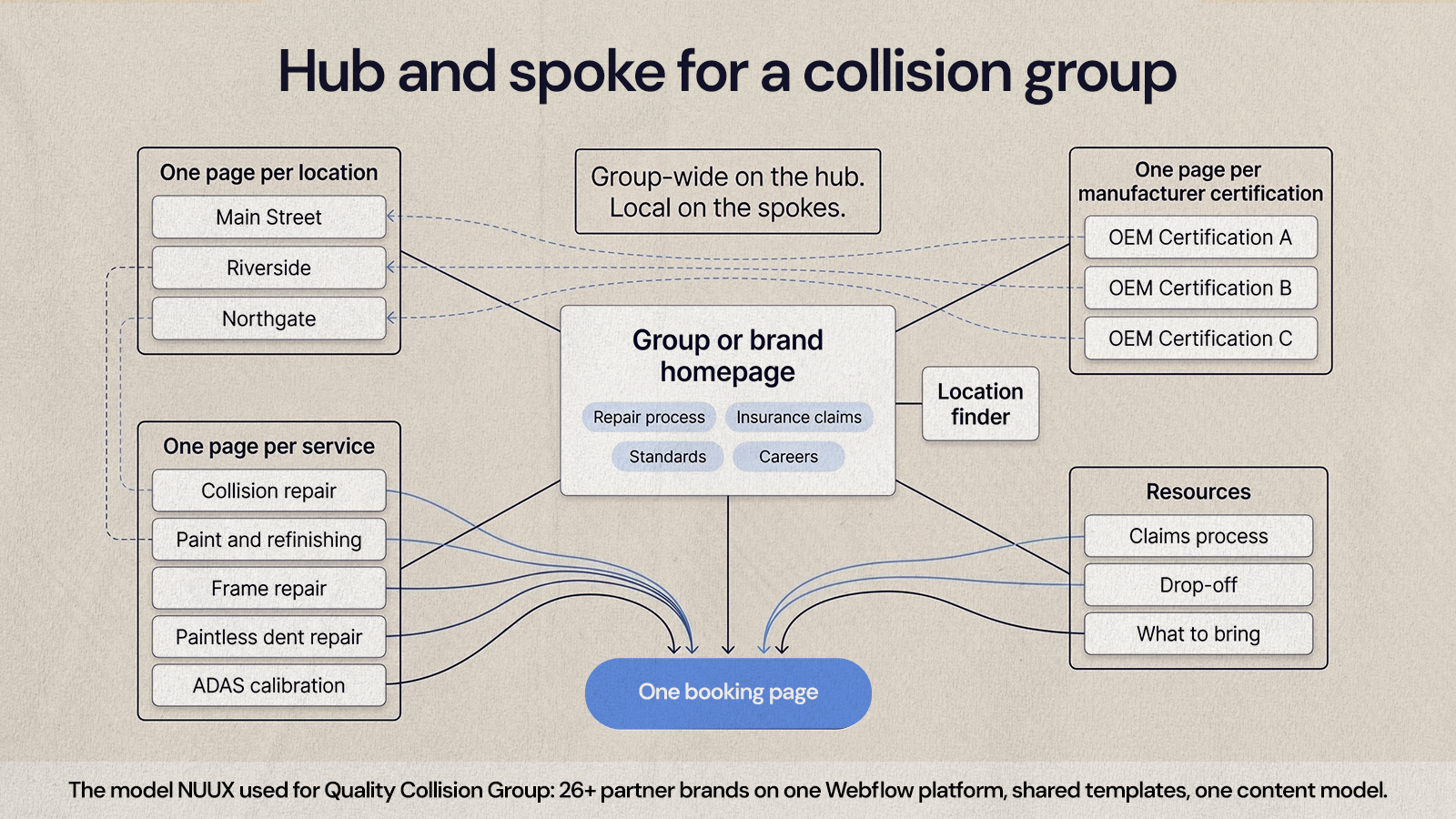
The hub is the group or brand level of the site: your repair process, insurance claim guidance, customer experience standards, careers and overall service area. The spokes are the pages that branch from it, including one page per location, one per service and one per manufacturer certification, each linking back to the hub and across to each other where it makes sense.
NUUX used this kind of structure on Quality Collision Group's multi-brand migration across 26+ partner brands, with every partner site built on one governed Webflow platform with shared templates and a single content model. Every brand followed the same logic, so content had an obvious home and new pages slotted into an existing pattern.
A practical hub and spoke structure for a collision group includes:
- A homepage for the group or primary brand.
- A location finder that helps visitors choose the right shop.
- One page per location.
- One page per service, such as collision repair, paint and refinishing, frame repair, paintless dent repair and ADAS calibration, only where you actually offer it.
- One page per manufacturer certification, linking to the shops that hold it.
- One booking page used across the whole site.
- Resource content on the claims process, drop-off and what to bring.
Group-wide information belongs on the hub. Local details belong on the spokes. That simple rule settles most arguments about where content should go.
How should a location selector work for repair customers?
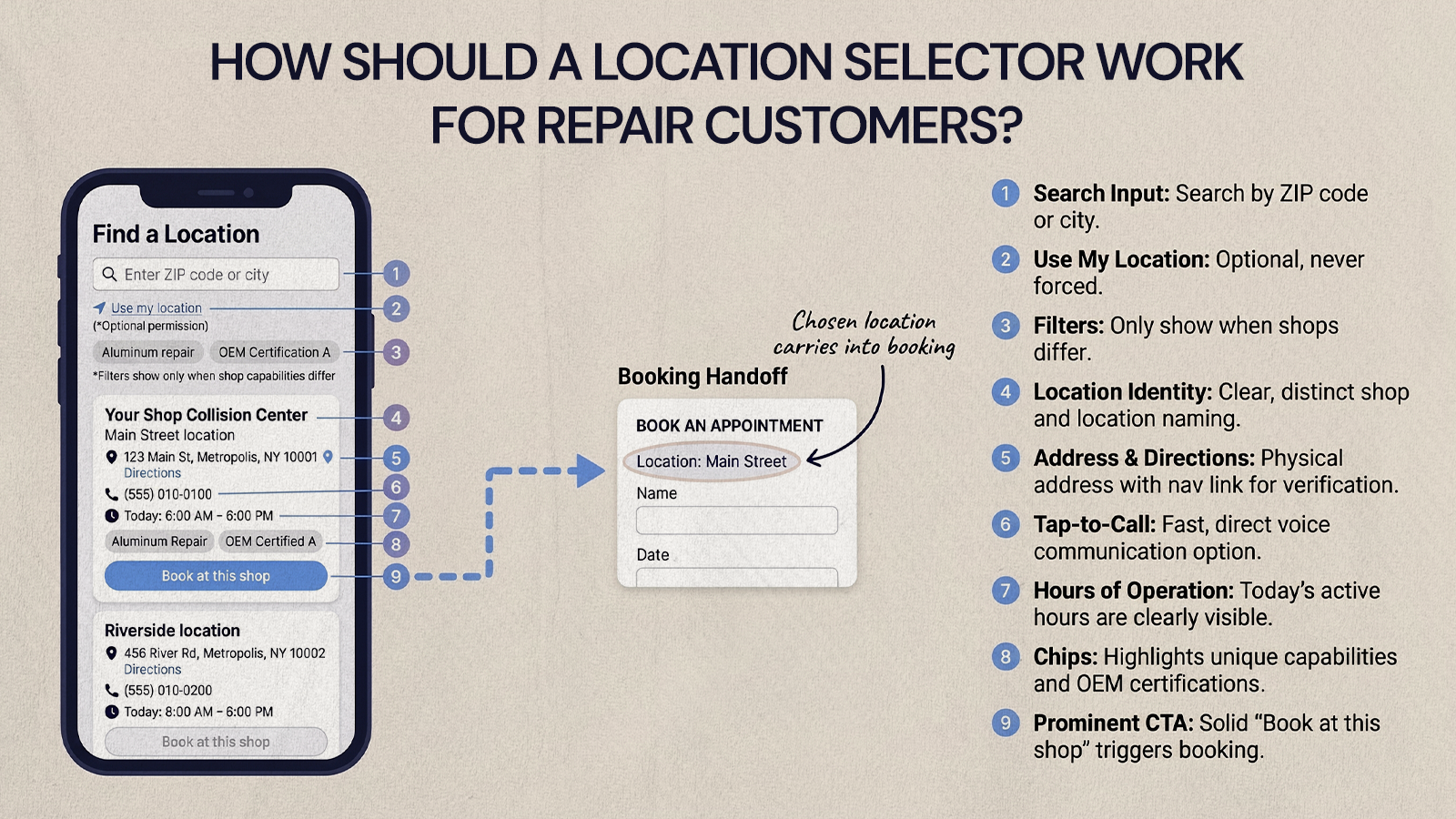
A location selector should help someone choose the right shop quickly on a phone, with search and clear details, and without extra steps before they can call, get directions or book. Many visitors arrive with urgent intent from a "collision repair near me" search or a map listing, and they just need to confirm they are in the right place.
Each result in the selector should show:
- Shop name, city and neighborhood or market
- Full street address and a directions link
- A click-to-call phone number for that shop
- Hours, if your team can keep them accurate
- The main services and certifications at that location
- A booking button that carries the chosen location into the booking page
Let visitors search by ZIP code or city, and offer "use my location" as an option rather than a requirement. Filters help only when they reflect real differences between shops, for example aluminum repair, specific manufacturer certifications or fleet services. If every shop offers the same services, filters are clutter.
The selector should also respect the visitor's path. Someone who starts on a certification page should be able to see which nearby shops hold it. Someone already on a location page shouldn't be pushed back into a broad search.
Shared service pages and location pages have different jobs
Service pages and location pages often get blended together, which makes a multi-location site harder to use and harder to maintain. Give each page type one job.
Group service pages
These explain what the service is and what customers can expect: the repair process, estimate steps, communication, parts and paint matching, and quality checks. They are written for people who want to understand the work before choosing a shop. Avoid cramming every local detail into them.
Location pages
These answer local intent: the shop's address, phone, hours, the services and certifications available there, directions, photos, reviews and the next step. This is where a customer decides this is the shop to contact. Avoid copying generic service paragraphs across every location. Google's spam policies describe "substantially similar pages" targeted at different cities as doorway abuse, and copied location pages drift in that direction.
Market pages
Useful when several shops serve the same metro area and customers search for the area rather than a neighborhood. Create them only for markets you clearly serve.
Resource articles
These answer common repair and claims questions. They should educate and link to the relevant service and booking pages, without turning every article into a sales page.
With these roles fixed, each new location drops into an existing structure instead of becoming a one-off project. Starting from a structured template helps here, and our guide to choosing an auto body shop website template covers what to look for.
Why should every shop use the same booking flow?
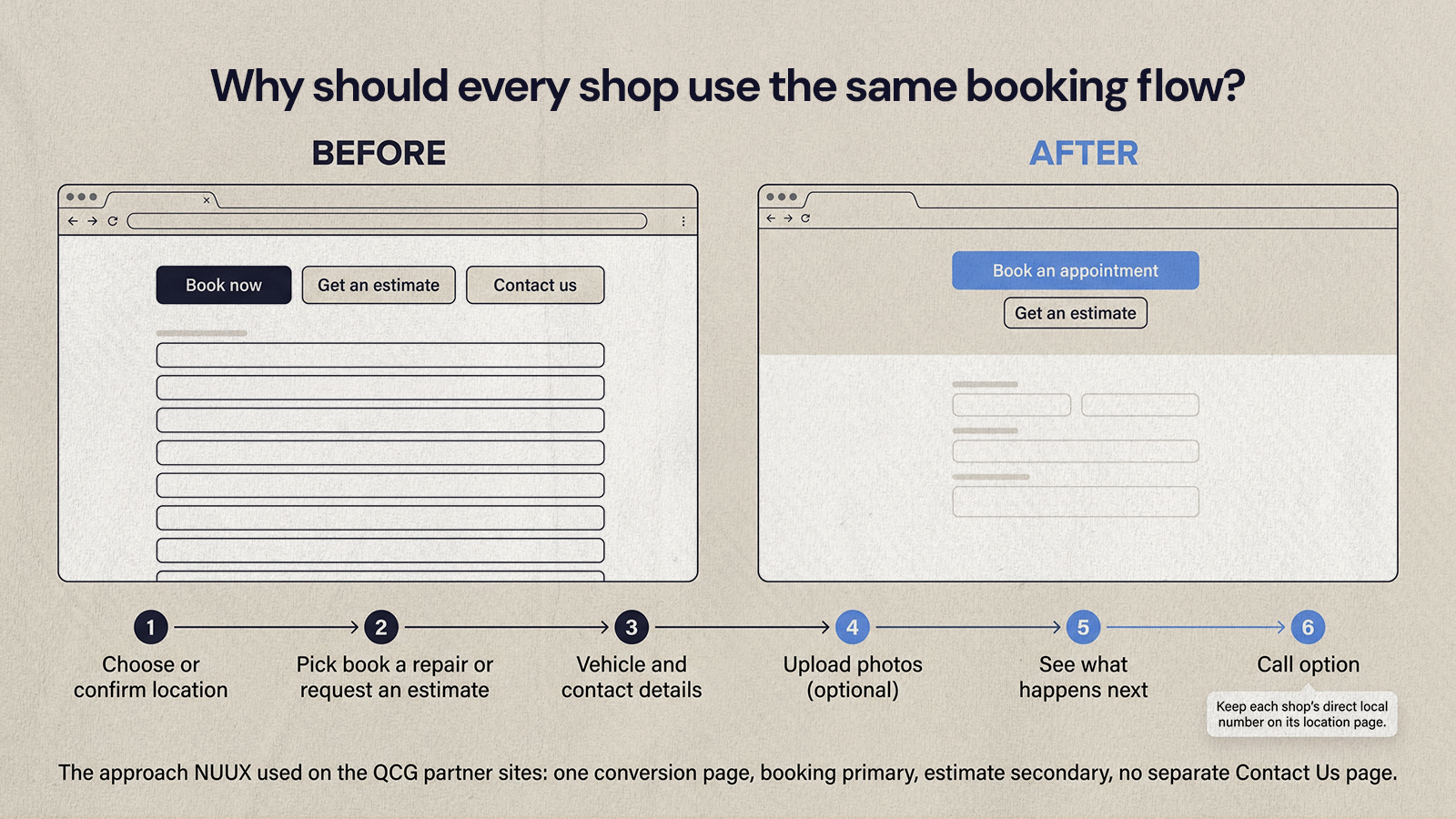
Customers shouldn't have to relearn the site from one shop to the next. If one page says "book now," another says "schedule service" and a third says "get an estimate," people wonder whether these are different processes, and some stop to call instead.
On the QCG partner sites, NUUX used exactly one conversion page per site, with booking as the primary action and estimate as the secondary option on the same page, and no separate Contact Us page. The legacy sites had too many competing calls to action and forms that asked far more than needed, so the fix was fewer paths and shorter forms. We walk through the conversion side in more depth in how collision shops can turn visitors into booked estimates.
A consistent flow usually looks like this:
- Choose a location, or confirm the one preselected from the location page.
- Pick the main need: book a repair or request an estimate.
- Enter vehicle and contact details in a short form with clear labels.
- Upload photos, if your process uses them.
- See what happens next and when to expect a response.
- Have a call option for people who would rather talk to someone.
The operations behind the form can still differ. Some shops may route inquiries to a central team, others handle them locally. One note on phone numbers: Google's Business Profile guidelines ask each location to use a phone number that connects to that location, and to prefer a local number over a central call center line where possible, so keep direct shop numbers on location pages even if the booking form routes centrally.
Consistency helps internally too. Marketing can compare conversion across locations with fewer variables, and staff can be trained on exactly what customers see before they call.
Why should multiple collision locations run from one CMS?
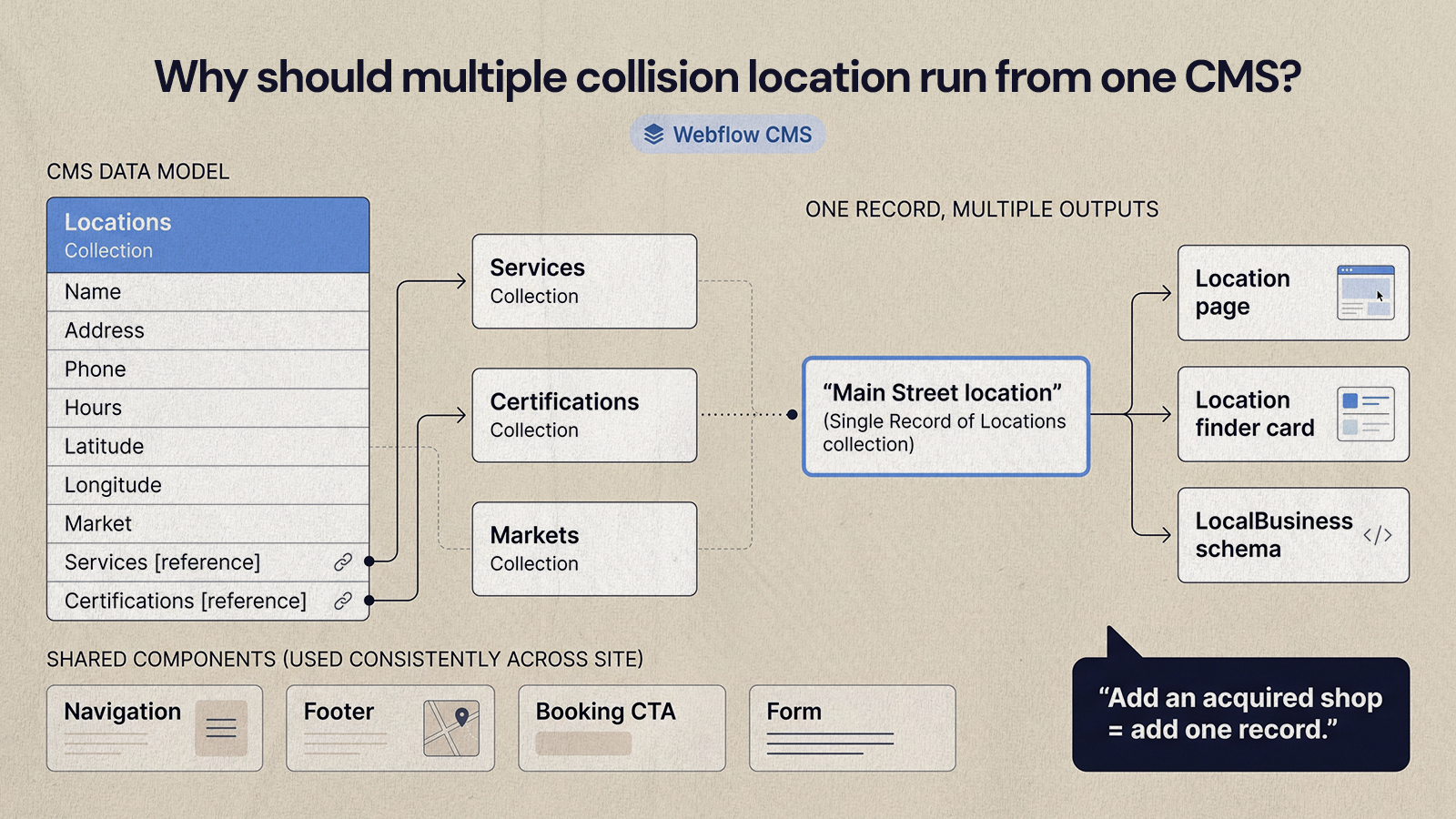
One CMS makes content, branding, updates, permissions and expansion easier to manage than a separate website per shop. When hours change, a service is added or a location needs new photos, the team edits one record instead of chasing logins across disconnected sites.
A well-planned CMS setup for a collision group includes:
- Collection templates for locations, services, certifications and market pages
- Structured fields for address, phone, hours, coordinates, services and certifications, so they can be reused on the page, in the selector and in LocalBusiness schema
- Reference fields that connect each location to the services and certifications it offers
- Role-based access for marketing, operations and outside partners
- Reusable calls to action and form components
- Central control of navigation and footer
- A repeatable process for adding acquired shops
Keep the template flexible enough that local pages still have room for real local detail, but locked enough that layout, calls to action and content quality don't drift. For multi-site and multi-brand groups, Webflow is our default recommendation because its CMS collections and shared components handle this pattern well. If you are consolidating several old sites onto one platform, our CMS migration checklist covers the steps.
Designing for drivers on a phone
Responsive design has to do more than shrink the desktop layout. It should put the actions mobile visitors need first: a phone number that is easy to tap, location details readable without zooming, short forms and a booking button that isn't buried under long blocks of text.
For multi-location groups, pay close attention to:
- A sticky or always-visible booking button
- Fast access to the location finder from every page
- Tap targets that are comfortably large. WCAG 2.2 success criterion 2.5.8 (Level AA) sets a minimum of 24 by 24 CSS pixels for pointer targets, with some exceptions.
- Map and directions links that open the phone's map app
- Short forms with visible labels
- Service content that is easy to scan
- Page speed. Google's Core Web Vitals target a Largest Contentful Paint within 2.5 seconds and an Interaction to Next Paint of 200 milliseconds or less.
- A clear confirmation after a form is submitted
A site that feels broken on a phone makes people assume the repair will feel the same way. A clear mobile experience lowers anxiety and moves the visitor toward the next step.
Should a multi-brand collision group use one website or several?
It depends on how customers recognize your shops. If drivers know each shop by its own local name, separate brand sites on their own domains usually make sense, as long as they share one CMS, one set of templates and one content model behind the scenes. If the group brand is what customers recognize, one parent site with location pages is simpler.
Groups change constantly: shops are acquired, names change, services expand and markets get reorganized. A repeatable structure makes each change manageable. When you acquire a shop, your team should be able to add the location record, assign it to a market, publish accurate local details, connect it to the booking flow and decide whether it needs transitional messaging about the old name.
Rebrands and domain moves need careful redirects so existing rankings and links carry over. Our guide to handling redirects when migrating to Webflow covers how to plan them.
A site structure checklist for growing repair groups
Before a redesign or an acquisition rollout, audit the current structure to find where customers get stuck and where your team loses time:
- Brand structure: is the site built for one brand, several brands or an ownership group with several shop names?
- Navigation: can customers reach locations, services, booking and careers from the main menu?
- Location finder: can visitors search by city or ZIP code without friction?
- Location pages: does each page show accurate address, phone, directions, services, certifications and next steps?
- Service pages: is each service explained once, in useful detail?
- Booking: does every shop use the same booking page and labels?
- CMS: can your team update locations without a developer for every small change?
- Mobile: can a driver book from a phone without frustration?
- Local SEO: are titles, headings and content specific enough for each location?
- Scalability: can the site absorb new shops, rebrands or market pages without a rebuild?
The checklist also gives owners, marketing, operations and your web partner a shared way to judge the site on customer behavior rather than color and layout preferences.
Design the system before the pages
For a collision group, the best website connects group-level trust, shop-level relevance, mobile usability and operational control. Start with structure: hub and spoke, a location selector, clear roles for service and location pages, one booking flow and one CMS. Once the architecture is right, the visual design has a clear job, which is guiding drivers from a damaged car to a booked repair at the right shop.
If you are planning a multi-location build or consolidating several shop sites, that is the kind of project our web development team takes on.
Want results like this
Your website should make money, not excuses. Let us find the revenue hiding in your current experience.
FAQs
Quick answers to the questions we hear most about website conversion and UX design.
Usually not as a fully separate build. If customers know each shop by its own name, separate brand domains can make sense, but they should share one CMS, one set of templates and one content model. That keeps booking, branding and updates consistent. If the group brand is what drivers recognize, one site with a page per location is simpler to run.
A hub and spoke structure puts group-level content, such as your repair process, standards and claims guidance, at the center, with pages for each location, service and certification branching from it. Each spoke links back to the hub and across to related spokes. For collision groups it keeps content organized and makes adding a new shop a matter of filling in a template.
At minimum, one page per location, one per service you offer, one per manufacturer certification and one booking page, plus a homepage, a locations directory and supporting pages like about and careers. The total grows with your footprint. What matters more than the count is that every page has a clear job and accurate, location-specific detail where it applies.
Yes. One booking page with a location field, preselected when the visitor arrives from a location page, gives customers a consistent experience while routing each request to the right shop or central team. Keep booking as the primary action and estimate as the secondary one on the same page, keep the form short and show each shop's direct phone number for people who prefer to call.
Look for a CMS with structured collections, reference fields between locations, services and certifications, reusable components and role-based access. Those features let you manage many shops from one place without every page looking identical. Webflow is a strong fit for multi-site and multi-brand groups, and it is what NUUX recommends by default for this kind of migration.
Related articles
More field notes on conversion, UX, and building websites that sell.