.svg)
.svg)

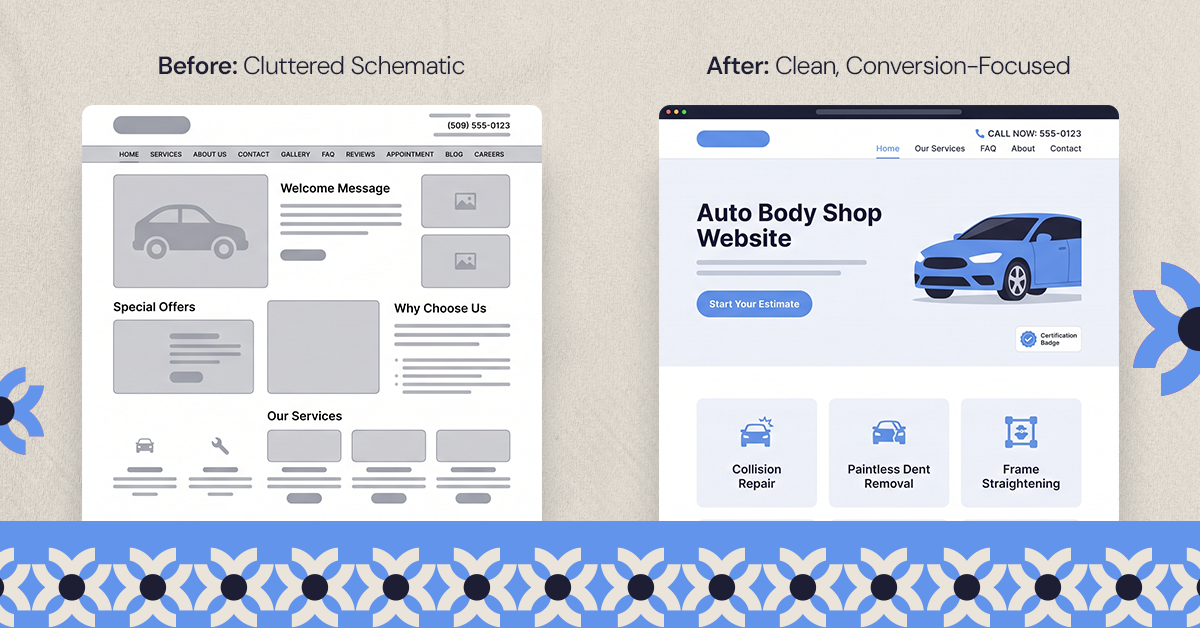
A converting auto body shop site answers three questions above the fold: is this shop trustworthy, can an estimate start without a phone call, and do they work on this make and model. Collision repair is a distress purchase, so the order matters.
A converting auto body shop website answers three questions before a visitor scrolls past the fold: is this shop trustworthy, can an estimate be started without a phone call, and does the shop actually work on this make and model. Most collision repair sites skip straight to services and pricing without settling any of that first, which is why a visitor who landed there still ends up calling a competitor. Auto body shop website design that converts is less about adding more features and more about answering those three questions in the right order.
What Makes an Auto Body Shop Website Convert?
Collision repair is a distress purchase. Nobody browses auto body shop websites for fun; they land there after an accident, usually on a phone, often within an hour of the collision. That context changes what "good design" means. A homepage built for browsing (large hero images, brand storytelling, a slow scroll through services) works against a visitor who wants to know in ten seconds whether this shop can be trusted with their car and how fast they can start an estimate. The seven elements below are ordered by how directly they affect that decision, not by how visually prominent they are.
1. Calls to Action That Match the Repair Journey
A generic "Contact Us" button asks a distressed visitor to do more work than they're willing to do in that moment. It doesn't say what happens next, how long it takes, or whether it commits them to anything. Auto body shop CTAs convert better when they name the next concrete step: starting an estimate, uploading photos of the damage, or scheduling a drop-off. Each of those implies a different level of commitment, and a homepage that offers only one catch-all CTA forces every visitor into the highest-commitment option, which is usually a phone call.
The fix isn't more buttons everywhere; it's matching the CTA to where the visitor is in the decision. A hero section CTA should be the lowest-friction option (start an estimate), while service pages further down the funnel can carry higher-commitment CTAs (schedule an appointment). This is the same logic covered in more depth in how a site's conversion rate is actually improved, matching the ask to the visitor's intent rather than repeating the same CTA everywhere on the page.
2. Does a Mobile-First Layout Actually Change Conversion Rates?
Yes, and the data on this is specific enough to act on. Research aggregated from Google's Core Web Vitals studies found that mobile visits are abandoned at a much higher rate once load time crosses three seconds, and a one-second delay can cost a meaningful share of conversions depending on the sector. For an auto body shop, where most visitors are searching from a phone at the accident scene or from an insurance adjuster's office, that threshold is not abstract. A site that takes five seconds to load on a phone connection has already lost a chunk of its most urgent visitors before they see a single CTA.
Mobile-first for a collision repair site means more than a responsive layout. The estimate form needs to work with a thumb, not a mouse. Photo upload fields need to accept a camera roll without forcing a desktop-style file browser. Phone numbers need to be tap-to-call, not text that has to be copied. These are small technical details, but they sit directly between a visitor's intent and their action.
3. Before-and-After Galleries That Prove the Work
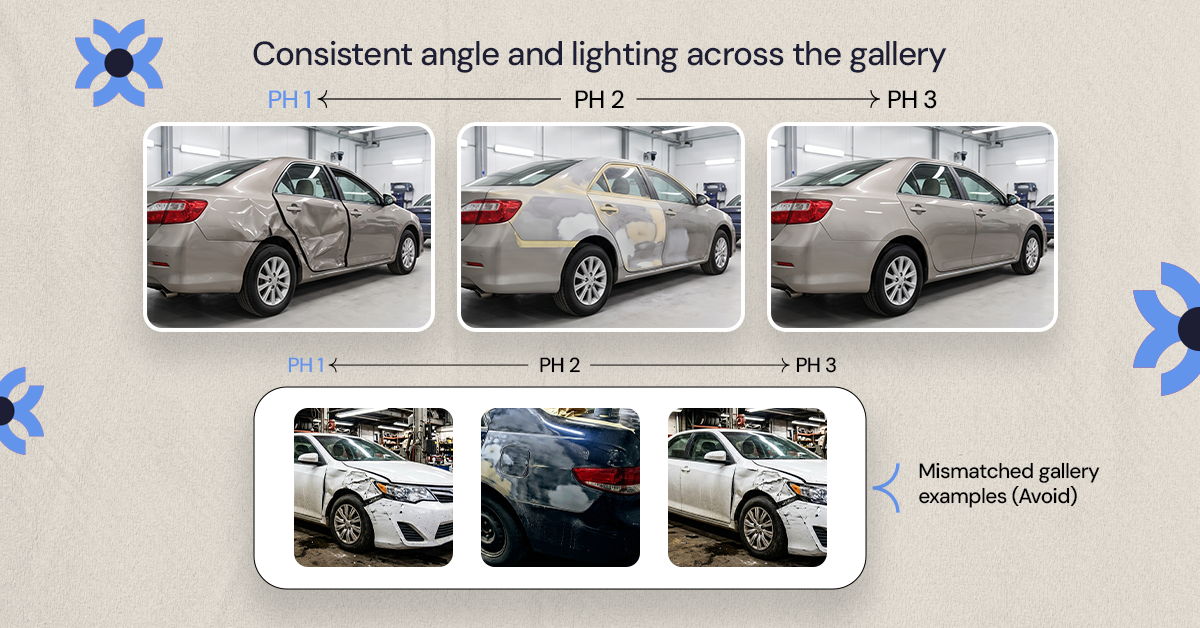
A before-and-after gallery does a job that testimonials and service descriptions can't: it lets a visitor judge the quality of the work with their own eyes instead of taking the shop's word for it. This matters more in collision repair than in most industries because the customer usually can't evaluate repair quality themselves; they're trusting the shop's word on structural and paint work they'll never personally inspect. Photo evidence is the closest a website can get to closing that trust gap.
The detail that actually affects conversion here is consistency of angle and lighting between the before and after shots. A gallery of mismatched, poorly lit phone photos reads as an afterthought, while a small set of consistently shot pairs (even five or six) does more to build confidence than fifty inconsistent ones. Multi-location groups managing this at scale, such as LaMettry's Collision, tend to standardize a shot list per repair so every location's gallery looks like it belongs to the same shop.
4. Trust Signals: Certifications, Guarantees, and Real Reviews
Certifications only work as trust signals if the visitor understands what they mean, and most auto body sites display badges without any explanation. I-CAR Gold Class, for example, is a real and meaningful certification: it requires every technician on a repair team to complete role-specific ongoing training, and it has to be maintained continuously rather than earned once. Only a minority of collision repair shops in the US actually hold it. A badge with no context looks the same to a visitor as a badge that means nothing, so the certification needs a line explaining what it actually requires.
Reviews carry similar weight but need similar honesty. BrightLocal's most recent consumer research found that only a small fraction of consumers say they never read online reviews before choosing a local business, which makes a review section close to mandatory rather than optional. What matters for conversion isn't a perfect five-star average; it's recency and specificity. A handful of recent reviews that mention actual repair details read as more credible than a large batch of generic five-star ratings with no dates.
5. Should Auto Body Shops Offer Online Booking?
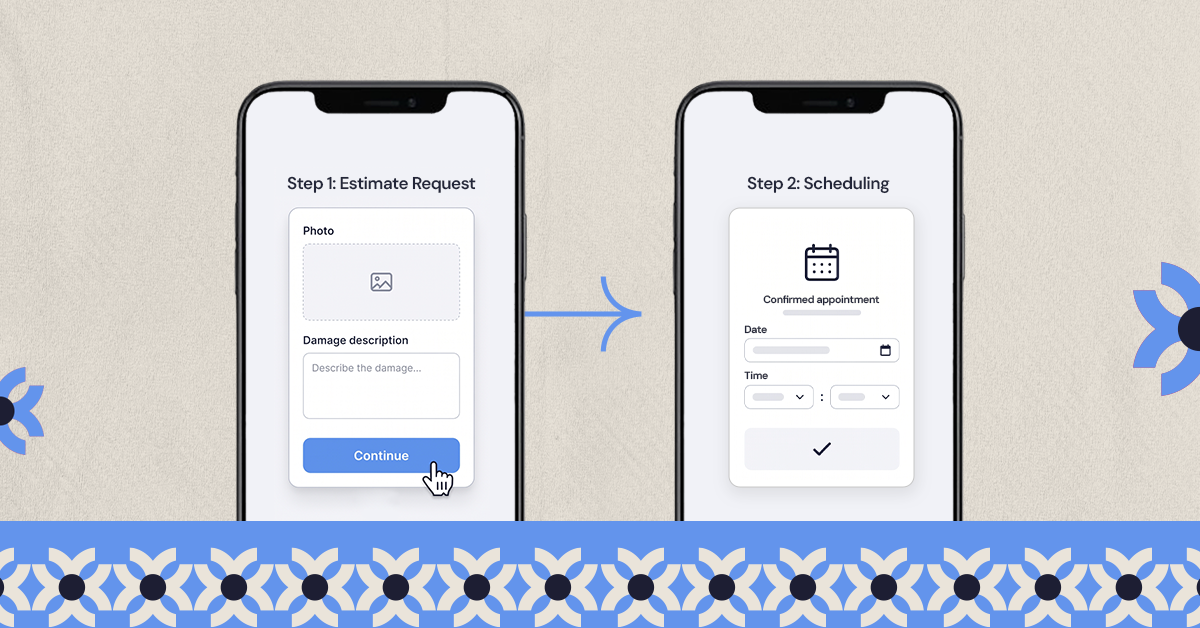
Online booking helps, but only if it's scoped correctly. A full self-service scheduling calendar works for an oil change; it doesn't work well for collision repair, where the shop usually needs to see photos or run an estimate before committing to a repair timeline. The version that actually converts is a two-step flow: an online estimate request first (photos, damage description, insurance information if relevant), followed by a scheduling step once the shop has enough information to commit to a timeline.
Trying to force a full booking calendar onto a process that isn't ready for one tends to produce abandoned forms, since the visitor doesn't yet know how long their repair will take and can't commit to a slot. Starting with a low-commitment estimate request keeps the visitor moving instead of stalling them on a decision they can't make yet.
6. How Does Local SEO Help a Collision Repair Shop Get Found?
Design and SEO aren't separate concerns for a local service business; the design choices above (fast load times, mobile usability, structured content) are also the technical foundation local search ranking depends on. Beyond that technical overlap, a collision repair site benefits from location-specific landing pages when a business operates in more than one service area, each with its own name, address, and phone number kept consistent with the shop's Google Business Profile. Consistency here isn't a minor detail; mismatched business information across a site and a listing is one of the more common reasons a legitimate multi-location shop underperforms in local search relative to its actual reputation.
This is also where design and marketing performance genuinely intersect, and it's worth being clear about the boundary: getting the right visitors to the site is a marketing and estimate-flow question, covered in tracking collision repair marketing performance, while what happens once they arrive is the design question this article is answering.
7. Site Speed and Security as Conversion Factors
Speed and security tend to get filed under "technical SEO" and treated as separate from design, but they behave like design decisions because they show up in the same moment a visitor is deciding whether to trust the site. An SSL certificate isn't optional for any site collecting damage photos or insurance details through a form; its absence shows up as a visible browser warning that will stop a cautious visitor before they submit anything. Speed compounds the same trust problem: a site that loads slowly reads as neglected, and a distressed visitor already looking for reasons to trust one shop over another will not wait to find out if the slowness was a fluke.
Bonus Tips: Analytics, Security, and Ongoing Updates
To ensure your website stays effective, integrate analytics tools. These tools help track user behavior, revealing what's working or needs improvement. Regularly analyze this data to refine your site.
Security is equally important to protect customer information. Ensure your site has an SSL certificate. Regular updates and maintenance will keep your website secure and functional.
Consider these essential practices:
- Analyze website traffic and user behavior regularly
- Implement and maintain strong security measures
- Keep the website updated with the latest features
Turn Clicks Into Customers
A conversion-focused auto body shop website is vital. By implementing the strategies covered, you'll enhance user experience and increase engagement.
Adopt these elements to transform website visitors into loyal customers and ensure business growth.
Want results like this
Your website should make money, not excuses. Let us find the revenue hiding in your current experience.
FAQs
Quick answers to the questions we hear most about website conversion and UX design.
A site that lets a visitor confirm trustworthiness, start an estimate without calling, and see proof the shop handles their type of repair, all within the first screen or two.
Usually not as the first step. A two-stage flow (estimate request, then scheduling) fits how collision repair actually works better than a self-service calendar built for routine maintenance.
A small, consistently shot set does more for trust than a large, inconsistent one. Five or six well-matched pairs typically outperform fifty mismatched ones.
Yes. Mobile abandonment rises sharply once load time crosses a few seconds, and collision repair visitors are disproportionately searching on mobile under time pressure.
Only ones the visitor can actually understand. A badge like I-CAR Gold Class means something specific (ongoing, role-specific technician training) but only if the site explains what it requires; an unexplained badge carries no more weight than no badge at all.
Related articles
More field notes on conversion, UX, and building websites that sell.