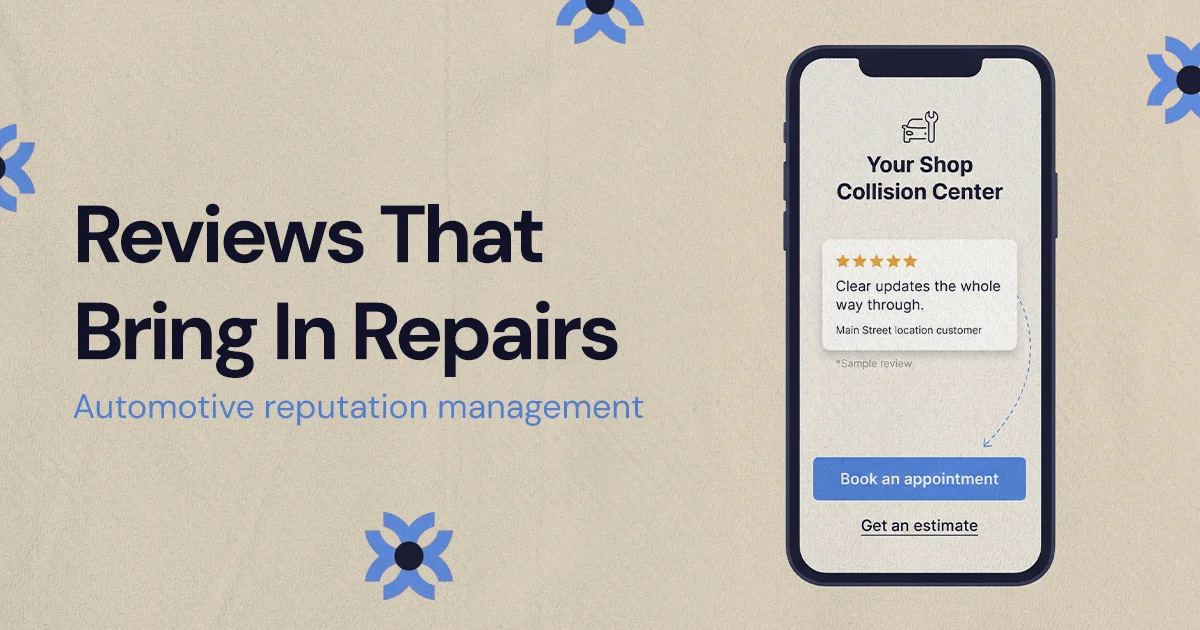
Automotive reputation management means earning, monitoring, answering and displaying customer reviews so drivers choose your shop. For collision and repair shops, that means asking every customer for a review at delivery, keeping each location's Google Business Profile accurate, replying professionally and placing relevant reviews next to booking and estimate actions.
Automotive reputation management is how a repair shop earns, monitors, answers and displays customer reviews so that drivers choose it when they need work done. For collision and auto repair shops, the parts that bring in repairs are asking for reviews at the right point in the repair, keeping each Google Business Profile accurate, replying to reviews professionally and putting relevant reviews next to the booking and estimate actions on your website.
A driver who needs bumper repair, paint work, frame straightening or an ADAS calibration is usually stressed before they ever call. They may be dealing with an insurer for the first time, arranging a rental or worrying about a deductible. Reviews are one of the few things they can check quickly to decide whether a shop will explain the repair, keep them updated and hand the car back when promised. That makes reviews part of the repair pipeline, not a side project for marketing.
What does automotive reputation management mean for repair shops?
For a repair shop, automotive reputation management covers the full review cycle: earning reviews from real customers, watching for new ones across every location, responding publicly, and using what customers say to support booking decisions on your website and profile. In collision repair it should follow the real customer journey, from the first estimate request through insurer coordination, repair updates, delivery and follow-up.
A good process answers the questions drivers already have. Will this shop explain the estimate? Will they tell me if parts are delayed? Will the car be clean and ready when they said it would be? Reviews that speak to those moments carry more weight than generic praise.
The goal is not a perfect 5.0 rating or a profile with no complaints. Google's own guidance notes that a mix of positive and negative feedback often feels more trustworthy. What you want is a credible, current review profile that shows consistent service and a shop that takes feedback seriously.
Do reviews affect local search rankings for auto shops?
Yes, according to Google. In its explanation of how local results are ranked, Google says prominence is one of the factors it uses and that "more reviews and positive ratings can help your business's local ranking." The same page says that replying to reviews shows you value customer feedback and that positive reviews and helpful replies can help a business stand out.
Google does not publish exact weights, so be careful with anyone who promises that a specific number of reviews will put you in the top three results. Relevance and distance also matter, and distance is something you cannot change. What you can control is whether each location has a steady flow of genuine, recent reviews and visible, professional replies.
For multi-location collision groups, this happens at the location level. A strong brand helps, but a driver searching after an accident usually wants to know whether the shop closest to them is responsive and reliable. Each location's profile needs its own reviews and its own attention.
Collision-specific review generation that follows the repair journey
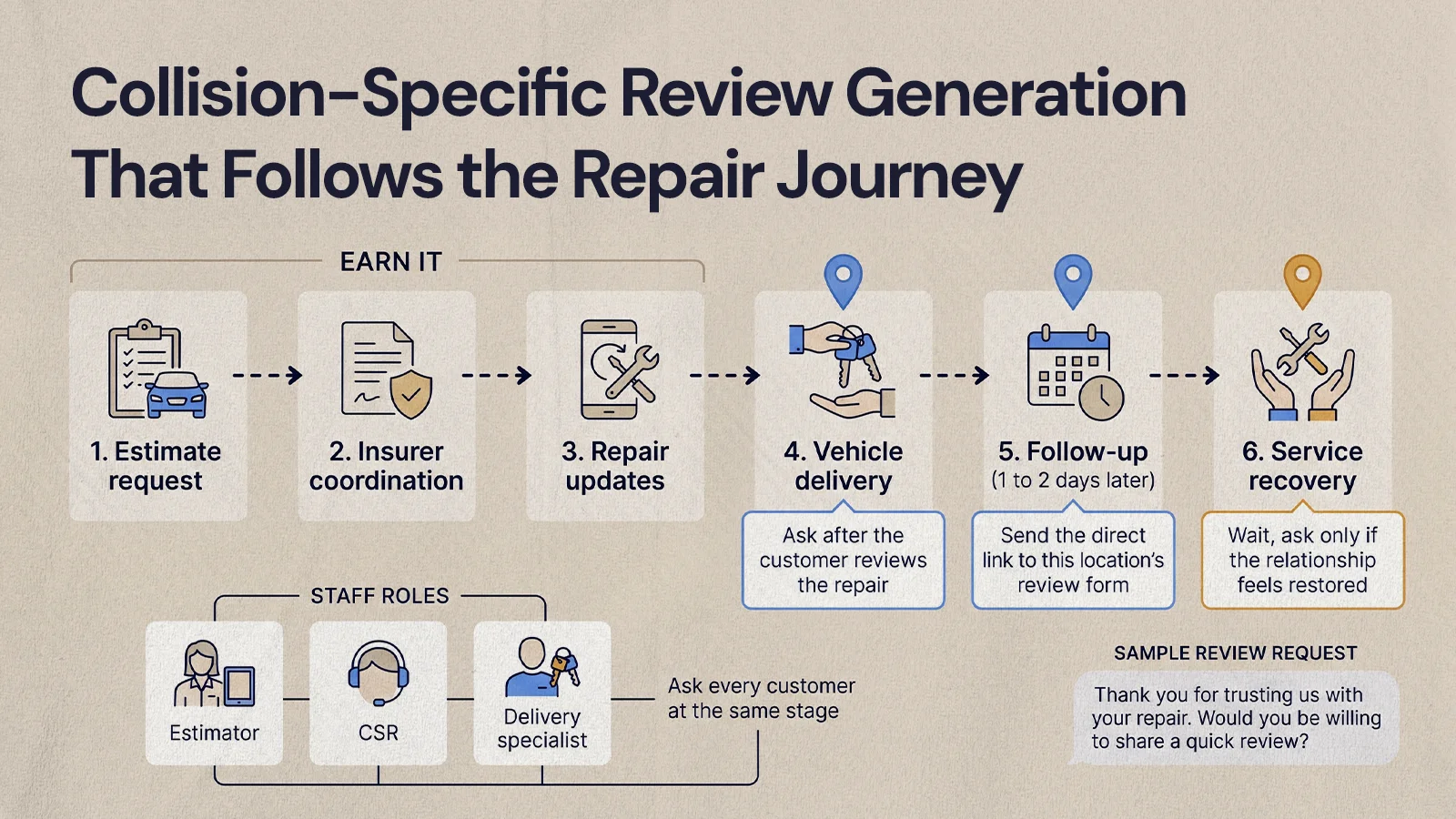
The best review requests feel timely and earned. Collision customers often had a stressful week before they found you, so a generic "leave us a review" message can feel thin. Tie the request to the care your team gave during the repair.
- At vehicle delivery: after the customer has looked over the repair, ask whether everything was explained clearly and whether they would be comfortable sharing feedback.
- After a good handoff: if the customer thanks the estimator, CSR or delivery specialist, mention that reviews help other drivers find a shop they can trust.
- In a follow-up message: a short email or text a day or two after delivery, with a direct link to the right location's review form.
- After service recovery: if a problem was resolved well, give the customer time before asking, and only ask if the relationship feels restored.
A request can be as simple as this:
Thank you for trusting us with your repair. If our team made the process easier, would you be willing to share a quick review? Your feedback helps other drivers know what to expect when they need collision repair.
It is specific and respectful, and it asks for honest feedback rather than a five-star rating.
Train the front line without scripting them
Estimators, CSRs, service advisors and delivery staff are the people customers remember. Give them a short internal checklist so requests feel natural:
- Ask every customer at the same stage, not only the ones who seem happy.
- Explain briefly why reviews matter to other local drivers.
- Send the direct link to the correct location's review form.
- Never offer anything in exchange for a review.
- Log that the request was sent so nobody gets asked twice.
Consistency matters more than intensity. A steady process usually produces a more believable review profile than a one-off push that floods your profile in a single week.
Can a repair shop offer incentives for reviews?
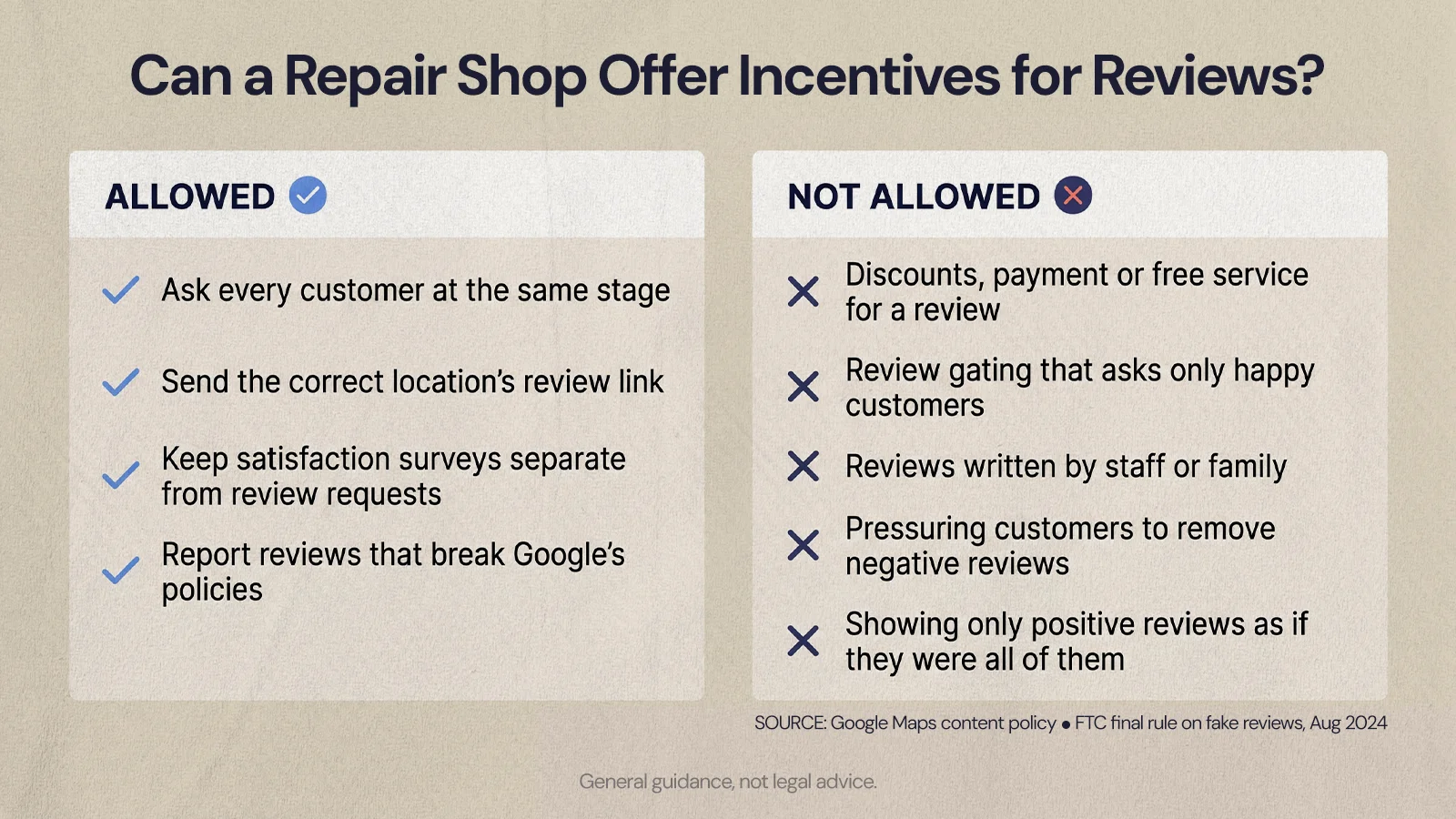
No, not on Google. Google's Maps content policy prohibits offering incentives such as payment, discounts or free goods or services in exchange for posting a review, and Google's Business Profile help calls this "strictly prohibited." The same policy prohibits discouraging negative reviews or selectively soliciting positive ones, which is why the checklist above asks every customer rather than only the happy ones.
There is also a federal rule. In August 2024 the Federal Trade Commission announced a final rule banning fake reviews and testimonials. Among other things, it bars offering compensation or incentives conditioned on a review expressing a particular sentiment, using threats or intimidation to prevent negative reviews, and misrepresenting that the reviews displayed on your website represent all or most of the reviews submitted when some have been suppressed.
In practice, that means no discounts on the next oil change for a five-star review, no "happy customers only" review funnels, no reviews written by staff or family, and no pressure on unhappy customers to take a review down. If you run a customer satisfaction survey, keep it separate from the review request, and send the review request to everyone. This is general guidance, not legal advice, so check anything unusual with your own counsel.
How should a shop use Google Business Profile for reviews?
Treat Google Business Profile as the hub of your review management, because it is often the first place drivers see your rating, recent comments, photos, hours and a call button. Keep every location's profile accurate, send customers to the right profile's review link and reply the way you would handle a customer at the front counter.
The basics are easy to let slide. Your name, address, phone number, hours, categories, services, photos and booking link should be current. If the profile says you are open or offer a service, the experience when someone calls should match.
For collision groups, profile management needs an owner. Decide who updates holiday hours, who monitors new reviews at each location, who flags inaccurate edits and who writes responses. Without an owner, profiles drift out of date and reviews sit unanswered.
Make review links easy and location-specific
Google lets you share a review link or a QR code from your Business Profile. Each facility should have its own. Sending customers to the wrong location confuses the customer and puts the review where it does the least good. Use location-specific links in:
- Delivery follow-up emails
- Text follow-ups, for customers who have opted in
- Printed handoff materials and QR codes at the counter
- CSR and estimator message templates
Keep the message short. Every extra step lowers the chance someone finishes.
How should you respond to negative reviews?
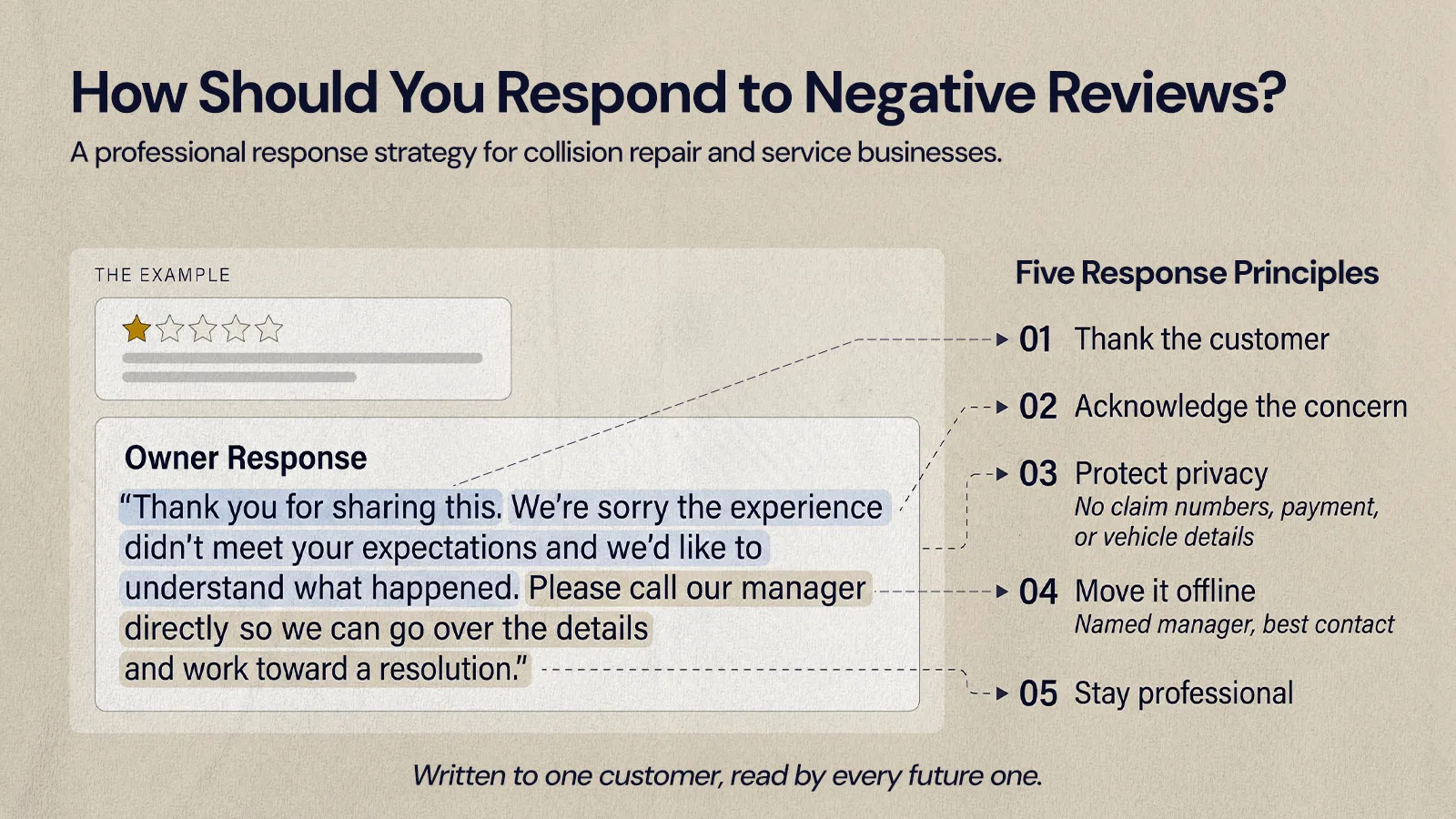
A reply is written to one customer and read by every future customer who checks your profile. A defensive reply makes the shop look difficult even when the complaint is unfair. A calm one shows that your team listens.
For positive reviews, skip the copy-and-paste thank you. Mention the kind of experience in general terms, such as communication, repair updates, help with the estimate or the delivery. Never reveal claim details, repair specifics or anything personal.
For negative reviews, the goal is not to win the argument. Use a simple framework:
- Thank the customer: critical feedback can point to a real process gap.
- Acknowledge the concern: keep it brief and do not debate details in public.
- Protect privacy: leave out claim numbers, payment issues, vehicle condition and personal information.
- Move it offline: give a named manager and the best way to reach them.
- Stay professional: write as if the next customer is deciding whether to book, because they are.
Thank you for sharing this. We're sorry the experience didn't meet your expectations and we'd like to understand what happened. Please call our manager directly so we can go over the details and work toward a resolution.
If a review breaks Google's policies, for example it is fake, off-topic or posted by someone with a conflict of interest, you can report it for review through your Business Profile. Reviews that are simply negative are not policy violations, so the reply is usually the better tool.
Where should reviews go on a collision repair website?
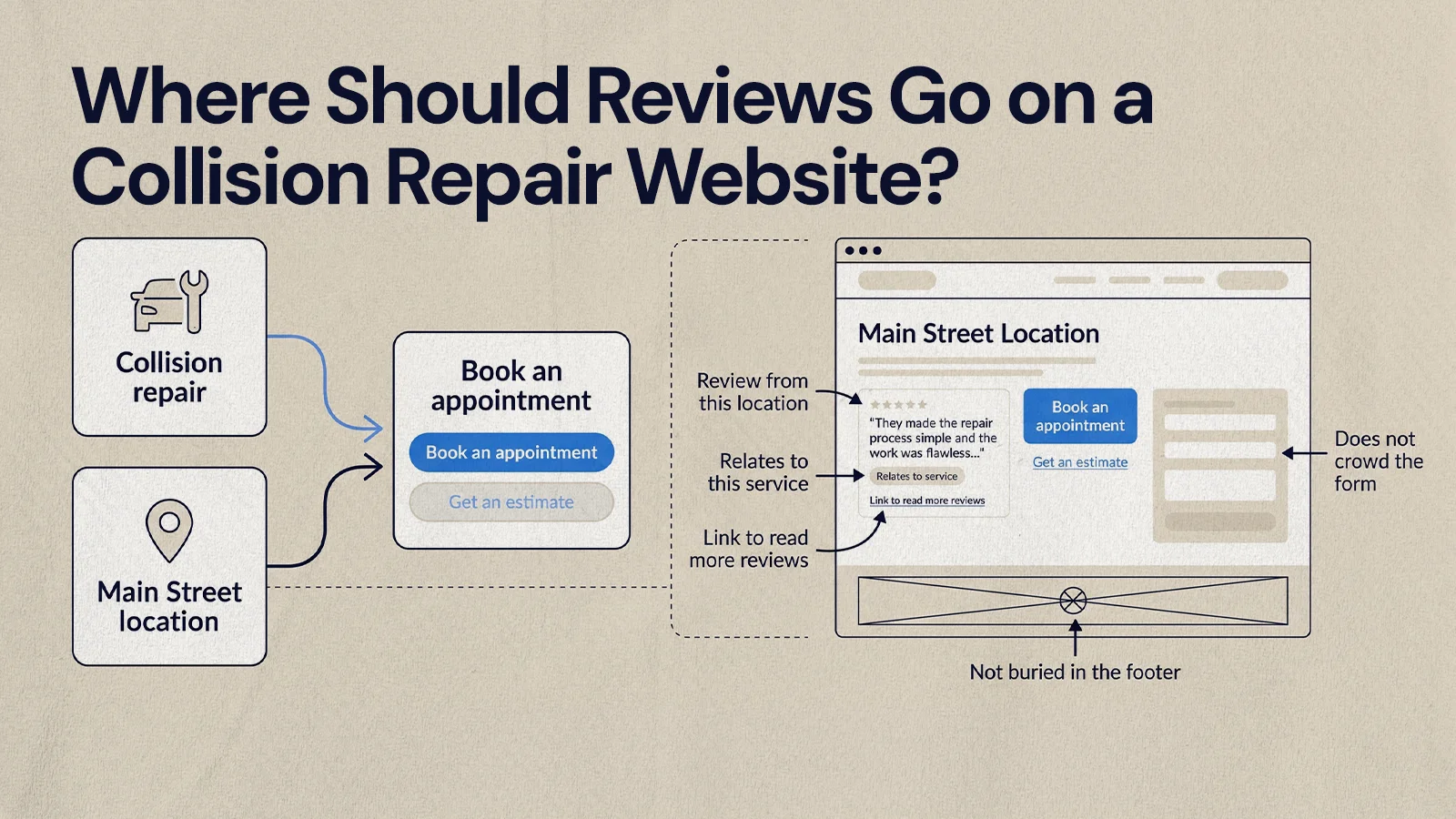
Put reviews where customers are already deciding to act. Someone on a collision repair page or an estimate form is close to booking, and a relevant review at that moment can settle the last doubt.
- Next to "Book an appointment" and "Get an estimate" buttons
- On each location page
- On collision, paint, auto body and mechanical service pages
- On insurance claim guidance pages
- Near mobile call and booking buttons
Relevance matters more than volume. A review about a quick oil change does little for someone booking major collision work. A review about clear communication during a body repair belongs on the collision page. For location pages, use reviews from that location.
Reviews also should not slow the page, clutter the form or compete with the main action. The natural place for them is on the service and location pages that lead to the booking page, supporting a single clear action. Our guide to turning collision website visitors into booked estimates goes deeper on that conversion path, and our post on what an auto body shop website needs to convert covers where trust signals fit on the page.
Use review snippets with care
Short excerpts work well as long as they stay accurate. If you trim for length, keep the meaning. If you pull reviews from a third-party platform, follow that platform's display rules and attribution requirements. Strong placements usually include a short excerpt from a real review, the location or service it relates to, a clear nearby action and a link to read more reviews, in a layout that works on a phone. If you are choosing a new site, check that the auto body shop website template you pick has a review section you can place per page rather than one fixed block.
A monthly review management rhythm for repair shops
Reputation management gets easier when it is a recurring habit with an owner. A simple monthly rhythm:
- Read new reviews for every location's Google Business Profile.
- Reply to anything unanswered with professional, privacy-safe language.
- Check that review links in emails, texts and printed materials still work.
- Note recurring praise that can shape website copy and staff training.
- Note recurring complaints that point to communication or process gaps.
- Refresh website review excerpts that are outdated.
- Confirm booking and location pages still show reviews clearly.
This is where marketing and operations meet. If reviews keep mentioning poor updates, that is a communication process problem, not a marketing one. If customers keep praising one estimator's clarity, that language belongs in training and on the website.
Turning reviews into repair orders
Reputation work pays off when real customer experience shows up at the moment a driver is choosing who to call. Ask every customer at the right point in the repair, send them to the right location's profile, reply with care and place relevant reviews near your booking actions. Done consistently, those reviews help bring in the next repair.
If you want your site built so reviews support booking instead of sitting in a footer, our growth marketing team can help.
Want results like this
Your website should make money, not excuses. Let us find the revenue hiding in your current experience.
FAQs
Quick answers to the questions we hear most about website conversion and UX design.
Ask every customer at the same point, usually at vehicle delivery, and follow up with a short text or email that links straight to the correct location's review form. Google Business Profile lets you share a review link or QR code, so put it on handoff materials and at the counter. Keep the request short, ask for honest feedback and never offer anything in return.
Replying to every review, or as close to every review as you can manage, is a good habit. Google says replies show you value customer feedback and can help your business stand out. Positive reviews deserve a specific thank you, and negative ones need a calm, private-details-free reply that moves the conversation offline. Future customers read the replies as much as the reviews.
You cannot delete a review yourself. If it breaks Google's policies, for example it is fake, spam, off-topic or written by someone with a conflict of interest, you can report it from your Business Profile for Google to assess. A review that is simply negative will usually stay, so a professional reply that offers to resolve the issue is the better response.
Yes. Asking customers for honest reviews is allowed. What crosses the line is offering incentives for reviews, asking only happy customers, writing or buying fake reviews, or pressuring people to remove negative ones. Google's policies prohibit incentives and selective solicitation, and the FTC's 2024 rule bans fake reviews and sentiment-conditioned incentives. Check unusual situations with your own counsel.
There is no official number. Google says more reviews and positive ratings can help local ranking, but it also weighs relevance and distance, and it does not publish thresholds. A practical target is a steady flow of recent, genuine reviews at each location, so a driver checking your profile sees current feedback rather than a burst from years ago.
Related articles
More field notes on conversion, UX, and building websites that sell.