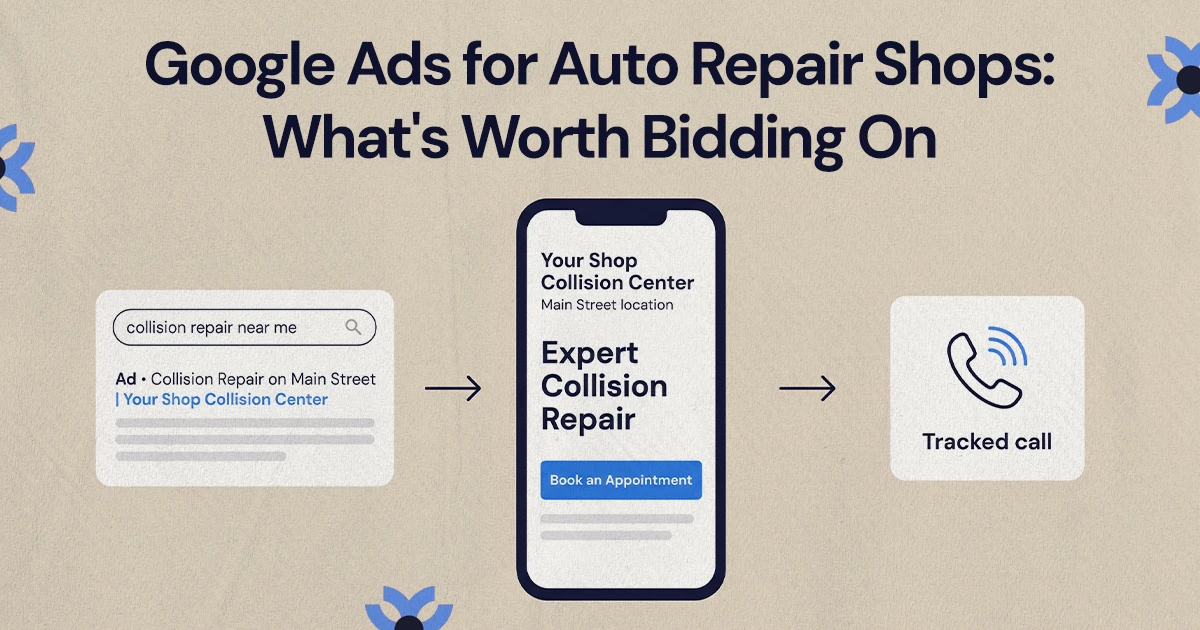
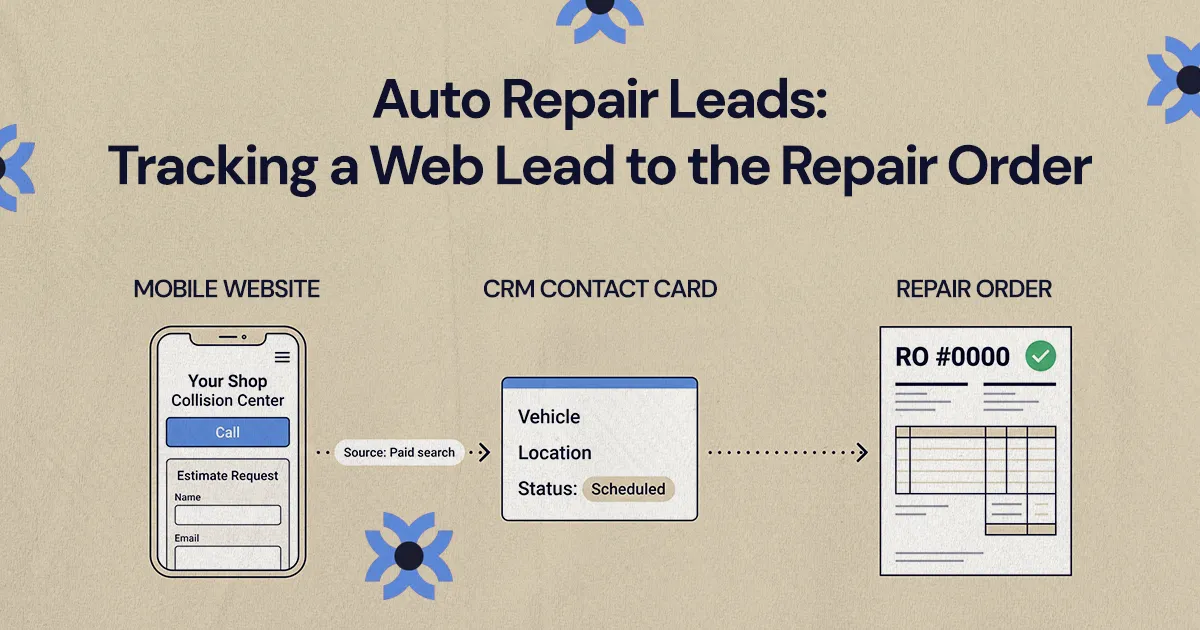
To track auto repair leads to the repair order, tag every call, form and estimate request with its source, capture contact and vehicle details consistently, and match each lead to the RO when the job is opened. Where jobs move into CCC or insurer platforms, label them as website-sourced, website-assisted, platform-sourced or unattributed instead of guessing.
Tracking auto repair leads to the repair order means tagging every website inquiry (a call, form, estimate request or booking) with its source, capturing enough customer and vehicle detail to recognize it later, and matching it to the repair order once the job is opened. When that match is made consistently, a shop can see which marketing channels produce real repair work instead of just clicks and calls.
The match is harder than it sounds, because a lead passes through several hands before it becomes an RO. A driver might click an ad, call from a location page, send photos, talk to a CSR and go through their insurer's process before an RO exists. This guide is for owners and marketing managers at independent auto repair shops, collision centers and multi-location groups in the US who want to follow that path from start to finish.
How do you track an auto repair web lead to a repair order?
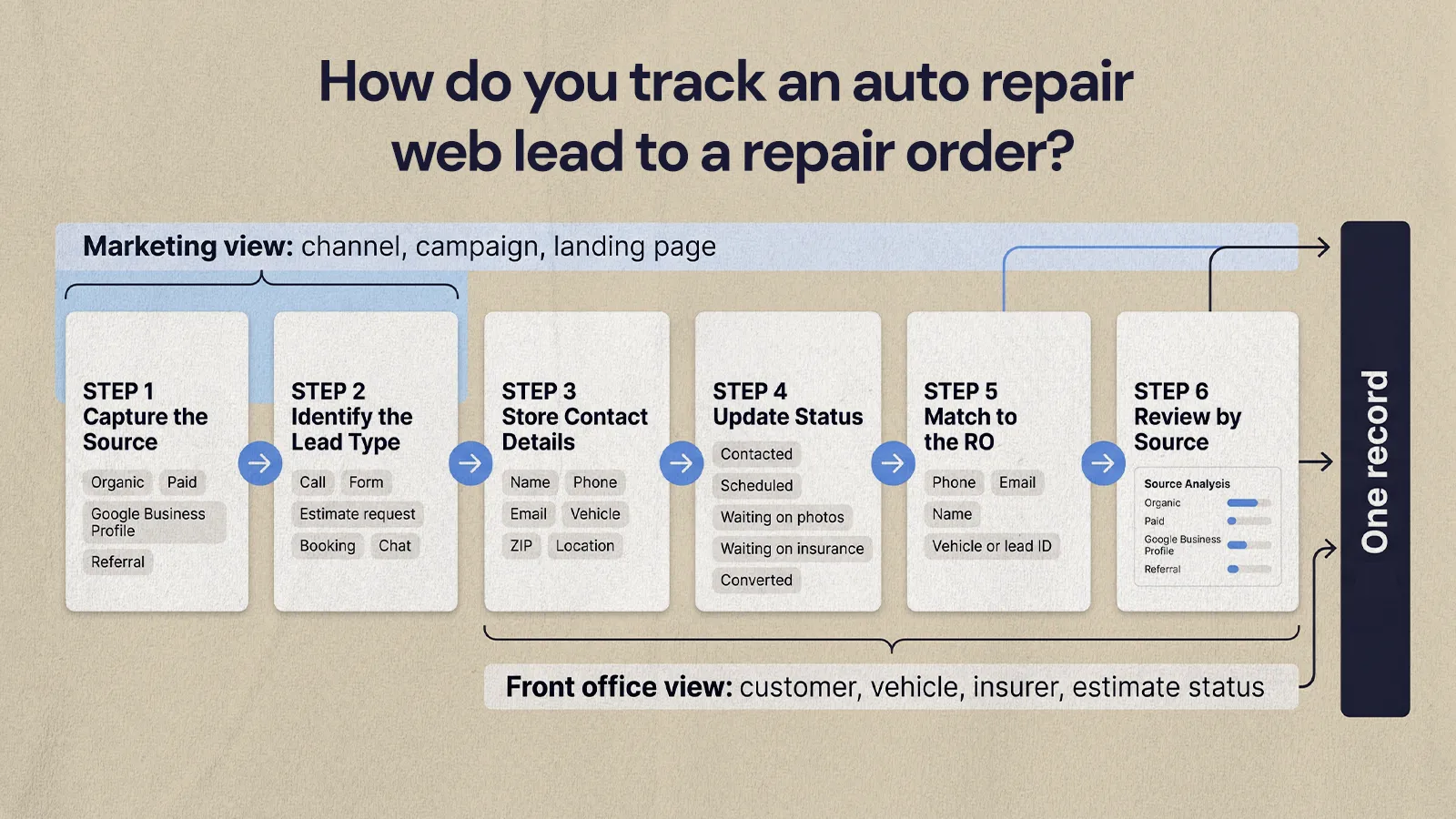
Give each inquiry a source when it arrives, record every follow-up step, and reconcile the lead against the RO when the job is written. It works best when your website forms, call tracking, CRM or lead sheet and shop management system all use the same field names and the same source list.
Marketing cares about channel, campaign and landing page. The front office cares about the customer, vehicle, insurer and estimate status. Tracking improves when both views live in one record.
A workable flow looks like this:
- Capture the original source. Organic search, paid search, Google Business Profile, direct, referral, social or a location-specific campaign.
- Identify the lead type. Phone call, form, estimate request, appointment request, chat or tow-in inquiry.
- Store contact details the same way every time. Name, phone, email, vehicle, ZIP code, preferred location and message.
- Update the front-office status. Contacted, scheduled, waiting on photos, waiting on insurance, not serviceable, duplicate or converted.
- Match the lead to the RO. Use phone number, email, name, vehicle or an internal lead ID.
- Review results by source. Compare leads, qualified leads, scheduled estimates and ROs by channel and location.
You don't need a perfect software stack to start, but you do need consistency. If staff enter "website," "internet," "Google" and "online" for the same kind of lead, the reports won't mean much.
Which auto repair lead sources should you separate from the start?
A collision customer with a drivable car, an open claim and photos ready to send is a different lead from someone asking for a cash price on a bumper. A mechanical repair call is different from an insurer referral, and a tow-in call is different from a general question. Your source list should be simple enough for staff to use at the counter and specific enough to guide budget decisions.
Useful categories include:
- Organic search: visitors from unpaid search results.
- Paid search: leads from Google Ads, Microsoft Ads or other search campaigns.
- Google Business Profile: calls, website clicks and direction requests from your listing.
- Direct: visitors who typed your URL or arrived without a clear referrer.
- Referral: visitors from directories, manufacturer or partner pages, fleet partners or community sites.
- Social: paid or organic traffic from the platforms you use.
- Email: past customers, fleet contacts and follow-up campaigns.
- Insurer or platform referrals: work that arrives through a carrier assignment or referral program.
Don't lump everything into one "internet lead" bucket. It's convenient at the counter, but it can't tell a marketing manager whether a landing page, paid campaign or local SEO work is producing repair jobs. For links you control, such as emails, social posts and partner listings, tag the URLs with UTM parameters. Google Analytics recommends always setting utm_source, utm_medium and utm_campaign so campaign traffic is reported consistently.
For multi-location groups, a shared source list matters even more. If one store logs a Google Business Profile call as "Google," another as "walk-in" and a third as "phone," leadership can't compare demand between markets.
What should shops track from forms, calls, and estimate requests?
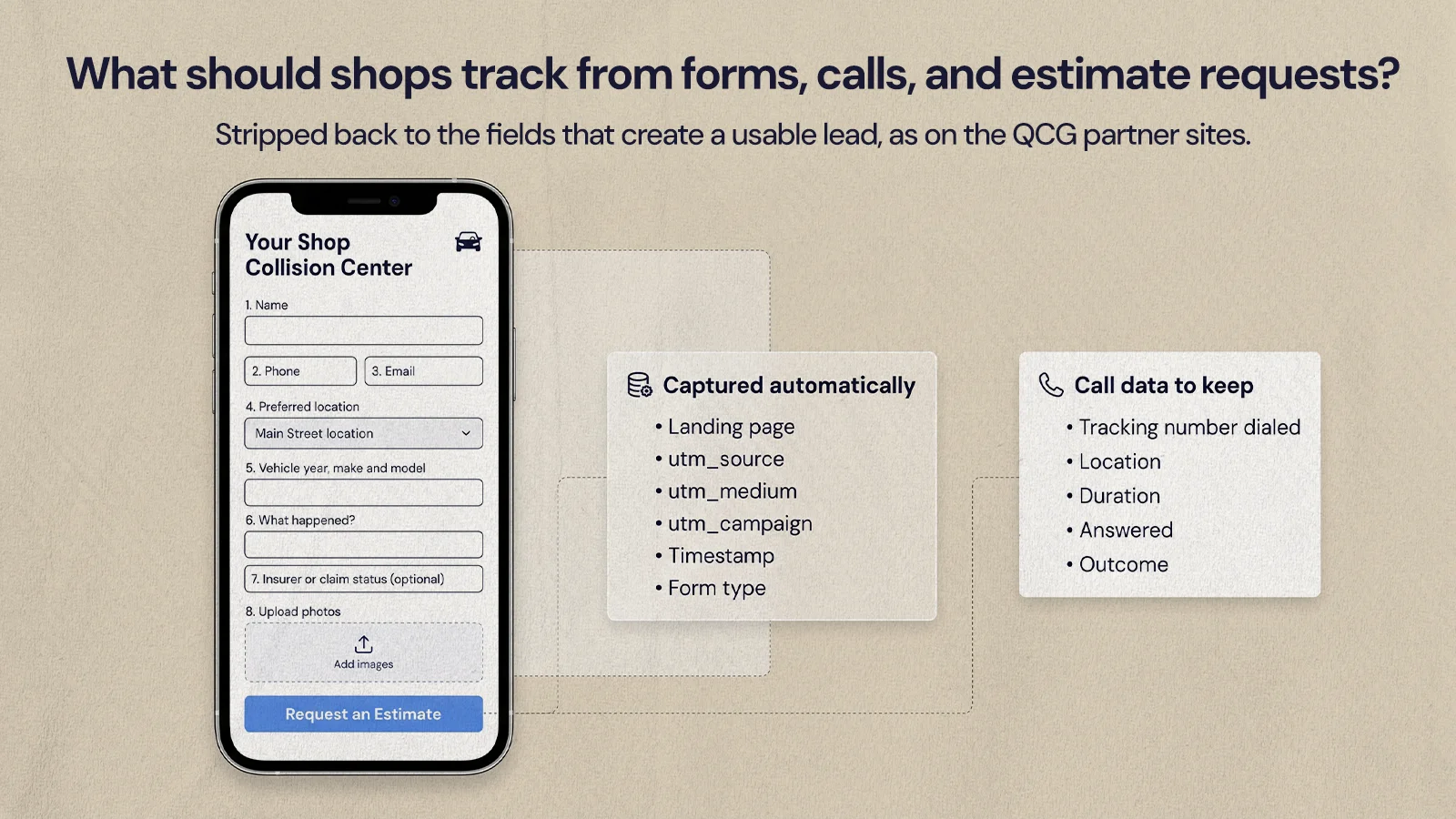
Track what helps you qualify the lead, respond quickly, credit the right source and match the lead to an estimate or RO later. Each form, call and estimate request should carry the details the customer gives you plus hidden attribution data they never see.
Form tracking
A form should create a record, not just send an email. That record should include a timestamp, the page URL, the form type, the chosen location, the customer's contact details and the source. Hidden fields can capture the campaign, landing page and UTM values without asking the customer to do anything extra.
Keep forms short. On the Quality Collision Group partner sites, NUUX stripped forms back to the fields that create a usable lead, because the legacy forms asked for far more than a shop needed at first contact. The useful set is usually:
- Name, phone and email
- Preferred location
- Vehicle year, make and model
- A short description of the damage or service needed
- Insurer or claim status, if the customer wants to share it
- Photos, for estimate requests
- Landing page, source and campaign values (captured automatically)
Call tracking
Calls are still a major source of auto repair leads, especially for collision customers who want to talk to someone before booking. Call tracking shows which sources produce calls, but set it up with care so it doesn't confuse customers or your local listings.
Dynamic number insertion shows a different tracking number to website visitors depending on how they arrived, while your main number stays in place on key listings. Google Ads offers a version of this for ad traffic, using forwarding numbers on your site and counting a call as a conversion when it lasts longer than a minimum length you set. Location-level numbers help groups see which store took the call. If you record calls, check the consent rules in the states where you operate.
The call data worth keeping:
- Caller number and time
- Tracking number dialed and the source or page behind it
- Location called
- Duration and whether it was answered
- Staff notes on the reason for the call
- Outcome: scheduled, referred, duplicate, not serviceable or follow-up needed
Call tracking only becomes reliable when staff mark the outcome. A long call isn't automatically a good lead, and a short one isn't automatically bad.
Estimate request tracking
Estimate requests sit between marketing and operations, which is exactly why they go missing. Treat the request as its own pipeline stage with clear statuses: received, reviewed, waiting on photos, waiting on insurer details, scheduled for inspection, declined as out of scope, or converted to an estimate or RO. Our guide to turning collision repair website visitors into booked estimates covers the page side of that journey.
How do you connect website leads to your shop management system?
The handoff from website to front office is where most tracking breaks. The marketing platform records a conversion, but the shop management system only shows a customer and an RO with no source. Closing that gap takes a repeatable process that moves lead data into the systems your staff already use.
For a single location, that might mean sending form submissions into a CRM or shared lead sheet, tagging calls in the call tracking dashboard and adding a source field before the RO is created. For a larger group, it might mean forms feeding a central CRM, routing by location, call tracking per store and a scheduled reconciliation against the shop management or estimating system.
The fields worth carrying through every step:
- Lead source: shows which channel created the opportunity.
- Lead type: separates calls, forms, chats and estimate requests.
- Preferred location: routes follow-up and allows store comparisons.
- Phone and email: make RO matching possible.
- Vehicle: helps connect the inquiry to the right estimate.
- Campaign or landing page: shows which marketing asset influenced the lead.
- Lead status: shows where opportunities stall.
- RO number: confirms the lead became repair work.
The CRM usually handles the stage before the RO, and the shop management system becomes the record once the job is written. If the two can't connect directly, run a manual reconciliation. Export leads from the website, call tracking and CRM, compare them with opened ROs by phone, email, name, vehicle and date range, and mark each match as converted with its RO number. It isn't elegant, but it's far better than guessing.
If you run Google Ads, you can send those matched outcomes back to the ad account. Google's offline conversion imports let advertisers report sales that happen offline after an ad click, so bidding can learn from booked work instead of form fills.
Why do auto repair leads lose their source once estimates move into CCC or insurer platforms?
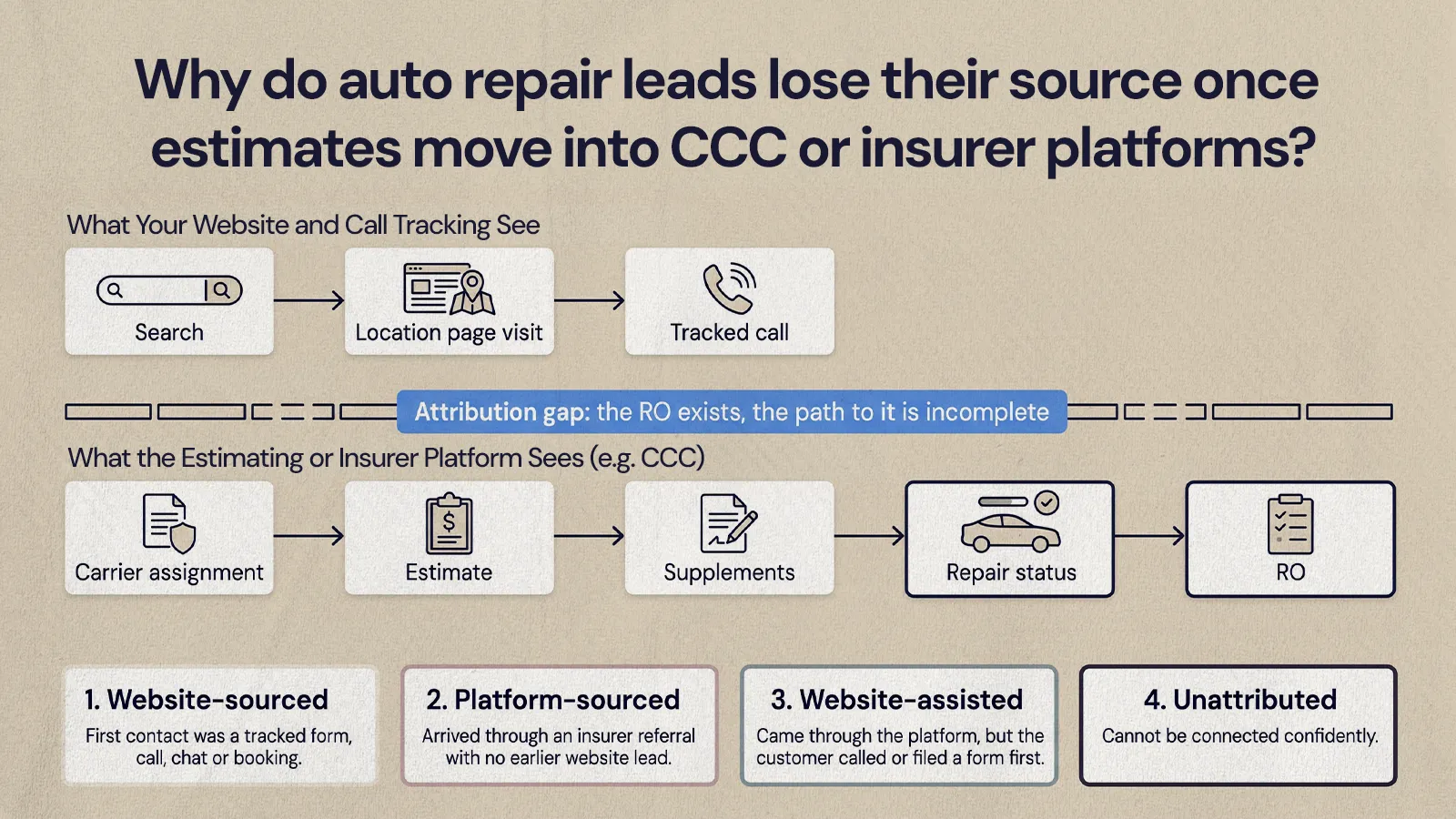
Because those systems are built to manage the repair, not to record how the customer found you. In collision, not every customer journey starts or ends on your website. One customer finds your shop through search, then calls their insurer, and the job arrives through the carrier's assignment workflow in CCC or a similar platform. Another gets a referral from their insurer first, then reads your reviews, visits your site and calls the shop.
Estimating and insurer platforms are essential to the collision workflow and hold the assignment, estimate, supplements and repair status. They usually don't hold the customer's earlier research. The result is an attribution gap: the RO exists, but the path that led to it is incomplete. If you only credit the final assignment, marketing looks weaker than it is. If you credit every website visit, insurer-driven volume looks like marketing.
Closing the gap is usually a people problem more than a software one: whoever owns the website and whoever owns the estimating system need to agree on how leads are matched.
You don't need to force every RO into a single perfect source. Separate what you know from what you can reasonably infer:
- Website-sourced: the first contact was a tracked website form, call, chat or booking.
- Platform-sourced: the job arrived through an insurer referral or assignment platform with no earlier known website lead.
- Website-assisted: the job came through an insurer or platform, but the customer also called a tracked number or submitted a form first.
- Unattributed: the shop can't confidently connect the RO to a source.
These labels keep reporting honest. They help you avoid cutting marketing that influenced demand but didn't get final credit, and avoid overspending on campaigns that generate inquiries but few ROs. For groups, the mix will vary by market, so review it per store.
A practical setup for single shops and multi-location groups
The setup has to work on a busy day at the counter. If staff need to check five systems or retype the same notes, it won't last. Build it around the natural path from inquiry to repair order, starting with a shared intake standard:
- One source list used by every location
- One required list of lead statuses
- Clear definitions for qualified, unqualified, duplicate, scheduled, estimated and converted
- Required contact fields for matching
- A process for after-hours forms and missed calls
- A routine for reconciling leads with ROs
Then decide who owns each stage. Marketing usually owns tracking setup, tagging and dashboards, the front office owns call outcomes and follow-up, and managers own reconciliation.
A single independent shop can run lean: call tracking, form tracking, a CRM or shared lead sheet and a weekly RO match. A growing group needs more structure: central reporting, store-level routing, consistent UTM naming, call outcome rules and a monthly review of lead quality by source. Our article on what an auto body shop website needs to convert covers the website side of this.
A short implementation checklist:
- Audit every website form, phone number, chat and estimate path, and confirm each records source and location.
- Standardize source names across marketing, CRM and shop systems.
- Add lead statuses that reflect your real intake process.
- Train staff to mark call outcomes and update lead status.
- Match leads to estimates and ROs on a set schedule.
- Review lead volume and RO conversion by source.
Which reports help you spend your marketing budget better?
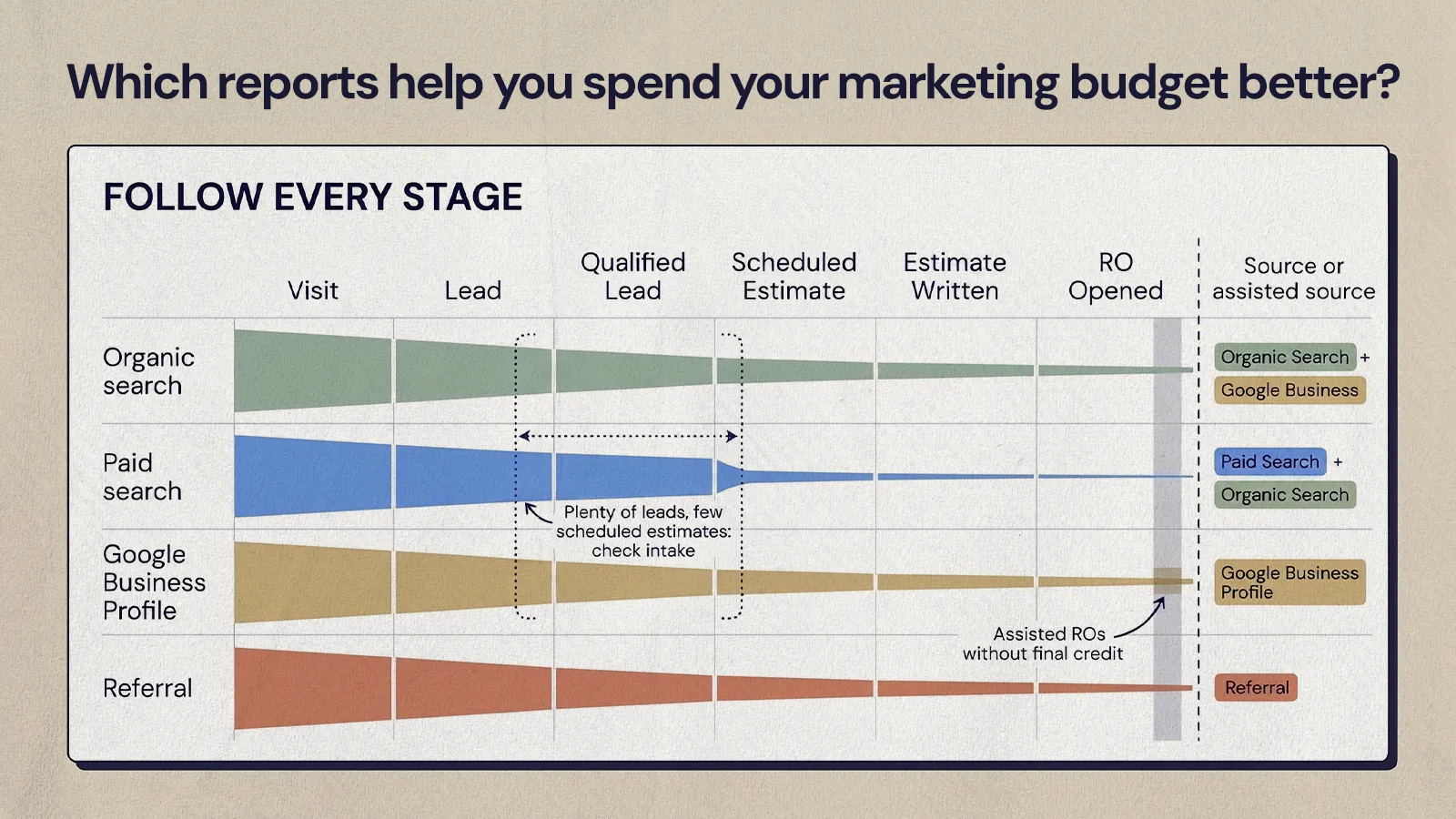
Tracking is only worth the effort if it changes where you spend time and money. Instead of only asking how many auto repair leads came in, ask:
- Which sources produced leads staff could actually reach?
- Which campaigns produced estimate requests with enough detail to act on?
- Which locations had plenty of inquiries but few scheduled estimates?
- Which landing pages assisted ROs even when they didn't get final credit?
- Which calls were missed or never followed up?
These questions separate marketing performance from intake performance. A campaign can bring in qualified callers and still lose the job if calls go unanswered. A smooth front office can't fix targeting that brings in leads you can't service. The most useful view follows every stage: visit, lead, qualified lead, scheduled estimate, estimate written, RO opened, and source or assisted source. If your site's conversion rate is the weak link, our guide to improving your website conversion rate is a good next read.
Following the lead all the way to the RO
Auto repair leads become far more useful once you can follow them from first contact to repair order. Set up one source list, track forms and calls carefully, treat estimate requests as a real stage, connect lead records to shop records, and be honest about the gap that opens when jobs move into CCC and insurer platforms. If you'd like help setting up the website side of that tracking, NUUX's growth marketing team can help.
Want results like this
Your website should make money, not excuses. Let us find the revenue hiding in your current experience.
FAQs
Quick answers to the questions we hear most about website conversion and UX design.
Start with the basics that bring in local, high-intent searches: an accurate Google Business Profile for every location, a service page for each repair you offer, clear location pages, and an easy path to call or book. Then track which sources produce booked work, so you can put more effort into the channels that actually turn into repair orders.
Tag every website call, form and estimate request with a source, then match those leads to opened repair orders using phone number, email, name or vehicle. Even a weekly manual match between your lead list and your shop management system will show how many ROs started on the website, which pages drove them and where leads are falling through.
It doesn't have to. Many shops use dynamic number insertion on the website so tracking numbers appear only to visitors, while the main local number stays consistent on the site's footer, listings and Google Business Profile. Google's guidelines ask for a phone number that connects to the individual business location, so keep your listings accurate and consistent whatever tracking you use.
Ask only for what creates a usable lead: name, phone, email, preferred location, vehicle year, make and model, a short damage description and photos. Insurer or claim details can be optional. Longer forms tend to put people off at first contact, and your team can collect the rest when they follow up.
Yes, with some setup. Google Ads can track calls from your ads and website, and offline conversion imports let you send back outcomes that happen later, such as a booked repair, matched to the original ad click. That requires capturing click IDs or customer details with each lead and matching them to your repair orders.
Related articles
More field notes on conversion, UX, and building websites that sell.