.svg)
WordPress to Webflow Migration: Cost, Timeline, and What an Agency Actually Does
Most businesses don't wake up one day wanting to migrate their website. It usually starts smaller: a redesign that takes longer than expected, a marketing team that keeps hitting the same limitations, or a growing site that's outgrown what it was originally built for. Webflow keeps coming up as the answer, but the next question stalls everything: what will it actually cost, and how long will the site be in limbo?
Webflow offers a design-centric approach, appealing to those seeking flexibility. This migration can enhance your website's performance and user experience.
Understanding the costs and timeline is crucial. Migration costs vary based on complexity and agency rates.
Typically, the process can take from weeks to months. Factors like website size and agency workload influence this timeline. Hiring a Webflow agency can streamline the transition. Agencies handle data migration, design replication, and SEO optimization.
They ensure a smooth transition and professional outcome. Post-migration, Webflow's features simplify site management.
This guide breaks down what that migration actually looks like: the real costs, the realistic timeline, and what an agency handles at each stage, so the decision stops being a guessing game.
WordPress vs Webflow for Business: Key Differences
When considering WordPress vs Webflow, businesses should weigh their options carefully. Both platforms offer unique features.
WordPress is renowned for its flexibility and extensive plugin library. It powers a substantial portion of the internet.
Webflow, however, prioritizes visual design and ease of use. It's ideal for those wanting control without deep coding knowledge.
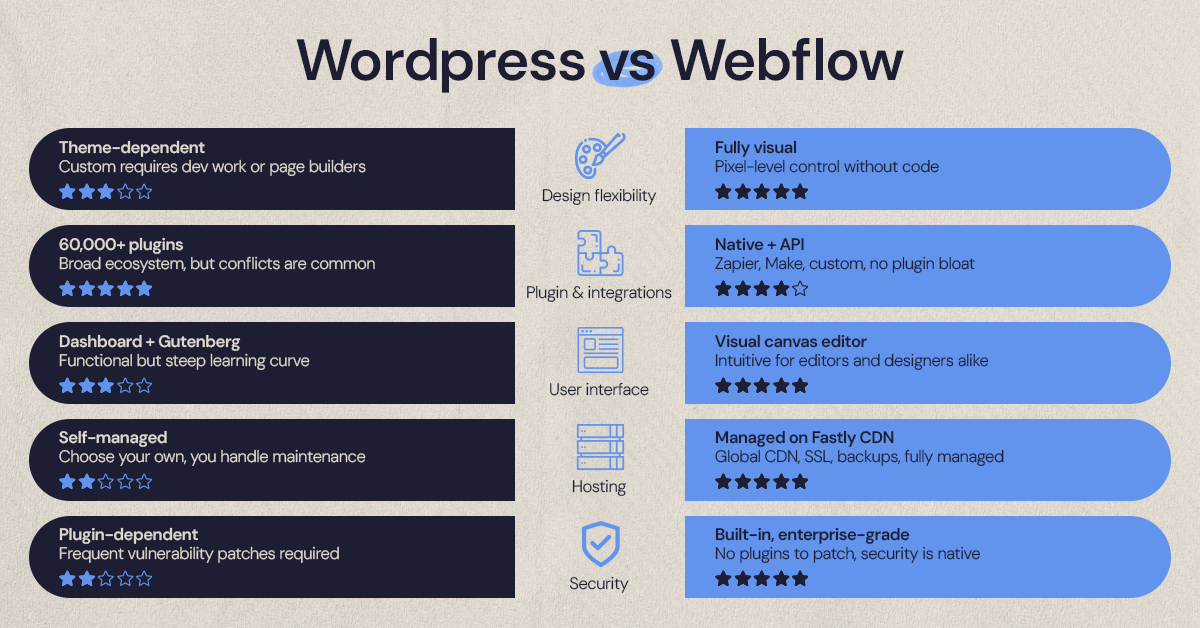
Key differences to consider include:
- Design Flexibility: Webflow offers a more intuitive visual editor.
- Plugins and Integrations: WordPress has a vast ecosystem of plugins.
- User Interface: Webflow provides a modern and user-friendly interface.
- Hosting Options: Webflow includes built-in hosting services.
- Security Features: Webflow offers robust security with less need for third-party plugins.
In essence, Webflow appeals to designers looking for creative freedom. WordPress remains a favorite for larger, more complex sites. Businesses must align these offerings with their goals and resources.
Why Migrate from WordPress to Webflow?
Migrating from WordPress to Webflow can bring numerous benefits. Many businesses seek enhancements in design flexibility and performance.
Webflow's design-centric approach allows for creative possibilities. This means less reliance on custom code and plugins.
A migration can lead to improved site speed and user experience. Webflow's clean code output contributes to faster load times.
Consider these key reasons for migration:
- Visual Design Control: Empowering non-coders to handle design tasks.
- Performance Benefits: Faster loading speeds improve user experience.
- Reduced Plugin Dependency: Lower risk of plugin conflicts.
- Built-In Hosting: Simplifies site management post-migration.
- Enhanced Security: Robust security features requiring minimal maintenance.
Switching to Webflow often aligns with strategic goals. Businesses seeking modern, responsive designs find great value in Webflow's offerings. This move can ultimately aid in achieving digital growth objectives.
Understanding the WordPress to Webflow Migration Process
Migrating from WordPress to Webflow involves several key steps. A clear understanding of these steps is crucial.
The process ensures a smooth transition with minimal disruption. Each phase addresses specific parts of your website.
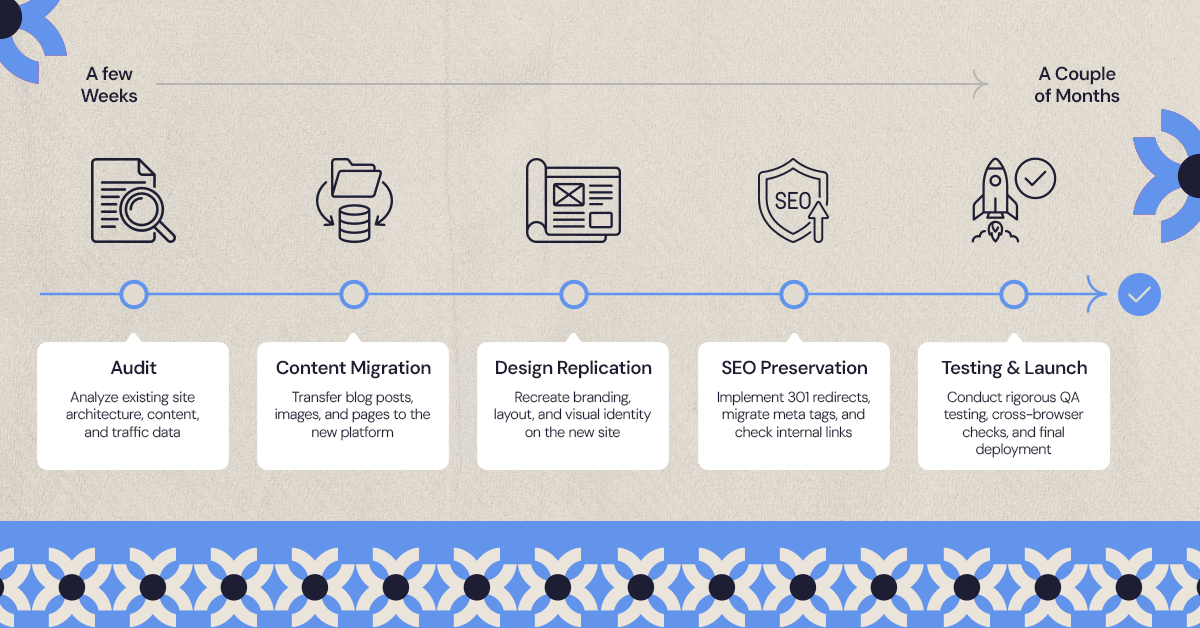
Typically, the migration process includes:
- Site Audit and Planning: Assessing current site status and requirements.
- Content and CMS Migration: Moving all media and data accurately.
- Design Replication and Enhancement: Recreating and improving design elements.
- SEO Preservation and Optimization: Ensuring rankings don't suffer.
- Testing, QA, and Launch: Final checks and launching the new site.
Hiring an agency can simplify this complex process. They bring expertise to manage each step effectively.
Proper execution ensures you get the most out of your new Webflow site. It enhances your site's performance and design.
The goal is to have your new website running smoothly, while maintaining or improving upon your current capabilities.
Step 1: Site Audit and Planning
The first stage is auditing your WordPress site. This involves evaluating its structure and identifying what needs to be migrated.
This step is crucial for understanding the scope of work. It aids in avoiding unnecessary surprises later in the process.
Typical considerations include:
- Current Site Analysis: Understanding existing features and functionalities.
- User Data and Analytics: Reviewing site performance metrics.
- Goal Setting: Determining objectives for the new Webflow site.
A comprehensive audit informs a strategic plan. This plan guides the entire migration process.
Step 2: Content and CMS Migration
Content migration focuses on transferring text, images, and other media. This is necessary to maintain continuity and SEO benefits.
Moving your CMS involves replicating database functionalities. This ensures your new site manages content as effectively as WordPress.
Steps involved in this phase:
- Content Inventory: Listing all existing site content.
- Mapping Data: Relating old and new CMS structures.
- Data Transfer: Moving content to Webflow with minimal disruption.
This stage requires careful attention. Accurate transfers are vital for continued functionality and user experience.
Step 3: Design Replication and Enhancement
Replicating your design involves recreating your old site's look and feel. This is where Webflow's design capabilities shine.
Enhancements are made by using Webflow's design tools. This leads to a more visually appealing and modern site.
The process can include:
- Template Selection: Choosing appropriate design frameworks.
- Styling Components: Applying colors, fonts, and styles.
- Responsive Adjustments: Ensuring the design works across devices.
By enhancing your design, you leverage Webflow's full potential. This results in a site that meets current design standards.
Step 4: SEO Preservation and Optimization
Preserving SEO during migration is critical. You want to maintain search engine rankings and visibility.
Optimizing SEO on Webflow involves leveraging new features. This might even improve your site's search performance.
Key tasks during this step are:
- SEO Audit: Identifying current SEO strengths and weaknesses.
- URL Redirection: Setting up redirects to new page URLs.
- Keyword Optimization: Utilizing Webflow's SEO tools.
This stage ensures that search engines continue recognizing your content. Efforts here can enhance your site's organic traffic.
Step 5: Testing, QA, and Launch
Testing involves checking all site functionalities. This ensures that everything works as expected.
Quality assurance (QA) is about catching and fixing issues. Thorough testing is essential before going live.
Key activities in this phase:
- Functionality Testing: Verifying all site features work correctly.
- Performance Checks: Ensuring site speed and responsiveness.
- Final Launch: Making the site live to the public.
Before launching, addressing all discovered issues is crucial. Once satisfied, you can confidently unveil your new Webflow site.
Webflow Migration Cost: What to Expect
The cost of a WordPress to Webflow migration can vary significantly. Understanding these costs is vital for budgeting.
Factors influencing migration costs include website complexity and agency rates. More complex sites require more time and expertise.
Migration costs can range from a few hundred to several thousand dollars. Getting a detailed cost breakdown helps in planning.
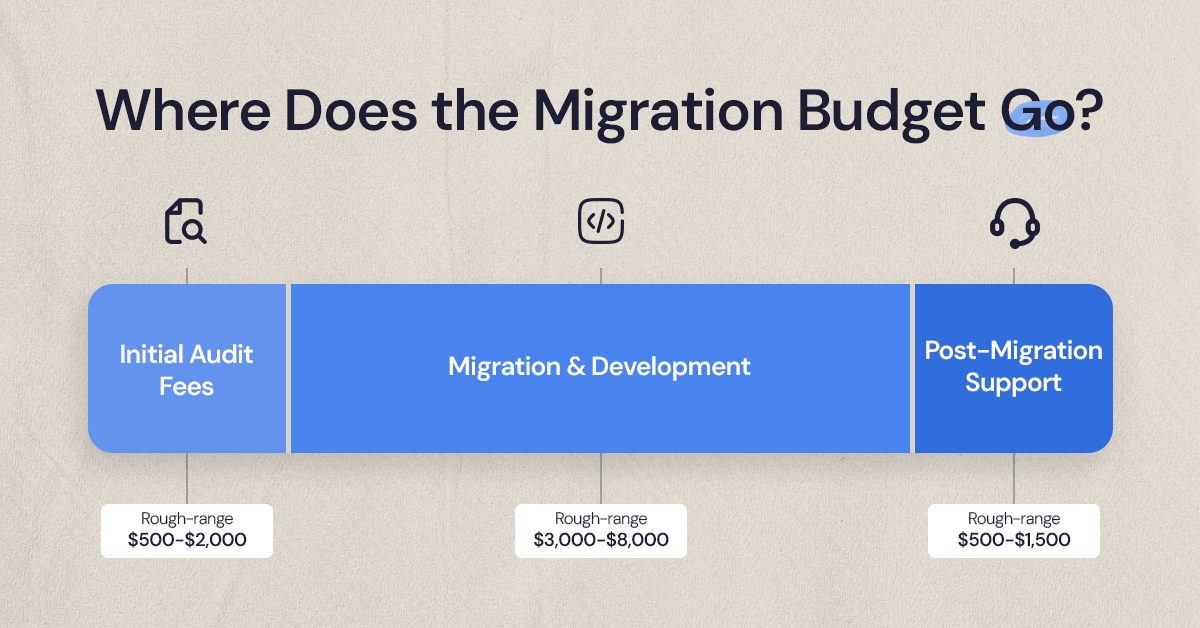
A typical cost structure may encompass:
- Initial Audit Fees: For assessing existing site conditions.
- Migration and Development Costs: Covering content transfer and design work.
- Post-Migration Support: Ensuring smooth handover and training.
It's essential to weigh short-term costs against long-term benefits. Investing in quality migration ensures lasting website performance.
Hiring an experienced Webflow agency can make a difference. They can offer more accurate estimates and deliver value through professional migration services.
Webflow Migration Timeline: How Long Does It Take?
The timeline for migrating from WordPress to Webflow varies. It's influenced by several key factors that require consideration.
The size and complexity of your website play a significant role. Larger websites with extensive content take longer to migrate.
On average, the migration process can take a few weeks to a couple of months. This timeline includes all essential steps.
Key factors affecting the migration timeline include:
- Website Size and Content Volume
- Design Complexity and Custom Features
- Agency Workload and Resource Allocation
Efficient planning and coordination with your agency can speed up the process. Regular updates and clear communication help keep everything on track. A well-structured timeline ensures a smooth transition with minimal disruptions to your business operations.
What an Agency Actually Does During Migration
Hiring a Webflow agency brings expertise to your migration journey. Agencies handle crucial tasks and ensure a seamless transition to Webflow.
First, they conduct a comprehensive site audit. This step identifies potential challenges and sets the stage for a successful migration.
Agencies meticulously handle data transfer. They ensure your content, media, and database elements migrate accurately.
Design replication is another key task. Agencies work to match your original site design, while leveraging Webflow's capabilities for enhancements.
They also focus on SEO preservation. Ensuring your rankings remain intact post-migration is vital for maintaining web visibility.
Key services offered by agencies include:
- Data and Content Transfer
- Design Replication and Enhancement
- SEO Strategy and Implementation
Finally, agencies perform thorough testing and QA. This guarantees all functionalities work smoothly before launching your new site on Webflow. Their comprehensive services ensure a professional outcome, leaving you confident in your site's performance.
Post-Migration Support and Training
After the migration, ongoing support is crucial. Agencies provide valuable resources to manage your new Webflow site effectively.
Training sessions are often part of the post-migration package. These sessions help your team understand Webflow's interface and capabilities.
Key aspects covered in support and training include:
- Webflow Interface Navigation
- Content Management
- Troubleshooting Common Issues
Furthermore, agencies may offer ongoing support. This ensures that any issues that arise post-migration are addressed promptly. With comprehensive training and reliable support, you'll be equipped to leverage your new site to its full potential, ensuring long-term success and site stability.
Risks, Challenges, and How Agencies Mitigate Them
Migrating from WordPress to Webflow isn't without its risks. Data loss and downtime can pose significant challenges during this transition.
Agencies play a pivotal role in mitigating these risks. They employ thorough planning and testing to preempt and address potential problems effectively.
Common migration challenges include:
- Data Integrity Issues
- SEO Risks
- Design Consistency
Agencies use robust backup protocols to safeguard data. They also maintain SEO rankings by following best practices during and after migration. By addressing these challenges head-on, agencies ensure a smooth transition, minimizing disruptions to your business operations. They help businesses maintain and even enhance their online presence during and after the migration process.
How to Hire a Webflow Agency: What to Look For
Choosing the right Webflow agency is crucial for a successful migration. A good agency understands both WordPress and Webflow intricately.
Start by reviewing their portfolio to assess previous work quality. Look for projects similar to yours to gauge their expertise.
Key qualities to look for include:
- Experience with Webflow and WordPress
- Strong Communication Skills
- Comprehensive Service Offerings
Remember to check client reviews and testimonials. Feedback can provide insights into the agency's reliability and professionalism. Consider their ability to meet deadlines and budgets. Transparency in their process is crucial to avoid surprises during the migration. Ultimately, selecting the right agency ensures a smoother transition and a better-fit website for your business goals.
WordPress to Webflow Migration: Real-World Case Studies
Migrating from WordPress to Webflow can transform a business. Real-world examples highlight the impacts and benefits of such a move.
One agency assisted a retail company in revamping its online presence. The migration led to a 30% increase in site speed and improved user engagement.
Key benefits observed in these case studies include:
- Enhanced Design Flexibility
- Increased Site Performance
- Improved User Experience
Another success story involved a tech startup. This startup leveraged Webflow's design tools for rapid prototyping. This adaptability enabled faster response to market trends. These case studies illustrate the potential gains from switching to Webflow. Such transformations are vital for businesses seeking growth and innovation.
Is Migrating to Webflow Right for Your Business?
Deciding to migrate to Webflow depends on your unique needs. Assessing your website goals and technical capabilities can guide this choice.
Webflow excels in design flexibility and modern site management. It suits businesses seeking innovative, visually appealing online experiences.
Consider your long-term strategy when deciding. A transition to Webflow might unlock new potential and streamline your digital approach. Evaluate all factors carefully to ensure the platform aligns with your business objectives and future plans.
Every migration looks a little different once the actual audit begins. If it would help to talk through what this would look like for your specific site, our team is happy to walk through it.
.svg)


.jpg)
.jpg)

.svg)

.svg)

.svg)
