.svg)
Webflow vs WordPress: Which Is Better for Your Business Website?
Webflow and WordPress are the two most talked-about website platforms for businesses right now. They are not the same thing, and the difference between them shows up directly in how your site performs, how fast it loads, how much it costs to maintain, and how much control your team actually has over it. For a business where the website is a key part of how you attract and convert customers, that difference has real consequences.
This is a full breakdown of both platforms across design, speed, SEO, cost, and ease of use, so by the end of this, you will know exactly which one is built for the kind of business results you are after.
What Is Webflow and What Is WordPress?
WordPress started as a blogging tool in 2003 and grew into the world's most-used website platform, powering over 42% of all websites globally. It is open-source, which means anyone can download it, build on it, and modify it. The way it works is straightforward: you install the software, choose a design theme, and add plugins for features like SEO tools, contact forms, or security. This makes it flexible, but that flexibility comes at a cost. You are responsible for managing hosting, keeping plugins updated, resolving conflicts, and handling anything that breaks.
Webflow takes a fundamentally different approach. Instead of themes and plugins, Webflow gives you a visual design canvas where you build your website by clicking, adjusting, and positioning, and the platform writes clean code behind the scenes. Hosting, security, performance, and backups are all included.
Think of it this way: WordPress is like buying a plot of land and building a house yourself. You have full freedom, but everything is your responsibility. Webflow is like a well-designed apartment where maintenance is already handled. Both are real places to live. But one of them lets you focus on running your business instead of managing infrastructure.
Design Freedom: How Much Control Do You Actually Get?
Design matters more than most business owners realise. Research from Stanford University's Web Credibility Project found that 75% of people judge a company's credibility based on the look and feel of its website. That first impression is shaped entirely by design.
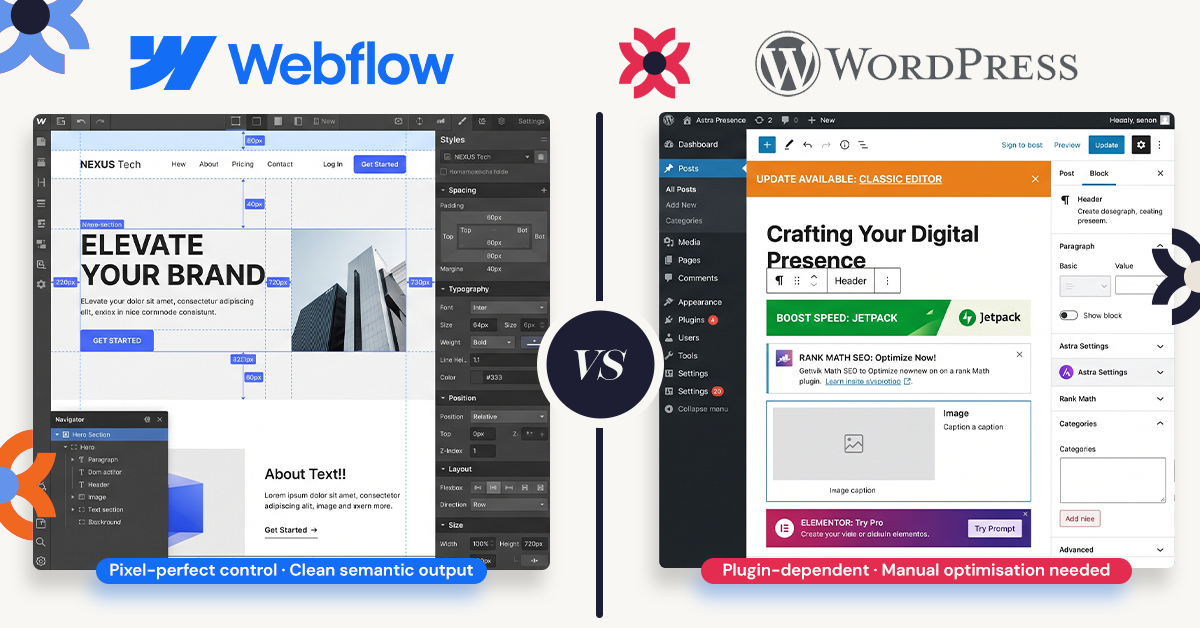
Webflow gives you pixel-level control over every element on the page. You can position things exactly where you want them, create custom animations, set unique typography, and build something that genuinely reflects your brand. Nothing looks like a template unless you choose to start from one. This level of control used to require a developer. Webflow makes it available to designers and marketers working on their own.
WordPress design depends almost entirely on your theme. A well-chosen theme with a page builder like Elementor can produce something professional, but you are always working within the limits of what the theme allows. Truly custom layouts, the kind that set a business apart, typically require a developer to build from scratch. And when themes update, those customisations can break.
For businesses where the website is a primary sales tool, the design ceiling on WordPress is a real constraint. Webflow removes that ceiling entirely.
Page Speed and Performance: Why This Is a Ranking Factor You Cannot Ignore
Google uses page speed as a direct ranking signal. Beyond rankings, slow websites lose visitors fast. Research from Google shows that as load time increases from one second to three seconds, the probability of a visitor leaving before the page loads rises by 32%.
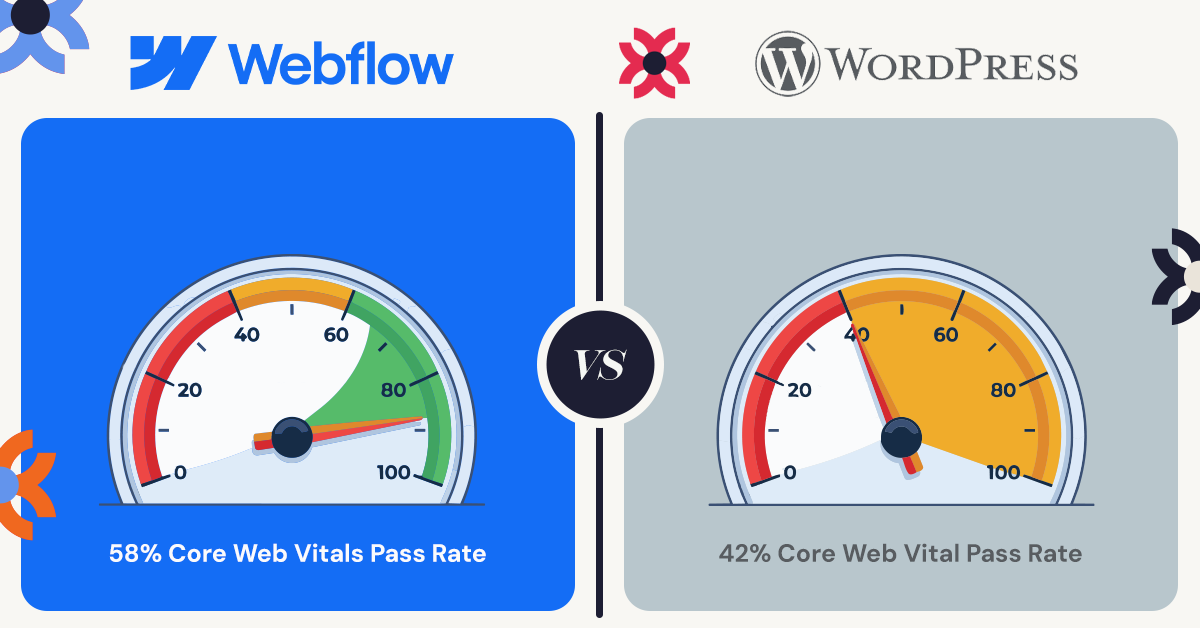
Webflow sites are hosted on Amazon Web Services with Cloudflare's global content delivery network built in. Image optimisation, code minification, caching, and lazy loading are all handled automatically. You do not configure any of it. According to the 2025 Web Almanac published by HTTP Archive, Webflow sites pass Google's Core Web Vitals assessment at a rate of 58%, compared to 42% for WordPress. That is not a small gap. A faster site ranks higher, holds visitors' attention longer, and converts more of them into customers.
WordPress can achieve excellent speed, but only if you invest in quality managed hosting, choose a lightweight theme, install and configure a caching plugin, and audit your plugin stack regularly. WordPress 6.9, released in December 2025, brought meaningful performance improvements that narrowed the gap, but those gains only materialise if your site is correctly set up. For a business owner without a developer on retainer, that is a significant ongoing burden.
The default performance difference between the two platforms is one of the most practical reasons businesses are making the switch.
SEO: Which Platform Gives You the Better Starting Point?
Both platforms can rank well on Google. The question is how much ongoing effort that takes.
Webflow includes built-in controls for every core SEO element from day one: meta titles, meta descriptions, image alt text, canonical tags, 301 redirects, XML sitemaps, and robots.txt. These are available on all paid plans without installing a single plugin. In January 2026, Webflow added AI-powered tools that generate meta titles, descriptions, and schema markup automatically, directly inside the editor.
The clean, lean code Webflow produces also helps search engines crawl and understand your pages more efficiently. Fewer technical issues mean fewer things that can silently drag down your rankings.
WordPress has a strong SEO ecosystem, particularly through plugins like Yoast and Rank Math, which give experienced users granular control over structured data and schema. For sites publishing hundreds of articles per month, that depth of configuration can be valuable.
The honest trade-off is this: WordPress SEO depends heavily on how well it is configured. A poorly maintained WordPress site with bloated plugins and slow load times can actively harm your rankings. Webflow gives you a clean, solid technical SEO foundation without requiring that configuration work. For most business websites, that reliability is worth more than the extra configurability, and it is a big part of why Webflow agencies are making the switch.
Cost: What Will You Actually Pay?
The pricing comparison between these two platforms is more nuanced than it first appears.
Webflow's site plans start at $15 per month for a Basic plan, stepping up to $25 per month for the Premium plan which includes the full CMS for blogging and content management. Both plans include hosting, SSL certificates, a global CDN, security, and automatic backups. There is nothing else to pay to keep your core infrastructure running.
WordPress is free to download, but running it properly involves separate costs that stack up quickly: hosting ($5 to $30 or more per month depending on quality), a domain name, a premium theme, an SEO plugin, a security plugin, and a backup solution. A properly equipped WordPress site typically costs between $800 and $1,200 per year before you factor in any developer time for maintenance or fixes.
When you account for those hidden costs, Webflow's all-inclusive pricing is often equal to or lower than a well-maintained WordPress setup. And it removes the ongoing time cost of keeping everything running.
Ease of Use: Can Your Team Actually Manage It?
Webflow has a learning curve, particularly in the first week. But once past that initial setup, the visual interface is intuitive, especially for anyone already familiar with design tools like Figma or Sketch. Marketing teams can make updates, publish new pages, and run experiments without waiting on a developer. That operational independence has real business value.
WordPress is broadly familiar, but managing it well requires ongoing attention. Keeping plugins updated, resolving conflicts between them, monitoring for security vulnerabilities, and maintaining speed all take time. A site that was built by an agency but is left running without regular maintenance will drift into performance and security problems.
The Nielsen Norman Group, which has studied web usability for decades, consistently finds that user experience on the backend of a tool directly affects the quality and speed of output on the frontend. When your team can make changes confidently without worrying about breaking something, they do it more often and more effectively.
So Which Platform Is Right for Your Business?
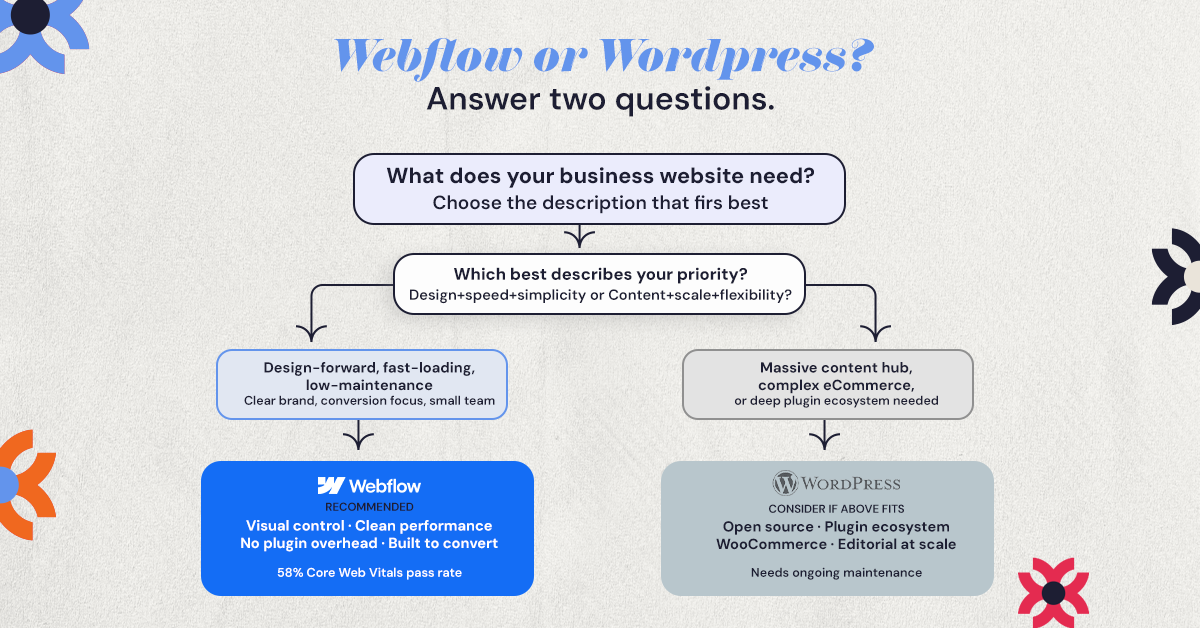
For most business websites in 2026, Webflow is the stronger choice.
It delivers better default performance, cleaner design control, a more reliable technical SEO foundation, and lower operational overhead. Your team can move faster, your site stays healthier without constant attention, and you spend less time managing infrastructure and more time growing your business.
WordPress still makes sense in specific situations: very large content operations publishing dozens of articles per week, complex WooCommerce stores with hundreds of products and intricate shipping logic, or organisations already deeply invested in a WordPress ecosystem with dedicated developers to manage it.
But for a service business, a startup, an agency, or any company where the website is a primary lead generation tool, Webflow consistently outperforms WordPress on the metrics that matter.
Not Sure Where to Start?
Platform decisions have long-term consequences. The wrong foundation can limit how quickly your team moves, hurt your search rankings, and cost significantly more to fix later than it would have cost to get right the first time.
If you are evaluating your options, the most useful thing you can do is talk through your specific goals with someone who has built on both platforms. The right choice for a restaurant group looks different from the right choice for an insurance company or a SaaS startup.
Book a free consultation with NUUX and we will help you figure out what will actually work for your business.
The Bottom Line
Webflow wins on design control, default performance, built-in SEO, and ease of maintenance. WordPress wins on raw plugin flexibility and content scalability at very large volumes. For most businesses, Webflow is where you want to be.
The best platform is the one that fits how your team works and what your business is actually trying to achieve. If you want help thinking that through, we are ready when you are.
.svg)
.jpg)


.jpg)

.svg)

.svg)

.svg)
