.svg)
.svg)

A user journey is the full path someone takes to complete a goal across every touchpoint. A user journey map documents that path with the actions, emotions and friction at each stage, so teams can see where people actually give up.
Sometimes, the hardest part of using a product or service is not the product itself. It is the experience of trying to get from one step to the next.
Someone might land on a website looking for a simple solution, only to spend several minutes trying to figure out where to click, what to do next, or how to complete a task. At some point, frustration takes over, and the easiest option is to leave.
For businesses, these issues are not always easy to spot. From the inside, everything may appear to work as expected. But from the user’s perspective, the experience can be confusing, slow, or unnecessarily complicated.
This gap between how companies think their products work and how people actually experience them is exactly why the concept of a user journey matters.
To understand how businesses improve these experiences, it helps to first look at what a user journey actually is.
What Is a User Journey?
A user journey is the path you take when trying to accomplish something with a product or service. That goal might be buying a product, signing up for a platform, booking a service, or simply learning more about a solution.
Instead of focusing on one interaction, a user journey looks at the entire experience from the user’s perspective. It captures the different moments where someone interacts with a brand and how those moments shape the overall experience.
The idea of understanding these interactions has existed for decades. Marketing researchers in the 1960s and 1970s began studying how people move through different stages before making a purchase. Later, in the 1980s, Scandinavian Airlines CEO Jan Carlzon introduced the concept of “moments of truth,” arguing that every interaction between a customer and a company influences how that company is perceived.
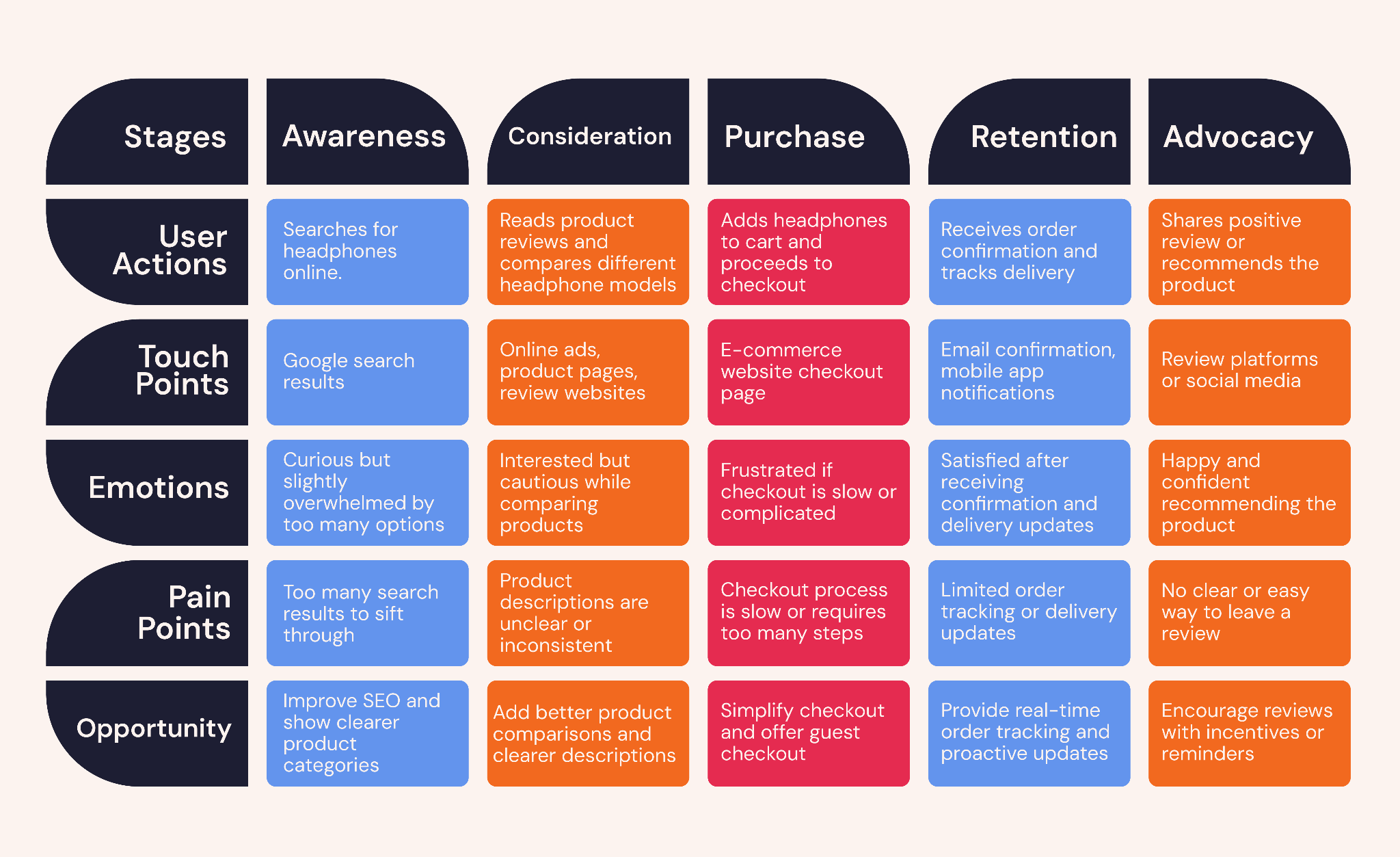
Take buying a pair of headphones online as an example. You might read reviews, browse different stores, compare models, and check customer feedback before deciding which one to buy. Each step shapes how confident you feel about the purchase.
When these moments are mapped out visually, they form what is known as a user journey map. According to Harvard Business School, journey mapping helps organizations understand how customers interact with a brand and where experiences may break down.
Key Components of a User Journey Map
A journey map includes several elements that help teams understand what users experience at different stages.
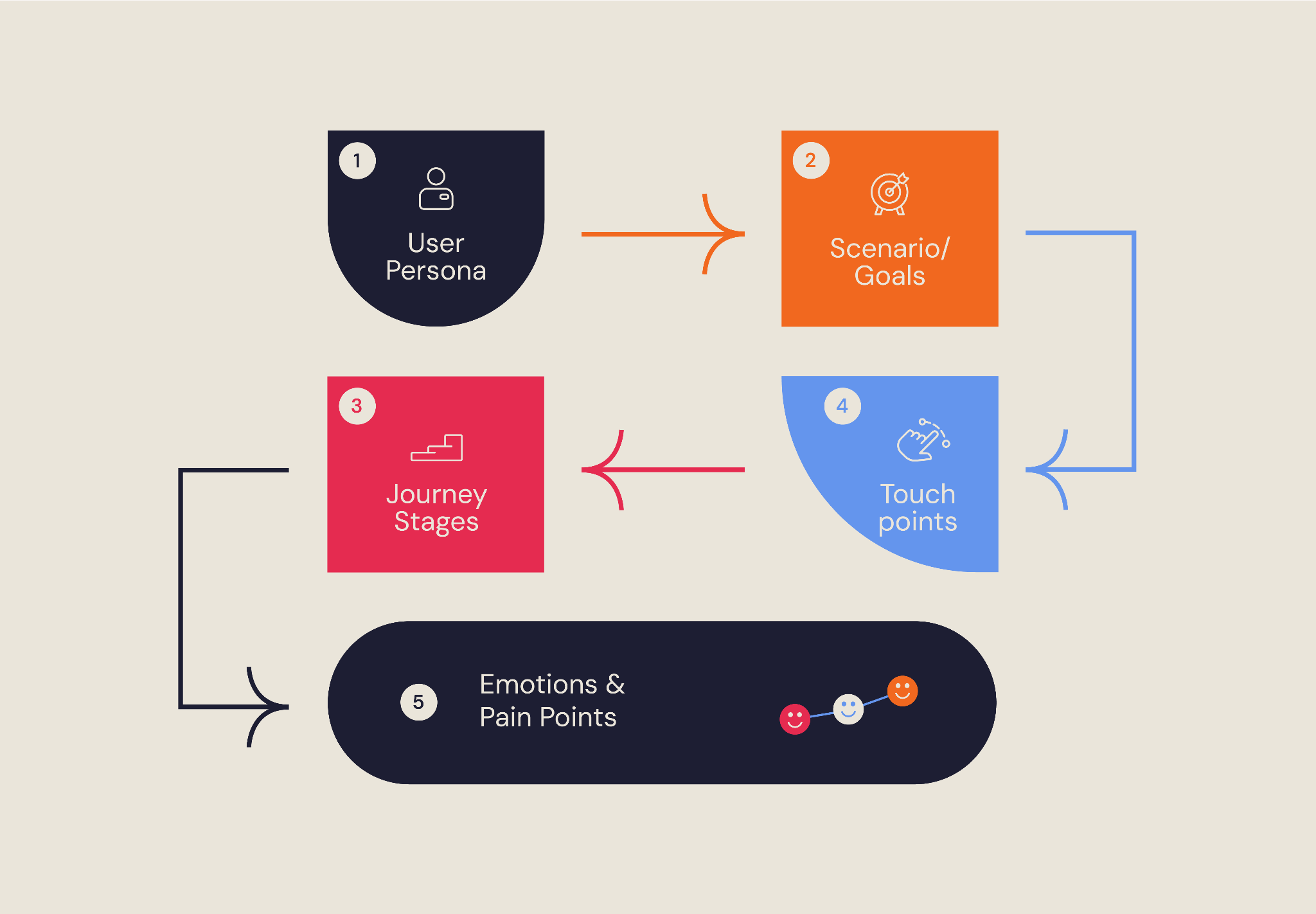
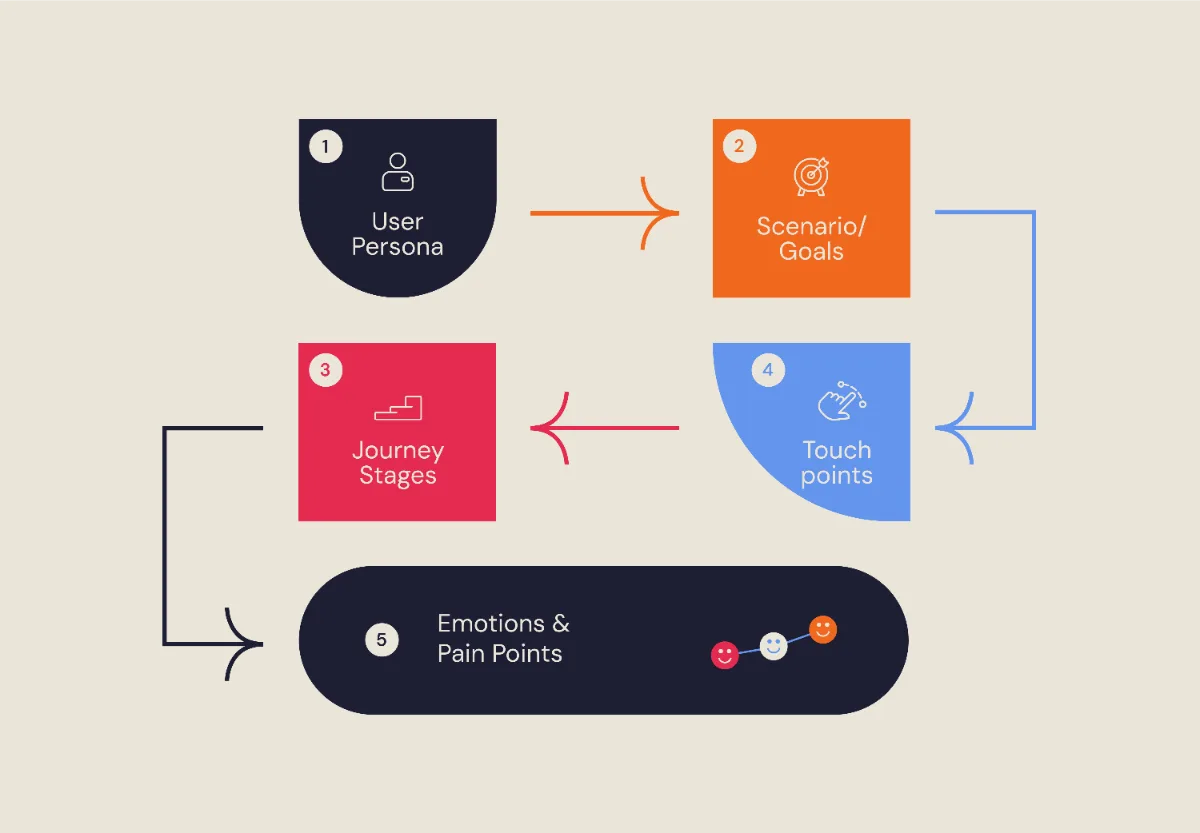
- User persona:
A persona represents the type of user the map focuses on and is usually based on research. It outlines the user’s goals, motivations, behaviors, and challenges.
- Scenario or goal:
This describes what the user is trying to accomplish. For example, the goal might be booking a service, purchasing a product, or signing up for a platform.
- Journey stages:
These are the phases users move through while interacting with a product or brand. Many journeys follow stages such as awareness, consideration, purchase, retention, and advocacy.
- Touchpoints:
Touchpoints are the moments where users interact with the company. Examples include visiting a website, opening an email, contacting customer support, or using a mobile app.
- Emotions and pain points:
Journey maps often capture how users feel during different stages of their experience. Feelings such as confusion, frustration, or satisfaction can reveal where the experience works well and where it breaks down. These moments help teams identify pain points that may prevent users from completing their goals.
Types of User Journey Maps
Organizations create different types of journey maps depending on what they want to understand.
- Current state journey map:
Shows how users currently experience a product or service. It helps teams identify existing issues and friction points in the experience.
- Future state journey map:
Illustrates what the ideal user experience should look like. Businesses often use this when planning improvements or redesigning a product.
- Day-in-the-life journey map:
Explores a user’s broader daily activities and experiences. This helps teams understand the context in which a product or service fits into the user’s life.
- Service blueprint:
Expands on a journey map by showing the internal processes that support the user experience, including systems, teams, and operations behind the scenes.
For many businesses starting with journey mapping, a current state journey map is often the most practical first step.
When Do You Need a User Journey Map?
A user journey map is not necessary for every project, but it becomes valuable when understanding the full customer experience can reveal problems or opportunities.
You may need a user journey map when:
- Users are dropping off or abandoning actions
If people leave during signup, checkout, or onboarding, mapping the journey can reveal where friction occurs.
- Launching a new product, feature, or redesign
Journey mapping keeps teams focused on real user goals and helps avoid internal assumptions.
- Experiences span multiple channels
When users move between websites, apps, emails, and customer support, mapping helps connect those interactions.
- Prioritizing improvements
Current-state maps reveal existing problems, while future-state maps help teams design better experiences.
Whenever an experience involves multiple steps, touchpoints, and emotions, journey mapping helps turn scattered insights into clear, actionable improvements.
How to Create a User Journey Map
Creating a user journey map does not require expensive tools or a large team. What matters most is having detailed research, collaboration, and a structured process.
1. Define Your Scope and Objectives
User journey mapping only works when the focus is well defined.
Trying to map everything at once often leads to scattered insights instead of meaningful direction. The goal is to isolate one journey, one moment where user behavior matters, and understand it in depth.
This could be a signup flow, onboarding, or checkout. What matters is choosing a scenario where users are either moving forward smoothly or dropping off.
That pattern is what guides the process.
This approach shaped the work carried out on the AMAX mobile app, where NUUX Design Studios led the product experience. The platform allows users to get insurance quotes and manage their policies, and the challenge surfaced within the quote journey.
Users were starting the process but not completing it.
Rather than treating it as a general platform issue, the focus shifted to that specific journey.
The objective then became more precise. Identify where users were losing momentum and reduce friction within that flow.
Each step was evaluated in context. Not just whether it worked, but whether it helped users move forward without hesitation.
With the scope narrowed to one journey, it became easier to trace the problem back to specific moments and improve the experience in a way that directly impacted user behavior.
2. Conduct User Research and Build Personas
A journey map should always be grounded in real user insights rather than assumptions.
Teams typically gather insights through several research methods, including:
- reviewing analytics data using tools such as Adobe Analytics or Contentsquare to understand user behavior and navigation patterns
- analyzing heatmaps or session recordings from platforms like Hotjar to see how users interact with pages
- conducting usability tests through platforms such as Maze or UserTesting
- running user interviews or surveys to understand motivations and expectations
- reviewing customer support tickets and feedback to identify recurring issues
These research methods help reveal how users actually behave when interacting with a product, rather than relying on internal assumptions.
Using these insights, teams create one or two user personas. A persona represents the type of user the journey map focuses on and includes details such as goals, behaviors, and frustrations.
For example:
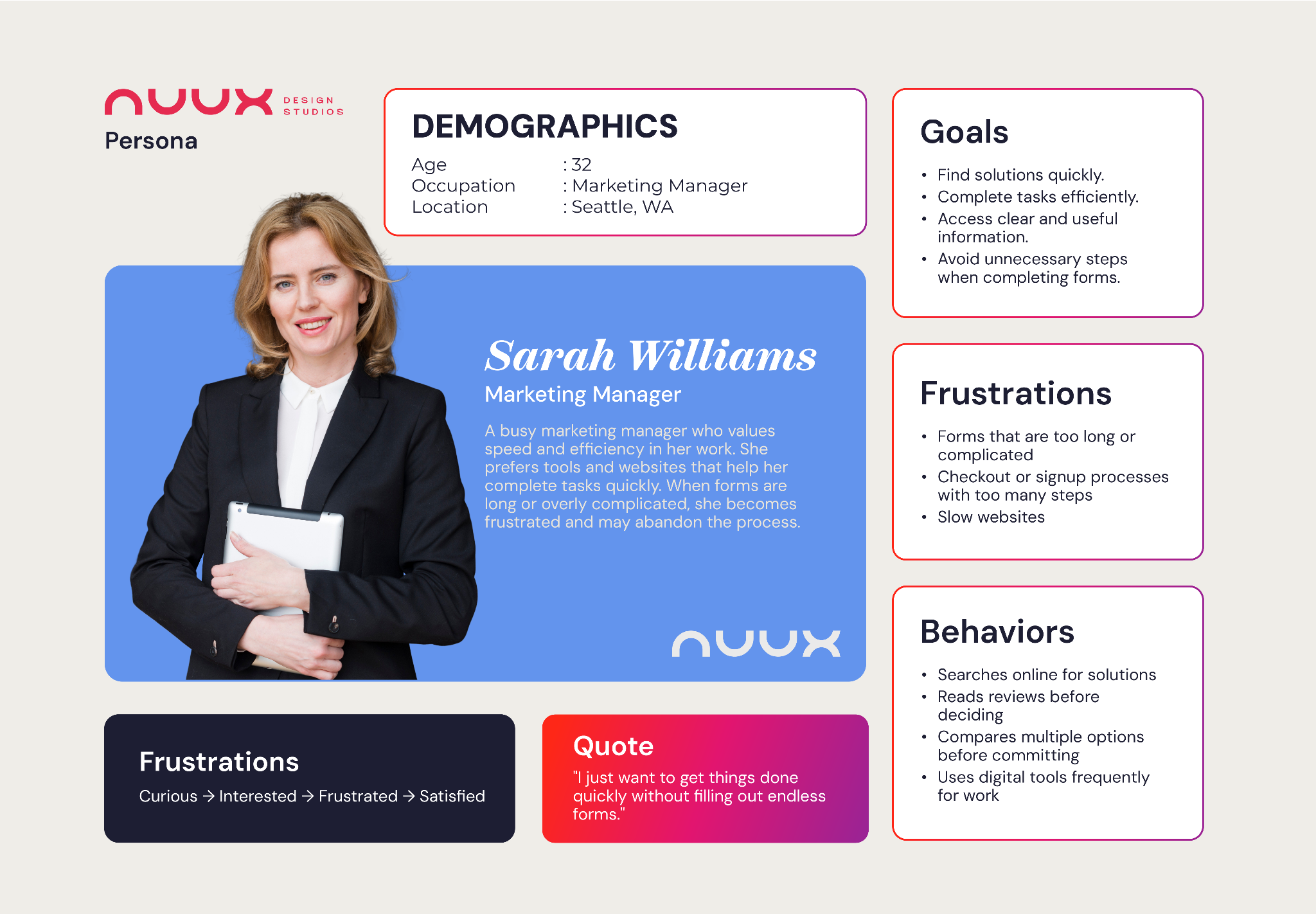
Sarah, a 32-year-old marketing manager, values speed and efficiency but becomes frustrated when forms are complicated or time-consuming.
Personas help ensure that decisions are based on real user needs.
3. Identify Journey Phases, Touchpoints, and Actions
With research in place, the next step is to break the experience into clear stages:
Awareness
Consideration
Decision
Onboarding
Retention
Within each stage, three things are mapped:
- what the user is doing
- where the interaction happens
- what might interrupt their progress
This is where the journey starts to come together.
In the Chin Chin project handled by NUUX Design Studios, mapping these stages revealed that the issue was not a single step, but how users moved between them. Users could discover, browse, and even start an order, but the transition into checkout required extra effort to figure out.
Seeing the journey this way made the gaps clear. Instead of optimizing isolated touchpoints, the focus shifted to how each stage connects to the next.
Once those transitions were simplified, the entire experience began to feel more direct and easier to move through from start to finish.
4. Map Emotions, Pain Points, and Opportunities
One of the most valuable parts of journey mapping is understanding how users feel throughout the experience.
Many teams visualize this as an emotional curve that rises and falls across the journey. Users may feel excited when discovering a product but uncertain when entering payment information.
Identifying these emotional moments helps reveal where improvements are needed. Pain points highlight the areas where users struggle, such as confusing navigation or slow-loading pages.
At the same time, these moments often reveal opportunities. For example, adding a progress indicator during checkout or simplifying a form may reduce frustration and help users complete their task.
Including direct quotes from user research can make these insights even more meaningful.
5. Visualize the Journey and Collaborate
Once the journey has been mapped conceptually, the next step is creating a visual representation.
Many teams use collaborative tools that allow different stakeholders to contribute ideas and insights.
Common tools include:
- Miro, which is widely used for collaborative journey mapping
- Figma, which designers often use alongside product prototypes
- Lucidchart, which helps teams create structured diagrams
Color coding can help make the map easier to interpret. For example, red might highlight pain points, while green may indicate positive experiences or opportunities for improvement.
Visualizing the journey helps teams see the experience as a whole rather than focusing on isolated interactions.
6. Validate, Iterate, and Share the Journey Map
A journey map should not be treated as a one-time exercise.
Once the map is created, teams should validate it with real users and internal stakeholders. This may involve usability testing, reviewing analytics data, or asking users whether the map reflects their experience.
As products and customer behaviors evolve, journey maps should also be updated.
Many organizations review and refine their maps regularly to ensure they reflect current user experiences.
When insights from the map lead to improvements, teams can track results through metrics such as reduced drop-off rates, improved conversions, or higher customer satisfaction.
Conclusion
Behind every click, signup, or purchase is a person simply trying to get something done. Sometimes the experience flows naturally. Other times, it becomes harder than it should be.
User journey mapping helps bring those moments into focus. It reminds teams that what may seem like a small step in a process can shape how someone experiences a product or service as a whole.
When businesses take the time to understand these journeys, they are better able to create experiences that are clearer, more supportive, and easier for people to move through.
At its core, good user experience begins with understanding the people using it.
If you are looking to better understand how users move through your product and where the experience may be holding them back, it may be time to take a closer look at your user journey.
Want results like this
Your website should make money, not excuses. Let us find the revenue hiding in your current experience.
FAQs
Quick answers to the questions we hear most about website conversion and UX design.
It depends on the scope. A simple journey can take a few hours, while a detailed, research-backed map may take days or weeks. The more accurate the data, the more useful the map becomes.
It should be reviewed regularly, especially after major product updates, new features, or changes in user behavior. Customer expectations evolve, and the journey should reflect that.
Low conversion rates often come from gaps in the user journey, not the product itself. Users may lose clarity or confidence at earlier steps, which leads to drop-offs before they complete an action.
A user flow focuses on the steps to complete a task within a product. A user journey looks at the full experience across multiple touchpoints, including emotions and decisions.
Yes. Each user group has different goals and behaviors. Creating separate journey maps helps you understand each experience more clearly.
Related articles
More field notes on conversion, UX, and building websites that sell.