.svg)
.svg)


A UX audit is a structured review of how people actually use a product, combining expert evaluation against usability principles with behavioral data, to identify where users get stuck and why they drop off.
Every digital product leaves behind clues about how people experience it. The pages users visit, the actions they take, and the moments where they leave all reveal something about how the product is working.
The challenge is that these signals are easy to overlook during day-to-day product work. Teams may see traffic numbers or conversion rates, but those metrics rarely explain why users struggle to complete certain tasks.
In many of the product reviews we conduct at NUUX, teams arrive with this exact challenge. Their product is live and people are using it, yet certain steps in the experience slow users down or cause them to drop off entirely. The data shows that something is happening, but the reason behind it is not always obvious.
This is where a User Experience Audit, often called a UX audit, becomes useful. It gives teams a structured way to step back, examine the experience more closely, and connect user behavior with what is actually happening in the interface.
To understand how this works, it helps to first look at what a UX audit actually is.
What Is a UX Audit?

A UX audit is a structured evaluation of how people experience a website, app, or digital product. It focuses on how users move through the interface and identifies where the experience becomes difficult, confusing, or inefficient. According to CareerFoundry, a UX audit helps uncover usability issues and highlight opportunities for improvement.
In practice, it looks at what users actually do, not what teams expect them to do.
It examines user behavior, interaction flows, and interface structure to find where users slow down, skip important actions, or abandon tasks entirely. For example, users might start filling out a form but leave halfway, miss a primary button because it does not stand out, or repeat steps because the next action is not obvious.
These are not random actions. They point to specific parts of the experience that are getting in the way.
A UX audit connects these behaviors to what is happening in the interface. It helps teams understand which elements are causing friction and what needs to change so users can move through tasks without unnecessary effort.
Why Do UX Audits Matter?
Many teams assume that if a product looks good, the experience must also be good. In reality, design aesthetics and user experience are not always the same thing. A UX audit helps reveal hidden friction in the product.
Analyzing user data and behavior during a UX audit helps businesses understand customer needs and identify usability issues that affect conversions and engagement. Here are some of the most important benefits.
Better understanding of users
UX audits often analyze behavioral data such as session recordings, heatmaps, and user journeys. These insights show how people actually use the product rather than how designers assume they use it.
Improved conversion rates
When usability barriers are removed, users can complete tasks more easily. This often leads to more purchases, sign-ups, and successful interactions.
Smarter product decisions
Instead of relying on assumptions, teams can use real insights from the audit to guide product improvements.
Reduced redesign costs
Fixing usability problems early prevents expensive redesign efforts later.
Stronger user satisfaction
When users can navigate a product without confusion, they feel more confident and more likely to return.
When Should You Conduct a UX Audit?
A UX audit is most helpful when a product already exists, and people have started using it.
Audits are commonly performed once a digital product has been in use for some time, and teams want to understand how well it meets user needs. Here are common situations where a UX audit becomes especially valuable.
When conversion rates begin to drop
If users visit your platform but rarely complete actions such as purchases or sign-ups, the experience may contain usability barriers.
Before a redesign
Teams often perform a UX audit before redesigning a product so they know exactly what needs improvement.
After launching new features
New features sometimes introduce unexpected friction. An audit helps confirm whether they improve or harm the overall experience.
When user complaints increase
Customer support feedback often reveals deeper usability problems that an audit can uncover.
During regular product reviews
Some companies run UX audits once or twice a year to ensure their product continues to meet user expectations.
What Are the Types of UX Audits?
Not every UX audit looks the same. Different types focus on different aspects of the user experience.
Usability audit
This examines how easily users can complete tasks such as signing up, searching for information, or making a purchase.
Accessibility audit
This evaluates whether a product is usable by people with disabilities and whether it follows accessibility guidelines such as WCAG standards.
Information architecture audit
This focuses on how content and navigation are organized. It evaluates whether users can easily find what they need.
Visual design audit
This examines layout consistency, color usage, typography, and visual hierarchy.
Content audit
A UX content audit evaluates whether text, images, and messaging support the user journey effectively.
Most UX audits combine several of these approaches to gain a complete understanding of the product.
What Does a UX Audit Include?
Whatever type of audit you run, the work usually comes down to four areas: how people actually use your site, how the site is structured, whether it is accessible to everyone, and how it compares to others in your space.
How people actually use the product
Analytics, heatmaps, and session recordings show which pages hold attention, where people click, which sections get ignored, and the point where they leave without taking action. These patterns often reveal friction that is not obvious from looking at the design alone.
How the site is structured
This covers navigation, page hierarchy, content organization, and user flows. The question is whether visitors can move naturally from one step to the next, and whether key actions such as making a purchase, booking a consultation, or submitting a form are easy to complete.
Accessibility and inclusive experience
The audit looks for barriers that affect people using screen readers, keyboard navigation, or other assistive technologies, along with color contrast, readability, and form usability. These fixes usually make the product easier for everyone to use, not only people with specific accessibility needs.
Competitive benchmarking
When it is relevant, key parts of the experience are compared against competitors and industry standards. User expectations are shaped by the other sites they use, so this shows where people may expect a smoother process, clearer information, or a more intuitive journey.
What Will You Need to Provide Before the Audit Starts?
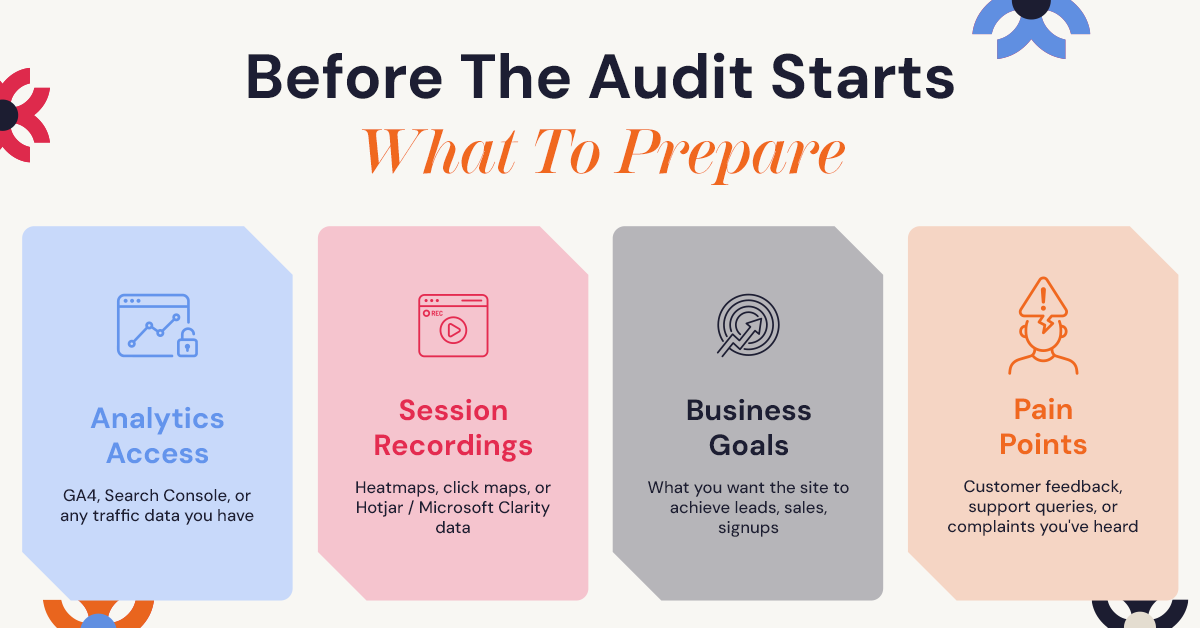
A good UX audit does not start with someone looking at your website in isolation. It starts with understanding what you are trying to achieve. Before kickoff, NUUX usually asks for a few things:
Access to your analytics. This is typically Google Analytics or a similar tool. If it is not set up properly, that is common, and it can be sorted out as part of getting the audit started.
Access to heatmap or session recording tools, if you have them. Tools like Hotjar or Microsoft Clarity show how people move through your pages and where they hesitate. If you do not have these in place yet, we can recommend simple ways to start collecting that data.
A short list of your business goals. What does success look like? More sign-ups, more completed purchases, or fewer support tickets about the same issue?
Any known pain points. Complaints your team has heard, drop-offs at a certain step, or a gut feeling about where things go wrong. These give the audit a starting point and often lead straight to the bigger issues.
Most of this comes down to understanding how people really behave on your site. Recommendations should come from the ability to analyze user experience with real user data rather than assumptions, which is why this stage matters more than people expect.
How Does the UX Audit Process Work?
While every project is different, most UX audits follow a similar process. Here is what it looks like, including what happens on your side of the table.
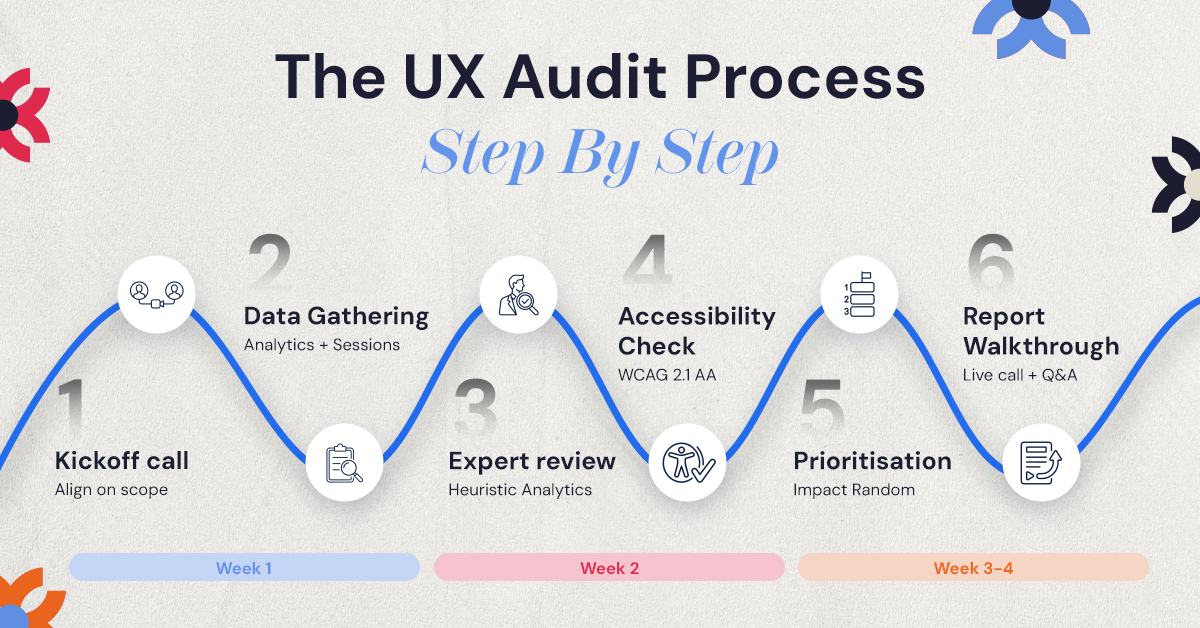
1. Define the objectives at kickoff
Every audit starts with a conversation about your business, your audience, and what you want the product to achieve, whether that is more leads, more sales, better sign-up rates, or fewer drop-offs. The kickoff call also confirms scope and timelines so everyone knows what to expect.
2. Gather product data
Analytics, heatmaps, session recordings, and user feedback are collected from tools such as Google Analytics, Google Search Console, Hotjar, or Microsoft Clarity. The review covers traffic patterns, conversion paths, and the points where visitors leave or struggle.
3. Understand the users
Personas, interviews, and customer journey maps help teams understand user goals, motivations, and frustrations.
4. Conduct a heuristic evaluation
Design experts review navigation, page layouts, content structure, calls to action, forms, and user flows against established usability principles. The goal is to find the places where users become confused, hesitate, or abandon a task.
5. Review accessibility and responsiveness
The product is tested with assistive technologies such as screen readers and keyboard navigation, and across desktop, tablet, and mobile screen sizes, so users are not running into unnecessary barriers on any device.
6. Analyze and prioritize the findings
Not every issue has the same impact on your business. Recurring problems are grouped and ranked by their likely effect on conversions, engagement, and customer satisfaction, which separates minor concerns from the issues worth fixing first.
7. Create the report and walk through it
The findings are compiled into a UX audit report with supporting evidence, visual examples, and recommended next steps. A dedicated review session follows, so your team can ask questions and agree on the best path forward.
How Long Does a UX Audit Take?
For most websites, the full process takes between two and four weeks. A focused audit of a single flow, such as checkout or sign-up, can be quicker. Larger websites, more complex products, or audits that include user interviews and additional testing may take longer.
What Do You Receive at the End of a UX Audit?
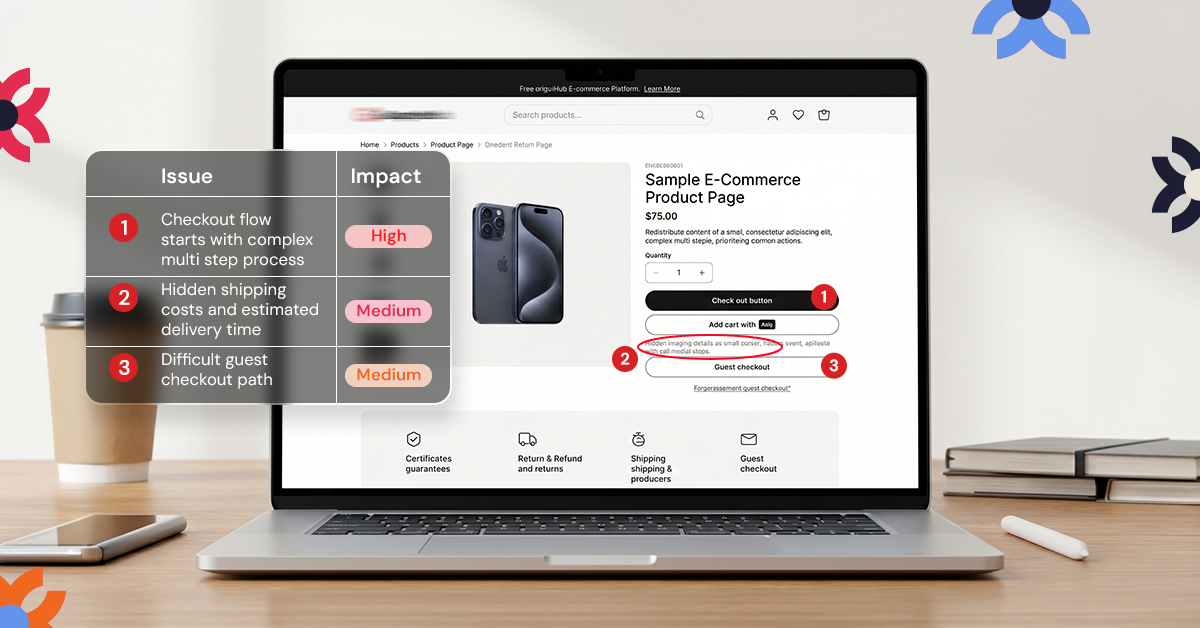
This is the part most people are curious about, so it is worth being specific. A UX audit report from NUUX includes:
A prioritized list of issues. A ranked list based on how much impact each fix is likely to have compared with how much effort it takes, so you know where to start.
Annotated visuals. Screenshots of your actual site with notes pointing to where each issue occurs. If a button is hard to find, you will see exactly which button on exactly which page.
Clear recommendations, not just criticism. Every issue comes with a suggested direction for the fix, so your team has something to act on.
A summary tied back to your goals. Everything connects back to what you said mattered at the start, whether that is conversions, sign-ups, or fewer support requests.
A walkthrough call. Reports can be dense, so the findings are reviewed with you directly to make sure nothing gets lost between the audit and your team.
The report should work as a roadmap your design or development team can pick up and start working from, not a document that gets opened once and forgotten.
UX Audit Checklist and Tools
During a UX audit, teams review different parts of a product to understand how the experience works from the user’s perspective. The goal is to examine the elements that shape how easily people can move through the product and complete what they came to do.
Some of the most common areas reviewed during a UX audit include:
• Navigation clarity
• Page load performance
• Accessibility compliance
• Mobile responsiveness
• Content readability
• Visual hierarchy
• Error messages and feedback
• Task completion flow
• User journey consistency
• Call to action visibility
Looking at these elements helps teams identify whether the product is guiding users smoothly or creating moments of friction along the way.
To support this process, UX teams often rely on tools that reveal how people actually interact with the product. Common UX audit tools include:
• Google Analytics for understanding user behavior and traffic patterns
• Hotjar for heatmaps and session recordings that show how users navigate pages
• Maze for usability testing and user journey insights
• Accessibility Insights for detecting accessibility issues
• UX heuristic evaluation frameworks for reviewing interfaces against established usability principles
These tools help teams collect behavioral data, observe user interactions, and uncover patterns that reveal where the experience may need improvement.
Best Practices for a Successful UX Audit
A UX audit becomes truly valuable when the insights it reveals lead to meaningful improvements. The goal is not simply to point out what is wrong with a product, but to understand the experience clearly enough that teams can make thoughtful decisions about what to improve and why.
To get the most out of the process, a few practices make a significant difference.
• Start with clear goals. Knowing what you want to learn from the audit helps keep the evaluation focused and prevents the process from becoming overwhelming.
• Use both qualitative and quantitative data. Analytics can show where users drop off or struggle, while user feedback and observations help explain why those moments happen.
• Prioritize improvements based on impact. Addressing the most critical usability issues first often leads to faster and more noticeable improvements in the user experience.
• Involve different teams. Designers, developers, and product managers each bring a different perspective. When they are part of the process, the insights from the audit are more likely to translate into real product changes.
• Treat UX audits as an ongoing practice. As products grow and user needs evolve, revisiting the experience regularly helps ensure the product continues to support the people using it.
When these practices are followed, a UX audit becomes more than an evaluation. It becomes a tool that helps teams continuously improve how their product works for the people who rely on it.
How Much Does a UX Audit Cost?
Cost depends mostly on scope. A focused audit of a single flow costs less than a full audit that covers your entire site or app and includes primary user research such as interviews or usability testing. As a general guide, smaller audits tend to fall in the lower thousands, while comprehensive audits with deeper research can run into the tens of thousands.
A more useful way to think about cost is what it is currently costing you to keep losing visitors at the same point in your funnel. For a quote based on your specific site, book a free consultation so the audit can be scoped properly.
Is a UX Audit the Same as a Redesign?
No, and this is one of the most common points of confusion. A UX audit diagnoses problems and explains why they happen. It does not include rebuilding your interface, writing new code, or producing final visual designs. Think of it as the diagnosis before the treatment plan.
Once you have the report, most teams start with the issues in the high impact, low effort zone: changes that are relatively quick to make and likely to make a visible difference. Some businesses hand the findings to their internal design or development team. Others keep working with the team that ran the audit, since those people already understand the issues in depth. The audit does not lock you into either path.
If you are comparing agencies, our guide on how to choose a UX audit company covers the questions to ask before you hire. And if you want one team to carry the findings from audit to implementation, our UX/UI design and product design teams can take it from there. Once those changes are live, a great user experience tends to show up in the numbers.
Conclusion
Building a digital product is more than features or visual design. What matters most is how people experience the product when they use it.
A UX audit gives teams the opportunity to understand that experience more clearly. It reveals moments of hesitation, confusion, and friction that often go unnoticed during development.
More importantly, it turns those discoveries into opportunities for improvement.
When a product becomes easier to understand, easier to navigate, and easier to trust, users naturally stay longer and accomplish more. That is the real value of a UX audit.
For teams trying to understand why users struggle with their product, taking the time to examine the experience closely can often reveal insights that are difficult to see during everyday product work. In many of the UX audits we conduct at NUUX, these insights become the starting point for meaningful product improvements.
If your product shows signs that users are struggling to move through key tasks, stepping back to evaluate the experience may be the first step toward building something that works better for the people who rely on it. Book a free consultation with NUUX to see what an audit tailored to your product would look like.
Want results like this
Your website should make money, not excuses. Let us find the revenue hiding in your current experience.
FAQs
Quick answers to the questions we hear most about website conversion and UX design.
If users are visiting but not converting, abandoning tasks, or struggling to navigate your product, it is a strong sign you need a UX audit to understand what is causing the issue.
A UX audit includes a review of how people use your site through analytics and heatmaps, a review of your site's structure and navigation, an accessibility check, and often a comparison against competitors. It ends with a report of prioritized issues and recommendations.
A standard UX audit typically takes two to four weeks. Smaller audits focused on a single flow can be quicker, while larger audits involving user research can take longer.
You'll receive a report containing a prioritized list of issues, annotated screenshots showing exactly where problems occur, clear recommendations for each issue, and a walkthrough call to go through the findings together.
Cost depends on scope. Smaller, focused audits tend to fall in the lower thousands, while comprehensive audits with research can run into the tens of thousands. The right number depends on the size of your product and how much research is involved.
Related articles
More field notes on conversion, UX, and building websites that sell.